Generative AI Comes to Embedded: Powered by Arm Ethos-U NPU
Discover how Arm Ethos-U85 and ExecuTorch enable diffusion-based face generation on Alif Ensemble E8, producing 128 x 128 images on embedded hardware
By Ash Naik
Generative AI is commonly associated with large language models, powerful GPUs, and cloud infrastructure. However, not every generative workload needs billions of parameters or server-class compute. The Arm Ethos-U85 NPU is helping embedded AI move beyond traditional classification and object detection, making Generative AI workloads increasingly practical on resource-constrained embedded devices.
Using PyTorch, ExecuTorch, and the Arm Ethos-U85 Neural Processing Unit (NPU), we demonstrate diffusion-based image generation directly on an Alif Ensemble E8 development board. The application uses a compact diffusion transformer to generate 128 × 128 RGB face images. Ethos-U85 accelerates neural-network computations, while an Arm Cortex-M55 CPU controls sampling. In a reference hardware run, the application generated an image in approximately 78 milliseconds, demonstrating that carefully designed generative models can execute on microcontroller-class hardware.
Why bring Generative AI to embedded devices?
Most Generative AI demonstrations focus on large language models and image-generation systems that depend on substantial compute and memory resources.
Embedded devices operate under different constraints. They typically have limited memory, tight power budgets, and strict latency requirements. Many applications could benefit from generating content locally rather than relying on a cloud service.
Potential applications include adaptive user interfaces, locally generated visual content, interactive embedded systems, and compact generative components within multimodal applications.
Making these workloads practical on embedded hardware requires more than reducing parameter counts. Developers must consider operator support, numerical precision, intermediate activations, memory bandwidth, and repeated neural-network execution.
Arm Ethos-U NPUs accelerate supported neural-network operations in resource-constrained systems. Combined with ExecuTorch and carefully selected architectures, they provide a practical deployment path for compact generative workloads.
Hardware considerations for embedded Generative AI
Running generative models on embedded devices requires a balance of compute performance, memory capacity, and efficient execution across processing elements. Unlike conventional classification workloads, diffusion models invoke the same neural network repeatedly, making inference latency and memory access particularly important.
For this demonstration, we use the Alif Ensemble E8 development board, which integrates Arm Cortex-M55 processors and Ethos-U NPUs. Although the SoC includes three NPUs (one Ethos-U85 and two Ethos-U55), the pico-faces application uses only the high-performance Cortex-M55 and Ethos-U85.
Neural-network acceleration with Ethos-U85
The Ethos-U85 provides hardware acceleration for supported neural-network operations, including those used in transformer-based architectures.
The E8 implementation provides the following capabilities:
|
Specification |
Configuration |
|
NPU |
Arm Ethos-U85 |
|
MAC units |
256 MACs per cycle |
|
Maximum NPU clock |
400 MHz |
|
Peak theoretical performance |
Approximately 204 GOPS (giga operations per second) |
|
Local memory interface |
128-bit |
|
Local memory bandwidth |
Over 12 GB/s (Alif specification) |
These figures describe the hardware's theoretical capabilities rather than measured performance for the pico-faces workload.
The importance of NPU acceleration becomes evident in diffusion-based generation. The pico-faces model executes its transformer eight times for four classifier-free-guided diffusion steps, followed by a single decoder invocation. Consequently, reducing the latency of each transformer invocation has a direct impact on overall image-generation time.
Memory requirements for generative inference
Unlike simple classification workloads, generative models must retain intermediate states across multiple inference steps.
The E8 provides 8 MB of bulk SRAM, 1.25 MB of high-performance Cortex-M55 TCM, 0.5 MB of high-efficiency Cortex-M55 TCM, and up to 5.5 MB of MRAM.
These are distinct memory regions with different characteristics, rather than a single interchangeable memory pool.
For pico-faces, memory is required for model weights, intermediate activations, latent tensors, and runtime buffers. The model operates on a compact 16 × 16 × 8 latent representation, reducing the amount of data processed during each diffusion step compared with generating the full-resolution image directly.
This illustrates why model architecture, quantization, and memory management are as important as raw accelerator throughput when deploying Generative AI on embedded devices.
CPU and NPU execution responsibilities
The demonstration separates neural-network computation from application-level sampling:
- Cortex-M55: Generates the initial noise, controls the diffusion sampling loop, applies classifier-free guidance, and updates the latent representation.
- Ethos-U85: Executes the delegated diffusion transformer and image decoder through ExecuTorch.
This division enables the NPU to handle supported compute-intensive neural-network operations while the CPU manages the sampling algorithm.
The remaining processors and NPUs on the E8 are not used in this demonstration.
The key architectural consideration is therefore not the number of processing engines available on the SoC, but how efficiently the application partitions its workload between the Cortex-M55, Ethos-U85, and memory system.
Understanding pico-faces: Model architecture and parameter count
The demonstration uses pico-faces, a compact generative image model based on a latent rectified-flow diffusion transformer (DiT). Unlike image classification, it begins with random noise and progressively transforms a compressed latent representation into a structured image. A convolutional decoder produces the final 128 × 128 RGB output.
How many parameters does the model contain?
The upstream pico-faces project describes a fast and a higher-quality variant:
|
Component |
Fast model |
Higher-quality model |
|
DiT parameters |
1.59 million |
2.37 million |
|
Decoder parameters |
~116,000 |
~493,000 |
|
Combined parameters |
~1.71 million |
~2.86 million |
|
Transformer depth |
8 blocks |
12 blocks |
|
Hidden dimension |
128 |
128 |
|
Original quantized model blob |
2.57 MB |
4.02 MB |
Source: Original pico-faces repository.Model blob sizes refer to the upstream implementation, not the ExecuTorch .pte file.
The Alif E8 demonstration uses m3_long_cfg, the fast variant. The upstream specification places its combined model at approximately 1.7 million parameters.
Despite its small size, the model retains key components found in larger generative architectures: transformer-based latent velocity prediction, iterative flow sampling, conditional and unconditional model evaluation, classifier-free guidance, and a separate image decoder.
Why generate images in latent space?
Direct generation of a 128 × 128 RGB image involves 49,152 output values. Pico-faces performs repeated inference in a 16 × 16 × 8 latent representation containing 2,048 values, one twenty-fourth of the RGB image’s 49,152 values. Its decoder expands the final latent into pixels only after sampling finishes.
This reduces the representation processed by the transformer on every sampling step and helps make repeated inference practical on embedded hardware.
How diffusion works: Four steps to generate an image
Pico-faces uses a rectified-flow formulation. The transformer predicts a velocity field that the Cortex-M55 uses to update the latent state.
Step 1: Initialize random noise
The application creates a random latent tensor. A random seed makes the generation configuration reproducible. The published reference run uses seed 3.
Step 2: Predict the latent update
The current latent and class condition are passed to the transformer. With classifier-free guidance (CFG), each sampling step evaluates the transformer twice: once with the selected class and once unconditionally.
Step 3: Update the latent
The CPU combines conditional and unconditional predictions using a guidance scale of 4.0. Conceptually:
v_guided = v_uncond + 4.0 * (v_cond - v_uncond)
The Cortex-M55 updates the latent according to the sampling schedule. It repeats this operation for four diffusion steps.
Step 4: Decode the image
After the fourth update, the final latent goes through the convolutional decoder once, producing the 128 × 128 RGB image displayed on the DevKit.
Why four steps require eight transformer calls
With classifier-free guidance (CFG), each diffusion step invokes the transformer twice: once to generate a conditional prediction and once to generate an unconditional prediction.
For the pico-faces demonstration, four diffusion steps therefore require eight transformer invocations. After the sampling process completes, a separate decoder invocation converts the final latent representation into a 128 × 128 RGB image.
More generally, with CFG enabled, the number of transformer invocations is twice the number of diffusion steps, while the decoder executes only once per generated image.
Increasing the number of diffusion steps therefore increases the computational workload and typically increases generation latency. Although additional steps may improve image quality, the benefits depend on the model and sampling configuration, and improvements are not necessarily proportional to the number of steps.
CMSIS-ExecuTorch workflow: from PyTorch to an embedded NPU
The CMSIS-ExecuTorch workflow links the familiar PyTorch development environment to an Arm Ethos-U-accelerated embedded application. The accompanying Arm Examples infographic illustrates five stages:
- Prepare: install the development tools and configure the Python environment.
- Export: quantize the PyTorch model, lower supported operations for the selected Ethos-U NPU, and generate the model artifacts.
- Integrate: create the AI layer and select the ExecuTorch runtime and CMSIS components required by the model.
- Build: compile the application and model integration using CMSIS-Toolbox.
- Run: execute on a suitable Arm platform and inspect model outputs and inference results.
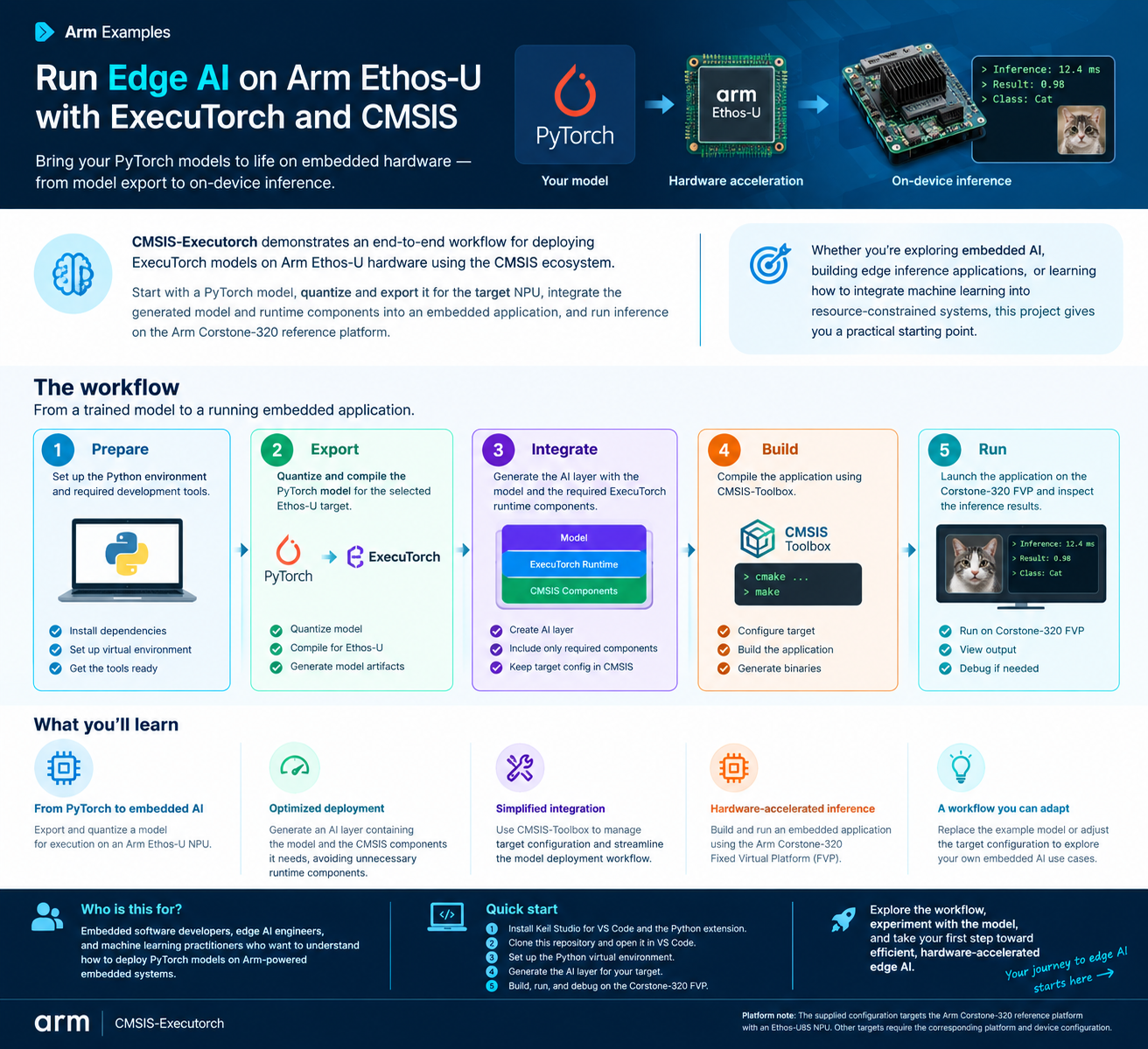
The supplied infographic illustrates a generic classification workflow using the Arm Corstone-320 Fixed Virtual Platform and a cat example. This blog post adapts the same five-stage process for generative image synthesis on the Alif Ensemble E8: the exported dit_step and decode methods execute on Ethos-U85, while the Cortex-M55 controls the four-step diffusion sampling loop. The cat classification output and its timing in the infographic are not measurements from pico-faces.
From PyTorch to Ethos-U85 using ExecuTorch
The workflow separates the exported neural-network methods from the application-controlled sampling algorithm.
|
Method |
Purpose |
Execution target |
|
|
Predict latent velocity |
Ethos-U85 |
|
|
Convert latent to RGB pixels |
Ethos-U85 |
|
Sampling loop |
Noise generation, guidance, latent updates |
Cortex-M55 |
Quantization
|
Component |
Activations |
Weights |
|
Diffusion transformer |
16-bit |
8-bit |
|
Convolutional decoder |
8-bit |
8-bit |
Higher activation precision in the transformer helps preserve numerical behavior in its residual computations, while the decoder uses lower precision to reduce execution cost.
Export and delegation
ExecuTorch exports both methods and delegates supported computation to the Arm Ethos-U backend. Delegated regions are lowered to TOSA and compiled for the selected Ethos-U85 using the Arm Vela compiler.
The resulting ExecuTorch program is packaged as .pte. CMSIS-Toolbox resolves the hardware configuration and integrates the generated AI layer with firmware.
Visualizing the model with Model Explorer
Model Explorer provides interactive inspection of ExecuTorch program graphs and TOSA representations. These are complementary stages: the ExecuTorch view reveals delegation boundaries, while TOSA exposes operator structure before final NPU command-stream compilation.
Inspecting the diffusion transformer
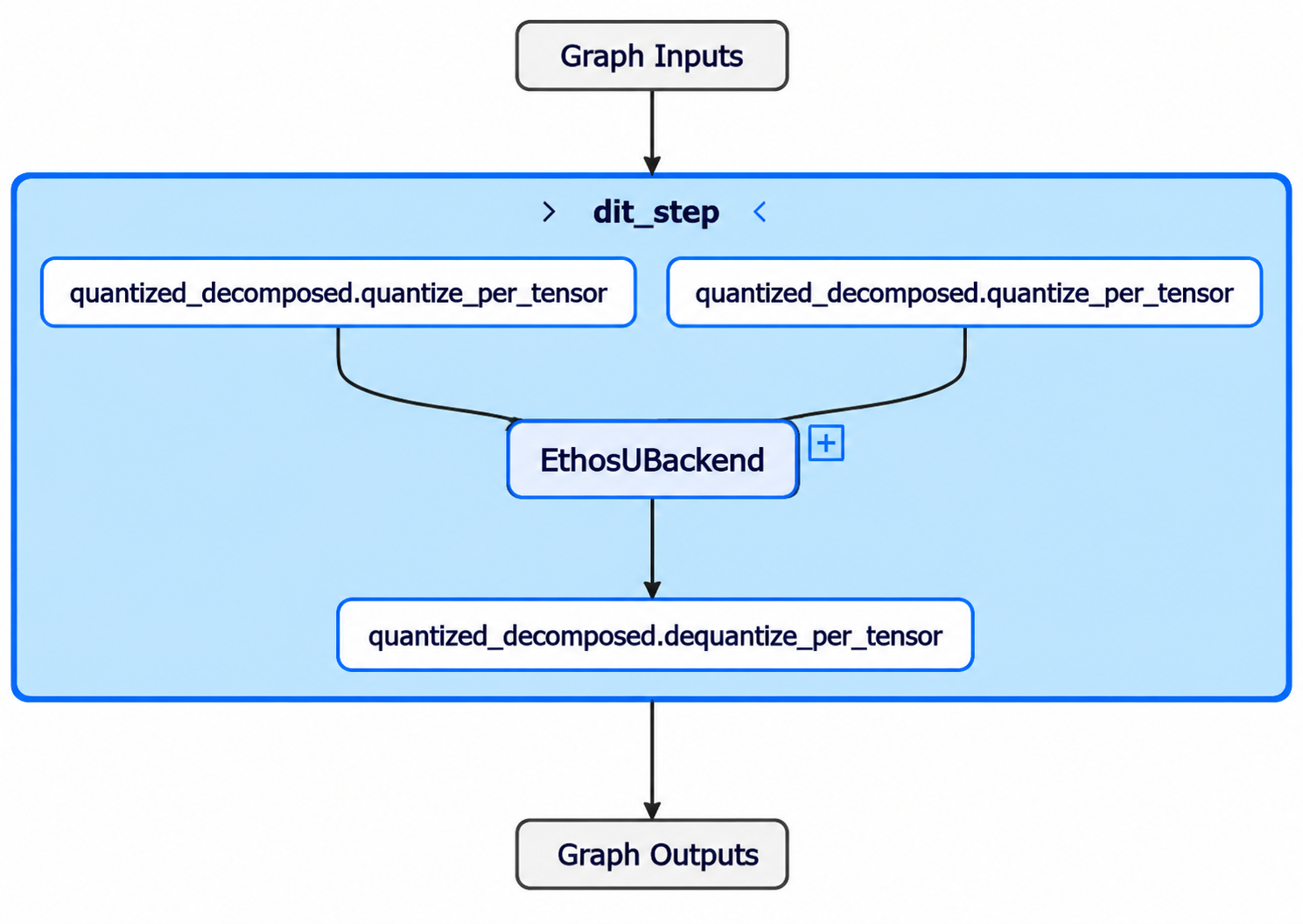
dit_stepThe graph has two quantized_decomposed::quantize_per_tensor input nodes, a single EthosUBackend delegate, and an output quantized_decomposed::dequantize_per_tensor node.
The transformer computation is encapsulated in one delegated region; its eight transformer blocks are not eight top-level ExecuTorch nodes in this view. Quantization boundaries remain visible outside the delegate. Unexpected additional CPU operators or delegate segments in other exports may warrant examination.
Open and inspect a Cortex-M PTE with Model Explorer explains basic program navigation. The Ethos-U PTE inspection section is more directly relevant to NPU delegation.
Inspecting TOSA operations
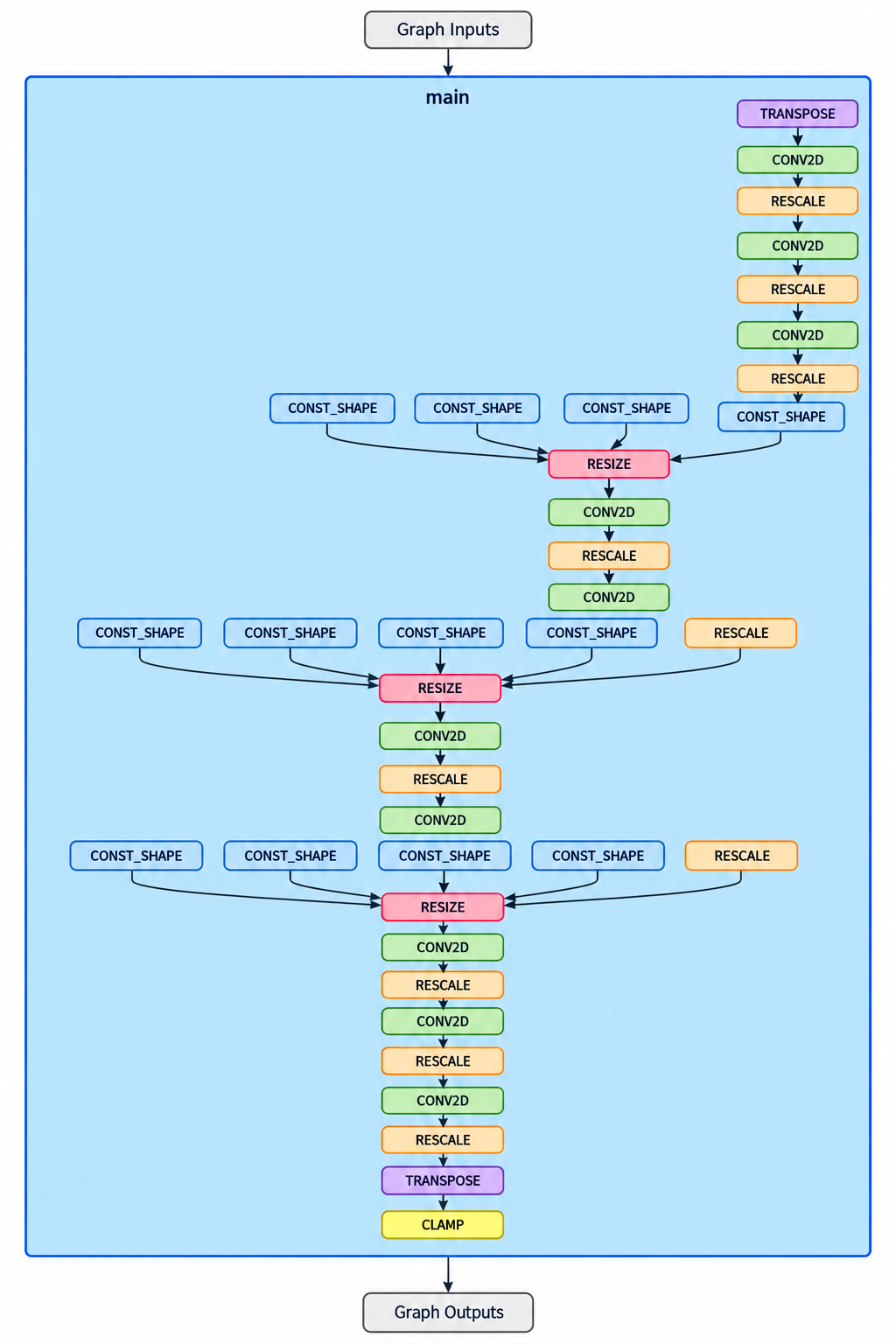
The graph includes CONV2D, RESCALE, RESIZE, CONST_SHAPE, TRANSPOSE, and CLAMP. Its convolution-and-resize structure is consistent with an image decoder. The screenshot entry point is labelled main. To identify the original exported method, check its source artifact.
TOSA provides visibility into operator connectivity, tensor types, shapes, and quantization transformations. A RESCALE operation does not automatically indicate CPU fallback, and a static graph does not provide runtime latency.
See Inspect TOSA artifacts with Model Explorer.
Why graph inspection matters for diffusion models
Because the same transformer is executed repeatedly, unexpected CPU fallback or delegation boundaries can accumulate overhead across sampling steps. Inspecting the .pte and TOSA graphs before performance analysis helps isolate partitioning and lowering issues. Hardware PMU measurements provide the separate runtime evidence needed to validate actual NPU execution.
Running the demo on Alif Ensemble E8
The complete setup is documented in the Arm Learning Path. The project uses VS Code, Keil Studio, CMSIS-Toolbox, Alif SETOOLS, and SEGGER J-Link.
Clone the pinned demonstration:
git clone --branch hackathon-pico-faces --single-branch \
  https://github.com/Arm-Examples/CMSIS-Executorch.git
cd CMSIS-Executorch
git checkout bb82e8f0c67b9e603ba6b0a48984c2f72866afce
code .
Select DevKit-E8 in CMSIS Manage Solution and run the supplied Setup Python virtual environment and Create AI layer tasks. Follow the Learning Path for board provisioning, firmware build, and J-Link loading.
|
Artifact |
Purpose |
|
|
ExecuTorch program with exported methods |
|
|
Model embedded into a C array |
|
|
Model and sampling parameters |
|
|
CMSIS component configuration |
After deployment, the Cortex-M55 invokes the two model methods through ExecuTorch, and the result appears on the DevKit LCD.
Performance results
|
Measurement |
Reference result |
|
Board |
Alif Ensemble E8 DevKit |
|
CPU |
Cortex-M55 at 400 MHz |
|
NPU |
Ethos-U85, 256 MACs/cycle |
|
Model variant |
|
|
Transformer depth |
8 blocks (upstream fast model) |
|
Hidden dimension |
128 |
|
Approximate upstream combined parameters |
1.7 million |
|
Output resolution |
128 × 128 RGB |
|
Diffusion steps |
4 |
|
CFG scale |
4.0 |
|
Transformer invocations |
8 |
|
Decoder invocations |
1 |
|
Transformer execution |
~68 ms |
|
Decoder execution |
~3 ms |
|
Total generation |
~78 ms |
These are published reference results, not guaranteed performance across firmware builds, model variants, or hardware settings.
The application also reports Ethos-U PMU counters such as NPU cycles, active time, MAC activity, and AXI reads. They help validate that the neural-network computation executed on the accelerator and support further performance analysis. The demonstration does not establish measured power savings over CPU-only execution.
Video comparison: Pico 2 CPU generation versus Alif E8 Ethos-U85
How does image-generation time change when moving from the original Raspberry Pi Pico 2 demonstration to the Arm Ethos-U85-accelerated Alif Ensemble E8? The videos below illustrate two implementations of pico-faces generation. In the original Pico 2 demonstration, a face takes approximately 8 seconds to generate. The published Alif E8 reference reports approximately 78 milliseconds per image with four diffusion steps and classifier-free guidance.
|
|
|
|
Characteristic |
Raspberry Pi Pico 2 demonstration |
Alif E8 reference configuration |
|
Compute path |
CPU-based original pico-faces implementation |
Cortex-M55 controls sampling; Ethos-U85 accelerates the transformer and decoder using ExecuTorch |
|
Generation time |
Approximately 8 s per image (illustrative original demonstration) |
Approximately 78 ms per image (published reference run) |
|
Diffusion configuration |
See original pico-faces project for the model and step settings used in that recording |
4 guided diffusion steps, 8 transformer calls, 1 decoder call |
The two demonstrations show a substantial difference in generation times, although the results are not directly comparable
The boards, models or revisions, step counts, runtime implementations, clocks, and measurement methods may differ. The comparison illustrates the practical experience of moving compact Generative AI workloads onto an Arm Ethos-U NPU; a controlled speedup claim requires matched workload settings and measurement boundaries.
References: original pico-faces project and Arm Learning Path on Alif Ensemble E8.
Ready to go a step further? Try conditional diffusion
Generating realistic human faces is impressive, but what if we wanted more control over the generated images? This is where conditional diffusion comes in.
In unconditional diffusion, the model starts with random noise and generates an image without specifying any particular attributes. Conditional diffusion, on the other hand, introduces additional information, such as a class label, to guide the generation process towards a desired output.
The trained model supports both approaches, with four conditional classes combining two attributes:
- Gender: Male or Female
- Facial expression: Neutral or Smiling
This means we can generate faces with specific characteristics, such as a smiling female face or a neutral male face, rather than relying entirely on random generation. The model also supports an unconditional class, allowing faces to be generated without selecting these attributes, which was shown in the previous section.
Bringing conditional diffusion to the Alif E8
To demonstrate this capability, we made a small modification to the existing CMSIS-ExecuTorch application codebase. We added touchscreen controls to switch between conditional and unconditional generation and select the desired facial attributes.
As illustrated in the accompanying demonstration, the Alif Ensemble E8 DevKit allows users to:
- Switch between Conditional and Unconditional generation.
- Select Male or Female when using conditional generation.
- Choose between Neutral and Smiling expressions.
- Press Generate to create a new face directly on the device.
The underlying diffusion transformer and image decoder continue to run on the Arm Ethos-U85 NPU. The Cortex-M55 manages the sampling process.
Importantly, we observed no noticeable additional generation latency when switching from unconditional to conditional diffusion in this demonstration. The conditioning information is supplied to the existing model, without requiring a separate neural network or model retraining. This is a qualitative observation from the demonstration rather than a controlled latency benchmark.
This demonstration highlights how compact Generative AI models can go beyond generating random outputs to deliver interactive, controllable image generation on microcontroller-class hardware. With ExecuTorch and Arm Ethos-U acceleration, developers can introduce additional user-controlled generative capabilities while retaining responsive on-device inference.
What this demonstration means for embedded Generative AI
The Alif Ensemble E8 board demonstrates how compact generative models can run on microcontroller-class hardware with Ethos-U85 acceleration. The model used here is about 1.7 million parameters. A compact latent representation, an eight-block diffusion transformer, component-specific quantization, and a clear CPU/NPU split make the demonstrated workload practical.
The pico-faces implementation uses four guided diffusion steps, eight transformer invocations, and one decoder invocation to produce a 128 × 128 image in approximately 78 milliseconds in the published reference run. Four guided steps require eight transformer calls; additional steps increase model invocations and generally increase latency. The transformer works repeatedly on 2,048 latent values rather than 49,152 output pixel values.
Model Explorer complements deployment by exposing the delegated program structure and TOSA operator representation, while PMU counters provide hardware-level evidence. Together, these workflows help developers move beyond getting a model to run and toward understanding how to optimize Generative AI on Arm-based embedded systems.
Try it yourself
Ready to explore Generative AI on embedded hardware?
Follow the Arm Learning Path: Generate human faces with a diffusion model on Alif Ensemble E8 to reproduce this demonstration. The guide covers preparing the PyTorch model and configuring ExecuTorch to deploying and running inference on an Arm Ethos-U85 NPU.
To explore the underlying technologies further:
- CMSIS-ExecuTorch: Explore the reference implementation and learn how to deploy PyTorch models on Arm Cortex-M processors and Ethos-U NPUs.
- Inspect ExecuTorch models with Model Explorer: Understand model delegation and inspect the exported computation graph.
- Explore TOSA representations: Investigate how neural-network operations are represented before NPU compilation.
This demonstration illustrates how compact generative models can move beyond cloud-based inference and become practical on microcontroller-class systems. With PyTorch, ExecuTorch, and Arm Ethos-U NPUs, developers can begin exploring new possibilities for on-device Generative AI.
Additional resources
Original pico-faces repository
Alif Ensemble E8 specifications

By Ash Naik
Re-use is only permitted for informational and non-commercial or personal use only.
