Benefit of pruning and clustering a neural network for before deploying on Arm Ethos-U NPU
How to design a neural network so that the compiler is able to efficiently compress the weights of your ML model and benefit fully from the capabilities of the Ethos-U hardware?
By George Gekov

Pruning and clustering are optimization techniques:
- Pruning: setting weights to zero
- Clustering: grouping weights together into clusters
These techniques modify the weights of a Machine Learning model. In some cases, they enable:
- Significant speed-up of the inference execution
- Reduction of the memory footprint
- Reduction in the overall power consumption of the system
Let's assume you can optimize your workload without loss in accuracy (more on that later in the blog) and you target an Arm® Ethos NPU. Then, you should consider pruning and clustering your neural network before feeding it to the Vela compiler and deploying it on the Ethos-U hardware.
Prerequisites
We assume that:
- You are familiar with the Vela compiler.
- You have run neural networks on the Ethos-U NPU. The ml-embedded-evaluation-kit allows you to execute neural networks on the Ethos-U NPU easily.
The complete code, which is runnable from the command line, is available on github.
Why prune and cluster a neural network?
The Ethos-U hardware has a dedicated weight decoder to process the model weights. At the same time, Vela arranges the weights into blocks. The blocks are then fed to the hardware weight decoder. As part of the block arrangement process, Vela compresses sequences of zero weights and clusters of weights. Vela uses lossless compression. Then, the bit accuracy between the TensorFlow Lite Reference kernels and the Vela optimized ML model is preserved. If the model you feed to the Vela compiler is optimized to have sequences of zero weights or clusters of the same weights, Vela can compress these weights very efficiently. Vela’s excellent compression results in fewer memory accesses by the NPU at runtime. This means that the MAC engines are not waiting for memory accesses and this results in better overall performance. So, if you have a workload where the MAC engines stall on memory accesses, do consider pruning and clustering your neural network before compiling it with Vela.
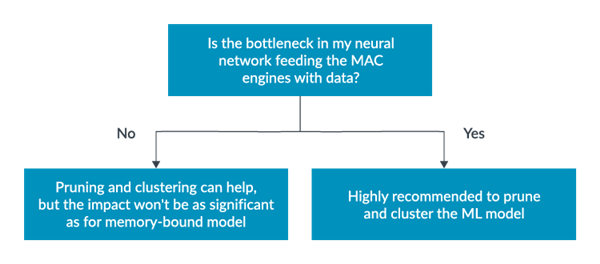
Identify memory bound ML model
To discover if your model is bottlenecked by memory accesses:
- Run the network on different MAC configurations of the Ethos-U.
- Analyze the overall performance for the model. You can use the Corstone-300 Fixed Virtual Platform or the MPS3 FPGA board to do this analysis.
If you run the neural network on Arm® Ethos -U55 NPU with 32 MACs/cc, 64 MACs/cc, 128 MACs/cc and 256 MACs/cc variants, you might see only slight improvement in the number of NPU Active cycles with the higher MAC configurations. This means that the high number of MACs does not result in significantly better performance. This is usually because the MAC engines are not fed fast enough with data.
Note that some layers are known to be memory-bound. You can skip this step for these layers. For example, Fully Connected is a highly memory-bound operation because every weight is read once only. You cannot buffer the weights in memory and reuse them for the computation. In comparison, in a convolution you usually have small filter sizes. This means that you can buffer all the convolution weights in memory and reuse them for the computation. If your model is composed entirely of Fully Connected layers, the workload is memory-bound so do consider pruning and clustering the workload.
Install dependencies
- Ensure that Python3 is installed on your machine.
- Run the following commands to install the libraries that you need to run the code sample.
$ pip3 install --upgrade pip3
$ pip3 install tensorflow==2.12.0
$ pip3 install numpy==1.23.5
Base model
For the base model, we can:
- Define and train a simple model with 3 Fully Connected layers.
- Examine the performance on the Ethos-U55-128 when running the Corstone-300 reference design on FPGA.
- Prune and cluster the model.
- Evaluate the number of memory accesses of the NPU, the overall performance, and the size of the tflite file we load on the device.
To deploy the model on the Ethos-U, we need to quantize the model to int8. We use post-training quantization. Pruning and clustering affects the accuracy of the model. We need to watch the accuracy of the base model, and the pruned and clustered versions of the workload.
import tensorflow as tf
import numpy as np
import tensorflow_model_optimization as tfmot
from tensorflow import keras
import tempfile

mnist = keras.datasets.mnist
(train_images, train_labels), (test_images, test_labels) = mnist.load_data()

# Normalize the input image so that each pixel value is between 0 and 1.
train_images = train_images / 255.0
test_images = test_images / 255.0

# Example model with 3 Fully Connected layers trained on the MNIST dataset
def define_example_nn():
  # First, we define the model
  input_shape=(28,28)
  model = tf.keras.Sequential(
      [
          tf.keras.Input(shape=input_shape),
          tf.keras.layers.Flatten(),
          tf.keras.layers.Dense(128,name='fc1',activation='relu'),
          tf.keras.layers.Dense(64,name='fc2',activation='relu'),
          tf.keras.layers.Dense(10,activation='softmax')
        ]
  )
  model.summary()
  model.compile(optimizer='adam',
              loss=tf.keras.losses.SparseCategoricalCrossentropy(from_logits=True),
              metrics=['accuracy'])

  # We train the model over 4 epochs
  model.fit(
    train_images,
    train_labels,
    epochs=4,
    validation_split=0.1,
  )
  return model
To deploy the model on the Ethos-U, we will need to quantize the model to int8. We will use post-training quantization to do that. Pruning and clustering also affects the accuracy of the model, so we need to keep track of the accuracy of the base model as well as the accuracy of the pruned and clustered versions of the workload.
# Function to do post-training quantisation of the model
def PTQ(model,name):
  def rep_dataset():
      for i in range(50):
          img = train_images[i].astype(np.float32)
          img = np.expand_dims(img,0)
          yield [img]

  converter_quant = tf.lite.TFLiteConverter.from_keras_model(model)
  converter_quant.optimizations = [tf.lite.Optimize.DEFAULT]
  converter_quant.representative_dataset = rep_dataset
  converter_quant.target_spec.supported_ops = [tf.lite.OpsSet.TFLITE_BUILTINS_INT8]

  converter_quant.inference_input_type = tf.int8
  converter_quant.inference_output_type = tf.int8
  tflite_model = converter_quant.convert()
  open(name+".tflite", 'wb').write(tflite_model)
  evaluate_accuracy(name+".tflite")

# Function evaluating the accuracy of a model
def evaluate_accuracy(nn):
  interpreter = tf.lite.Interpreter(model_path = nn)
  interpreter.allocate_tensors()
  input_details = interpreter.get_input_details()
  output_details = interpreter.get_output_details()

  print("Testing quantized model: ",nn)
  num_correct = 0
  for data, label in zip(test_images,test_labels):
    image = ((data*255)-128).astype(np.int8)
    interpreter.set_tensor(input_details[0]['index'], np.expand_dims(image,0))
    interpreter.invoke()
    outputs = interpreter.get_tensor(output_details[0]['index'])
    predicted = np.argmax(outputs)
    num_correct += np.sum(predicted==label)
  print(f"Accuracy on test set: {100 * num_correct / len(test_images)}%")
We are ready to call our function defining and training the model with 3 Fully-Connected layers, apply post-training quantization and evaluate the performance of the model.
def main():
  base_model = define_example_nn() # Base trained model
  PTQ(base_model,"model")

if __name__ == '__main__':
  main()
The model looks like the this:
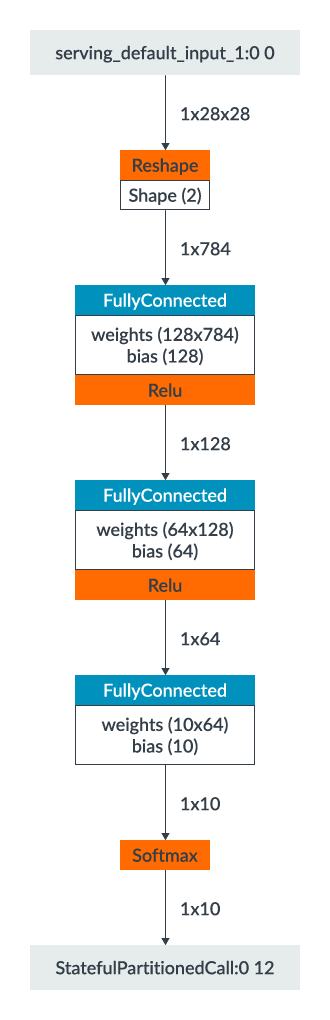
Visualization in Netron of the neural network
Performance of the baseline model on the Ethos-U
We obtain 97% accuracy on the test set after the post-training quantization routine. When compiling the quantized model with Vela, we can add the --verbose-weights CLI option to get information about the encoding of the weights. For the baseline model compiled in Shared_Sram memory mode, we get:
Original Weights Size                          106.62 KiB
NPU Encoded Weights Size                        93.17 KiB
The Original Weight Size is 106KB and the NPU Encoded Weight Size is 93KB. During inference, the NPU fetches the weights encoded by Vela from the AXI1 port of the NPU. Therefore, we monitor how the NPU Encoded Weight Size changes after we apply pruning and clustering.
When deploying on the Ethos-U, we place the model weights in the Flash and we obtain a total 91k NPU Active cycles for the inference on the Corstone-300 reference design. We also obtain 12k beats read on the AXI1 interface given by the ETHOSU_PMU_AXI1_RD_DATA_BEAT_RECEIVED PMU counter. The model size we load on-device is 104KB.
Pruned version of the base model
To prune the model:
- Set 50% of the weights randomly to 0.
- Retrain for 2 epochs.
- Have 80% of the weights set to 0 at the end of the training.
To do this, we add a function to our code for pruning the model which looks like this:
# Function to prune the base model
def prune_model(model):
  prune_low_magnitude = tfmot.sparsity.keras.prune_low_magnitude

  # Compute end step to finish pruning after 2 epochs.
  batch_size = 128
  epochs = 2
  validation_split = 0.1 # 10% of training set will be used for validation set.

  num_images = train_images.shape[0] * (1 - validation_split)
  end_step = np.ceil(num_images / batch_size).astype(np.int32) * epochs

  # Define model for pruning.
  pruning_params = {
        'pruning_schedule': tfmot.sparsity.keras.PolynomialDecay(initial_sparsity=0.50,
                                                                final_sparsity=0.80,
                                                                begin_step=0,
                                                                end_step=end_step)
  }

  model_for_pruning = prune_low_magnitude(model, **pruning_params)

  # `prune_low_magnitude` requires a recompile.
  model_for_pruning.compile(optimizer='adam',
                loss=tf.keras.losses.SparseCategoricalCrossentropy(from_logits=True),
                metrics=['accuracy'])

  model_for_pruning.summary()
  logdir = tempfile.mkdtemp()

  callbacks = [
    tfmot.sparsity.keras.UpdatePruningStep(),
    tfmot.sparsity.keras.PruningSummaries(log_dir=logdir),
  ]

  model_for_pruning.fit(train_images, train_labels,
                    batch_size=batch_size, epochs=epochs, validation_split=validation_split,
                    callbacks=callbacks)
  _, model_for_pruning_accuracy = model_for_pruning.evaluate(
   test_images, test_labels, verbose=0)

  print('Pruned test accuracy:', model_for_pruning_accuracy)
  print("Do post-train quant on the pruned model")
  model_for_export = tfmot.sparsity.keras.strip_pruning(model_for_pruning)
  return model_for_export
We modify the main function slightly to pass on a copy of the base model for pruning. The main looks this:
def main():
  base_model = define_example_nn() # Base trained model
  base_model1 = tf.keras.models.clone_model(base_model) # Clone of trained model
  base_model1.set_weights(base_model.get_weights()) # Set the weights of the cloned model
  model_pruned = prune_model(base_model1) # Prune the cloned version of the base model
  PTQ(base_model,"model")
  PTQ(model_pruned,"model_pruned")
if __name__ == '__main__':
  main()
Performance of the pruned model
After the post-training quantization, the accuracy of the base model and the pruned model are identical at 97%. You might even get a slight increase in accuracy of the pruned workload because you have added 2 more epochs to the training.
How is it possible to have 80% of the weights set to 0 without losing accuracy?
During training of the base model, it is common to have a lot of weights that are very close to 0, but are non-null. In the neural network design phase, we have not optimized the model architecture for embedded devices. We just look for correlations on the training data. As a result, there is a lot of redundancy in the network. Pruning exploits this redundancy. It enables us to get rid of some of this redundancy by setting some weights to 0 while preserving the accuracy.
Why aim for 80% sparsity by the end of the training and not another value?
In the design of the neural network, you can experiment with different sparsity levels and examine the impact on the model accuracy. Empirical research shows that on Fully Connected layers with big weight matrices, as in our model, you can apply high sparsity levels of 80%, and even 90%, without affecting the accuracy of the neural network. For the Ethos-U, the higher the sparsity, the better the performance is.
For the encoding of the weights, Vela reports:
Original Weights Size                          106.62 KiB
NPU Encoded Weights Size                        30.12 KiB
The Original Weight size stays at 106KB. This is logical because, although we have the same number of weights as in the first model, a lot of the weights are set to zero. However, the NPU Encoded Weight Size has reduced dramatically to 30KB. The is because the Vela compiler encodes the 0 weights very efficiently.
At runtime, we get 33k Active NPU cycles on the Ethos-U55-128 and 4k beats of data read on AXI1. The size of the Vela optimized model is 40KB.
Clustered version of the base model
We now, cluster the baseline model with 32 clusters. We need the following function to apply clustering to the model weights.
def cluster_model(model,keep_sparsity):
  cluster_weights = tfmot.clustering.keras.cluster_weights
  CentroidInitialization = tfmot.clustering.keras.CentroidInitialization

  clustering_params = {
    'number_of_clusters': 32,
    'cluster_centroids_init': CentroidInitialization.LINEAR,
    'preserve_sparsity': keep_sparsity
      }

  # Cluster a whole model
  clustered_model = cluster_weights(model, **clustering_params)

  # Use smaller learning rate for fine-tuning clustered model
  opt = tf.keras.optimizers.Adam(learning_rate=1e-5)

  clustered_model.compile(
    loss=tf.keras.losses.SparseCategoricalCrossentropy(from_logits=True),
    optimizer=opt,
    metrics=['accuracy'])

  clustered_model.summary()
  # Fine-tune model
  clustered_model.fit(
    train_images,
    train_labels,
    batch_size=500,
    epochs=1,
    validation_split=0.1)
  _, clustered_model_accuracy = clustered_model.evaluate(test_images, test_labels, verbose=0)
  print('Clustered test accuracy:', clustered_model_accuracy)
  final_model = tfmot.clustering.keras.strip_clustering(clustered_model)
  return final_model
And the corresponding main looks like this:
def main():
  base_model = define_example_nn() # Base trained model
  base_model2 = tf.keras.models.clone_model(base_model) # Clone of trained model
  base_model2.set_weights(base_model.get_weights())
  model_clustered = cluster_model(base_model2,False) # Cluster the clone of the base model
  PTQ(base_model,"model")
  PTQ(model_clustered,"model_clustered")
if __name__ == '__main__':
  main()
Performance of the clustered model
Note that because we start from the baseline model, the neural network contains a lot of weights that are not equal to 0 yet. We have not applied clustering to the pruned model yet. Therefore, Vela will be able to encode the clusters of weights, but it cannot encode sequences of 0 weights. Again, we keep the accuracy of 97% on the MNIST dataset.
Why did we select 32 clusters?
The Ethos-U hardware can work with different numbers of clusters. The lower the number of clusters, the better the encoding by the compiler is. The quantized model has weights in int8. Think of these as 256 clusters of weights. It is therefore sensible to cluster with less than 256 clusters. If we select 16 clusters instead of 32, we get better encoding by the complier. This results in better overall performance at runtime. The optimal number of clusters is highly workload dependent. We describe an uplift during inference of pruning and clustering. We recommend that you experiment with different number of clusters for your specific model so that you understand what is the lowest number of clusters that you can afford without degrading the accuracy.
On weight encoding, Vela now reports:
Original Weights Size                          106.62 KiB
NPU Encoded Weights Size                        54.86 KiB
The Original Weight Size remains the same, but the NPU Encoded Weight Size is 54KB. When pruning the model, we set 80% of the weights to 0. This results in better encoding than clustering with 32 clusters.
At runtime, we obtain 56k NPU Active cycles and 7.1k beats read from the AXI1 interface. The size of the Vela optimized model we write to memory is 64KB.
Prune and cluster the base model
Lastly, we apply pruning and clustering at the same time. We have all the necessary functions. The final version of the main function looks like this:
def main():
  base_model = define_example_nn() # Base trained model
  base_model1 = tf.keras.models.clone_model(base_model) # Clone of trained model
  base_model2 = tf.keras.models.clone_model(base_model) # Clone of trained model
  base_model1.set_weights(base_model.get_weights())
  base_model2.set_weights(base_model.get_weights())
  model_pruned = prune_model(base_model1)
  model_pruned_copy = tf.keras.models.clone_model(model_pruned) # Clone the pruned model
  model_pruned_copy.set_weights(model_pruned.get_weights())
  model_clustered = cluster_model(base_model2,False) # cluster without preserving sparsity
  model_pruned_clustered = cluster_model(model_pruned_copy,True) # cluster preserving the sparsity
  PTQ(base_model,"model")
  PTQ(model_pruned,"model_pruned")
  PTQ(model_clustered,"model_clustered")
  PTQ(model_pruned_clustered,"model_pruned_clustered")
if __name__ == '__main__':
  main()
Performance of the pruned and clustered model
On weight compression, Vela reports:
Original Weights Size                          106.62 KiB
NPU Encoded Weights Size                        22.22 KiB
In this case, we benefit from the encoding of 0 weights and encoding of the 32 clusters. This results in the lowest size of NPU Encoded Weights. This translates to lowest number of NPU Active cycles.
The accuracy of the model remains 97%. We obtain 26k NPU Active cycles, 3k beats read on AXI1, and the model size is 32KB.
Analysis
In conclusion:
| Model we compile with Vela | NPU Active cycles | AXI1 DATA BEAT_RECEIVED | Size of _vela.tflite file |
| model.tflite (no pruning, no clustering) | 91k | 12k | 104KB |
| model_pruned.tflite (80% sparsity, no clustering) | 34k | 4k | 40KB |
| model_clustered.tflite (no pruning, 32 clusters) | 56k | 7k | 64KB |
| model_pruned_clustered.tflite (80% sparsity, 32 clusters) | 26k | 3k | 32KB |
The model we defined is composed entirely of Fully Connected layers whose performance is limited by memory accesses. From the four workloads, the baseline model without pruning or clustering has the worst performance. On the pruned model, we get over 2.5x reduction in the number of NPU active cycles. We also obtain 3x reduction in the amount of memory traffic which results in a significant power saving for the system. Also, when the zero weights are compressed by Vela, the size of the model you store in memory reduces from 104 KB to 40 KB. On Fully Connected layers, pruning results in better compression compared to clustering. This is because there are a lot of weights that can be made equal to zero, and we get the best performance when we combine pruning and clustering. There was no loss in accuracy as we pruned and clustered the model, and this exploits the redundancy in the neural network. Finding the best balance between pruning and clustering is highly workload dependent. Recurrent Neural Networks such as LSTMs and GRUs also contain large Fully Connected layers. For such architectures, we also recommend pruning and clustering before compiling the model with Vela.
Conclusion
This blog describes how you can obtain better overall performance and lower number of memory accesses by pruning and clustering your neural network if you have a memory-bound model that you deploy on the Ethos-U. Note that this is true for any neural network architecture where the bottleneck is access to memory, not only for models composed of Fully Connected layers. If you have a convolutional neural network where the MAC engines are stalling on memory accesses, pruning and clustering also improves the overall performance and power of the system.

By George Gekov
Re-use is only permitted for informational and non-commercial or personal use only.
