Web AI: Bringing on-device intelligence to the browser
Learn how Web AI brings local AI inference to the browser, improving responsiveness, privacy, and portability across Arm platforms

Cloud AI and Web AI
AI applications on the web generally follow 2 approaches: Cloud AI and Web AI.
Today, most web-based AI experiences rely on Cloud AI. When you interact with an AI-powered application, the browser sends your input to a remote server The AI workload runs there and returns a result. The browser mainly acts as the interface between you and the cloud service. This approach powers many chatbots and AI assistants.
Recent advances in web technologies enable a different approach. Instead of acting only as a frontend, the browser can now run AI models and AI capabilities directly on the user's device.This approach is known as Web AI.
This shift changes the browser role. The browser no longer acts only as a user interface. It becomes part of the AI runtime, responsible for model loading, execution, data handling, and interaction with device capabilities. This shift raises a practical question for developers: when should the browser run AI locally instead of sending every request to the cloud?
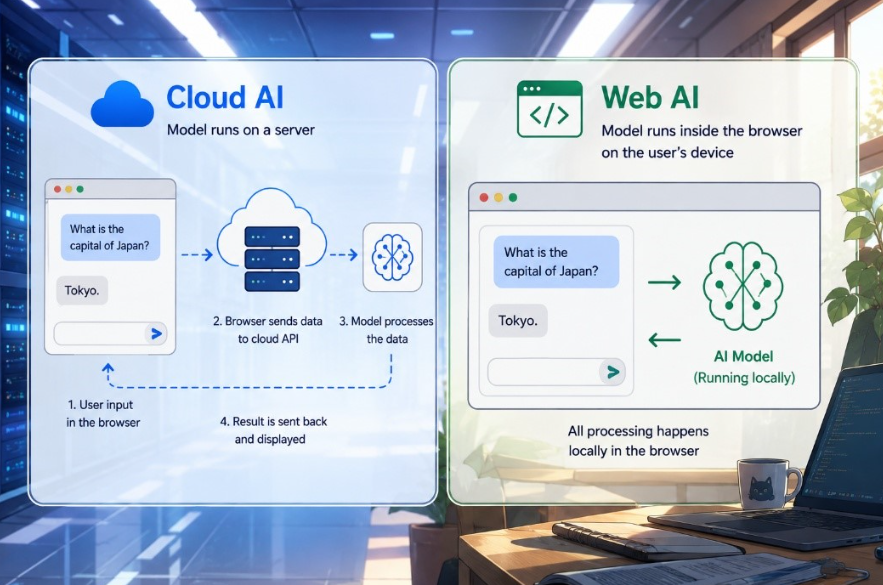
Figure 1. Simplified view of Cloud AI and Web AI
Why Run AI in the Browser?
Cloud AI and Web AI each serve different needs, and many applications will use both. Cloud AI is well suited for large-scale models, centralized services, and workloads that require managed server-side infrastructure. In contrast, Web AI enables local execution within the browser, which often offers several practical advantages.
Running models locally can improve responsiveness by avoiding network round trips, and it reduces the need to transmit sensitive data such as images, audio, or text. Local execution can also reduce server-side inference costs by shifting computation to the client, however, developers still need to consider device capability, memory use, battery life, and thermal constraints.
Another key advantage comes from the web itself. Users can access applications instantly through a link without installation or environment setup, making it easier to reach users across devices and platforms.
Practical Use Cases
These benefits become especially clear in applications where latency, bandwidth, or local data handling affect the user experience.
For example, in real-time video applications, continuously sending frames to a server increases both latency and bandwidth use. Running AI locally enables features such as background effects and live enhancements.
Similarly, speech-to-text and text-to-speech systems require immediate feedback. Even small delays can degrade the user experience, making local inference a strong fit when efficient models are available.
Photo and video editing are other examples. Processing media directly in the browser enables users to apply AI features without uploading personal content, while retaining the convenience of a web-based tool.
Across these scenarios, the value of Web AI comes from combining local execution with the accessibility of the web.
Why Web AI Matters for Arm-Based Platforms
Web AI is particularly relevant for Arm-based platforms, which power a wide range of devices, including smartphones, tablets, laptops, and edge systems. Because Web AI applications run in the browser, developers can target this diverse ecosystem with a single web application rather than maintaining separate native implementations for different operating systems and devices.
This makes the web an attractive deployment platform for AI applications across the Arm ecosystem. However, good performance depends on how effectively browser technologies usethe underlying hardware acceleration available on each device.
How Web AI Works
To understand how Web AI takes advantage of this diverse hardware landscape, it helps to examine the layers between a web application and the underlying device hardware.
The Web AI Stack
Running AI in a browser differs from native applications because the browser adds an execution layer between the application and the hardware. This layer provides portability and security boundaries, but it also determines how applications access compute APIs and hardware acceleration.
At a high level, the Web AI stack consists of:
- A JavaScript or TypeScript web application
- A Web AI framework or runtime
- Browser compute APIs (WebAssembly, WebGPU, WebNN)
- Browser runtime components (Execution engines and their backends)
- Underlying hardware, such as CPU, GPU, and where available, NPU acceleration.
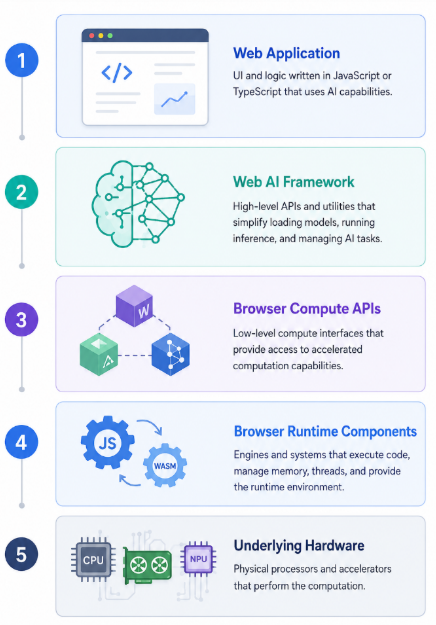
Figure 2.Web AI Stack
This stack primarily describes the framework-based Web AI path, where a web application uses a JavaScript framework to run a model through browser-provided compute APIs. Built-in browser AI APIs follow a different model, which is introduced later as a separate approach.
Web AI Frameworks
Framework-based Web AI is the most common way for developers to run custom AI models in the browser. In this approach, the application uses a JavaScript framework to handle model loading, tensor management, backend selection, and operator execution.
A key aspect of these frameworks is their support for different model formats and their ability to map model execution onto available hardware acceleration. The framework abstracts much of the complexity.
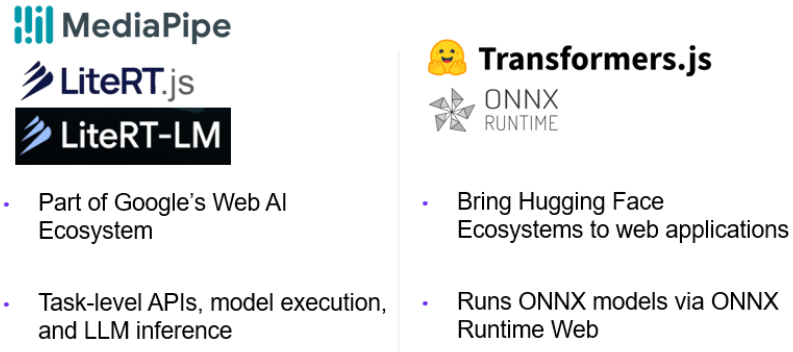
Figure 3. Web AI Frameworks
MediaPipe Web, LiteRT.js, and LiteRT-LM.js
MediaPipe, LiteRT.js, and LiteRT-LM.js are part of Google’s Web AI ecosystem, but they sit at different levels of abstraction. MediaPipe focuses on task-level APIs and application-oriented workflows. LiteRT.js provides a runtime path for LiteRT models in the browser. LiteRT-LM.js is a newer addition focused on local LLM inference through a JavaScript API.
Transformers.js and ONNX Runtime Web
Transformers.js, from Hugging Face, is designed to be functionally equivalent to the popular transformers python library. It provides access to many model types commonly used for natural language processing, embeddings, classification, and related tasks. ONNX Runtime Web enables ONNX models to run in browser environments. Together, they provide a flexible path for using models from the broader ONNX and Hugging Face ecosystems.
Browser Compute APIs
To understand where performance, portability, and hardware acceleration come from in framework-based Web AI, it is useful to look at the browser compute APIs that these frameworks target.
Browser compute APIs provide the execution paths used by Web AI frameworks to run model operations inside the browser. The main options are WebAssembly, WebGPU, and WebNN, each offering a different balance of portability, performance, and hardware access.
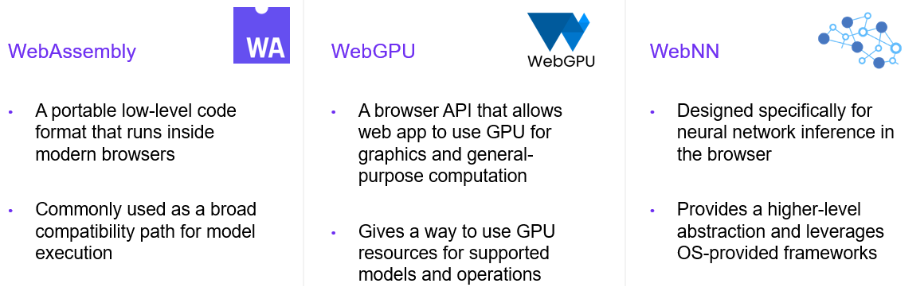
Figure 4. Browser Compute APIs
WebAssembly: The Portable CPU Path
WebAssembly (Wasm), is a low-level, portable execution format supported across modern browsers. It enables code written in languages such as C, C++, and Rust to run on the web.
In Web AI, Wasm serves as a widely available CPU execution path and is often used as a fallback when GPU acceleration is unavailable. Its support for SIMD operations can improve performance for certain workloads, making it a reliable baseline across devices. This makes Wasm a reliable baseline for broad compatibility across devices.
WebGPU: GPU Acceleration for the Browser
WebGPU provides access to GPU resources for both graphics and general-purpose computation.
For AI workloads, this enables parallel execution of operations common in neural networks. WebGPU support depends on the browser, device, and platform configuration. For that reason, many applications use runtime feature detection and provide fallback paths, often through WebAssembly.
WebNN: A Neural Network API for the Web
WebNN is designed specifically for neural network inference. It offers a higher-level abstraction compared to WebGPU, allowing frameworks to describe computation as model graphs.
Depending on the platform, execution may be routed to CPU, GPU, or NPU. WebNN is an emerging part of the Web AI ecosystem. As support matures, it becomes an important path for accessing optimized AI execution in the browser.
Built-in Browser AI APIs
The framework-based approach is not the only way AI capabilities are becoming available on the web. A separate approach is emerging through built-in browser AI APIs. Instead of asking developers to bring and manage their own models, these APIs expose browser-provided AI capabilities directly to web applications.
For example, Chrome provides Built-in AI APIs for tasks such as summarization, translation, writing, rewriting, proofreading, and prompt-based interactions. This reduces the need to manage models directly when built-in capabilities are sufficient.
Unlike the framework-based path described above, built-in browser AI APIs should be viewed as browser-provided capabilities rather than another execution backend for Web AI frameworks. Their internal implementation is browser-specific and may rely on native browser components or platform-managed components. This blog post does not go into those details, but distinguishing the two approaches is important when choosing how to build a Web AI application.
Choosing the Right Web AI Approach
With both framework-based Web AI and built-in browser AI APIs available, developers must choose the approach that best matches their application requirements.
Framework-based approaches are well suited for applications that need custom models, support for multiple model formats, or fine-grained control over inference. In contrast, built-in browser APIs are often the better choice for common AI tasks where simplicity and seamless browser integration are the priority.
Some applications may use both approaches, but the choice should be guided by the task, the required level of control, and the browsers and devices the application needs to support.
Conclusion
Web AI is an emerging and promising direction for bringing AI experiences to users through the browser. By enabling AI workloads to run locally, it can support responsive, privacy-conscious applications while preserving the accessibility and simplicity of web-based deployment.
For Arm-based platforms, this is especially relevant. A single web application can reach a wide range of Arm-powered devices, while browser technologies and Web AI frameworks continue to improve how AI workloads map onto available hardware.
As standards, frameworks, and browser capabilities continue to evolve, now is a good time to experiment, prototype, and build. The Web AI ecosystem is becoming more capable and practical, creating new opportunities to deliver AI experiences that are easy to access, simple to share, and available across platforms.
This post covers part of a broader collaborative effort with Yusuf Duman.

Re-use is only permitted for informational and non-commercial or personal use only.
