Part 2: FP8 Instructions for Arm Advanced SIMD, SVE, and SME
In Part 2, explore FP8 instructions, from conversion and scaling to dot products, matrix multiplication, and outer products in Advanced SIMD, SVE, and SME
By Siyu Mou

This blog series introduces the added instructions of FP8 and related features. Part 2 covers what instructions are available across Arm Advanced SIMD, SVE and SME ISA and how they compute results.
Part 1 introduces support for FP8, including the OFP8 E4M3 and E5M2 formats. These formats are controlled through the new Floating-point Mode Register, FPMR, which selects the FP8 source and destination formats and provides scaling and control for FP8 operations.
Alongside the data formats, the extensions introduce a set of FP8-related instructions across Advanced SIMD, SVE, and SME, including
- FP8 convert instructions;
- Floating-point scaling instructions;
- Widening multiply-accumulate instructions;
- Sum-of-products and accumulate instructions;
- Outer product and accumulate instructions.
Convert instructions
FEAT_FP8 introduces conversion instructions that convert the data between FP8 and wider formats (FP16, BF16 and FP32). These instructions are available in Advanced SIMD, SVE and SME2. They are mainly used at the boundaries of an FP8 kernel: down-convert model results to FP8 for storage savings and up-convert FP8 to higher precision when CPU does not support FP8 compute.
The workflow of Advanced SIMD instruction F1CVTL <Vd>.8H, <Vn>.8B is below.
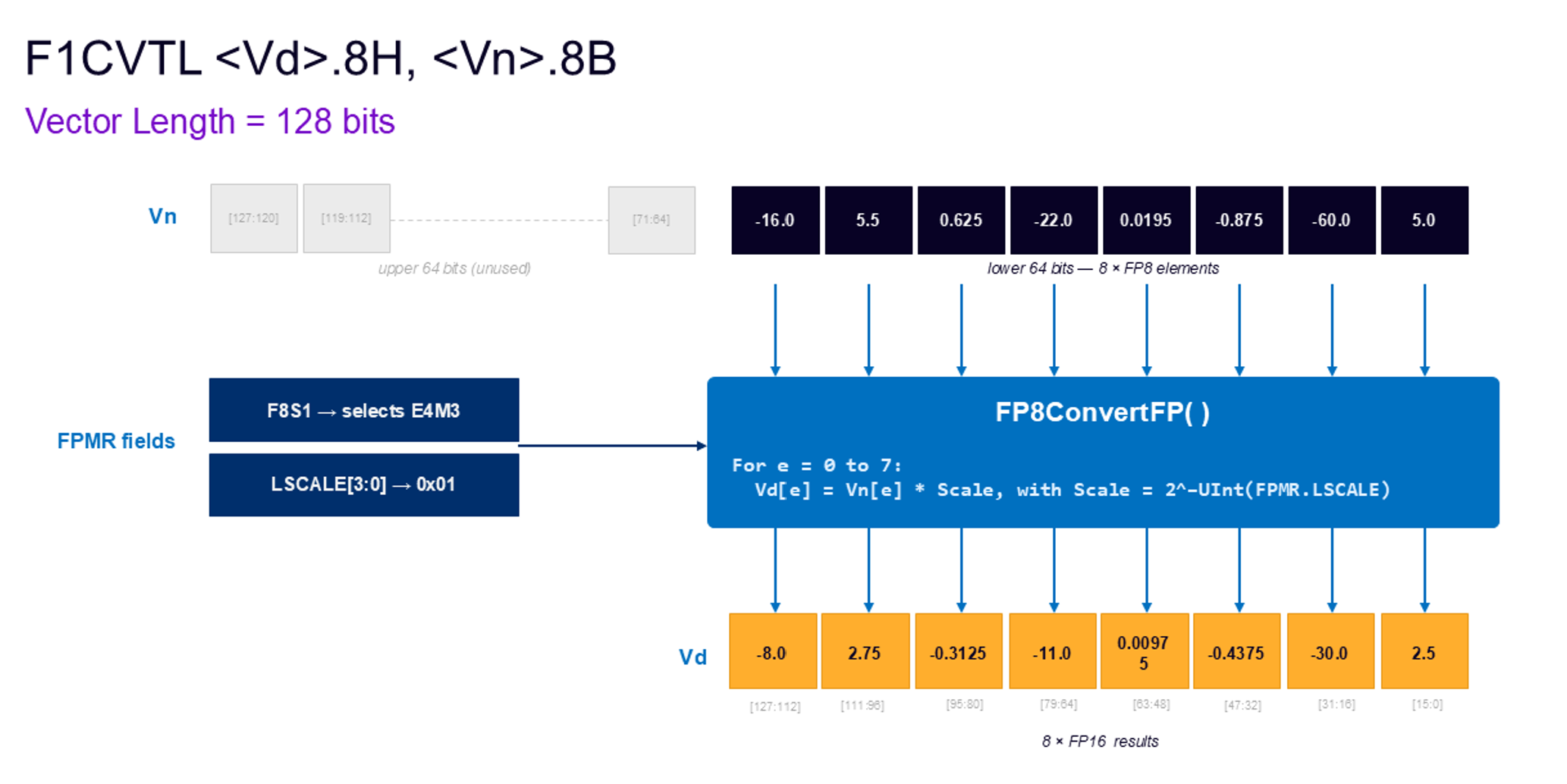
This instruction converts FP8 values to FP16 values and applies a downscaling factor. F1CVTL reads elements from the lower half of the source vector. The elements use the FP8 format selected by FPMR.F8S1, and are scaled by 2^-UInt(FPMR.LSCALE).
F2CVTL also reads elements from the lower half but it uses the FP8 format selected by FPMR.F8S2 and scales by 2^-UInt(FPMR.LSCALE2). There is a second variant of these instructions which access the elements in the upper half, F1CVTL2 and F2CVTL2 read elements from the upper half differently and then follow the above rules.
The following diagram shows the workflow of instruction of Advanced SIMD instruction FCVTN <Vd>.8B, <Vn>.4S, <Vm>.4S.
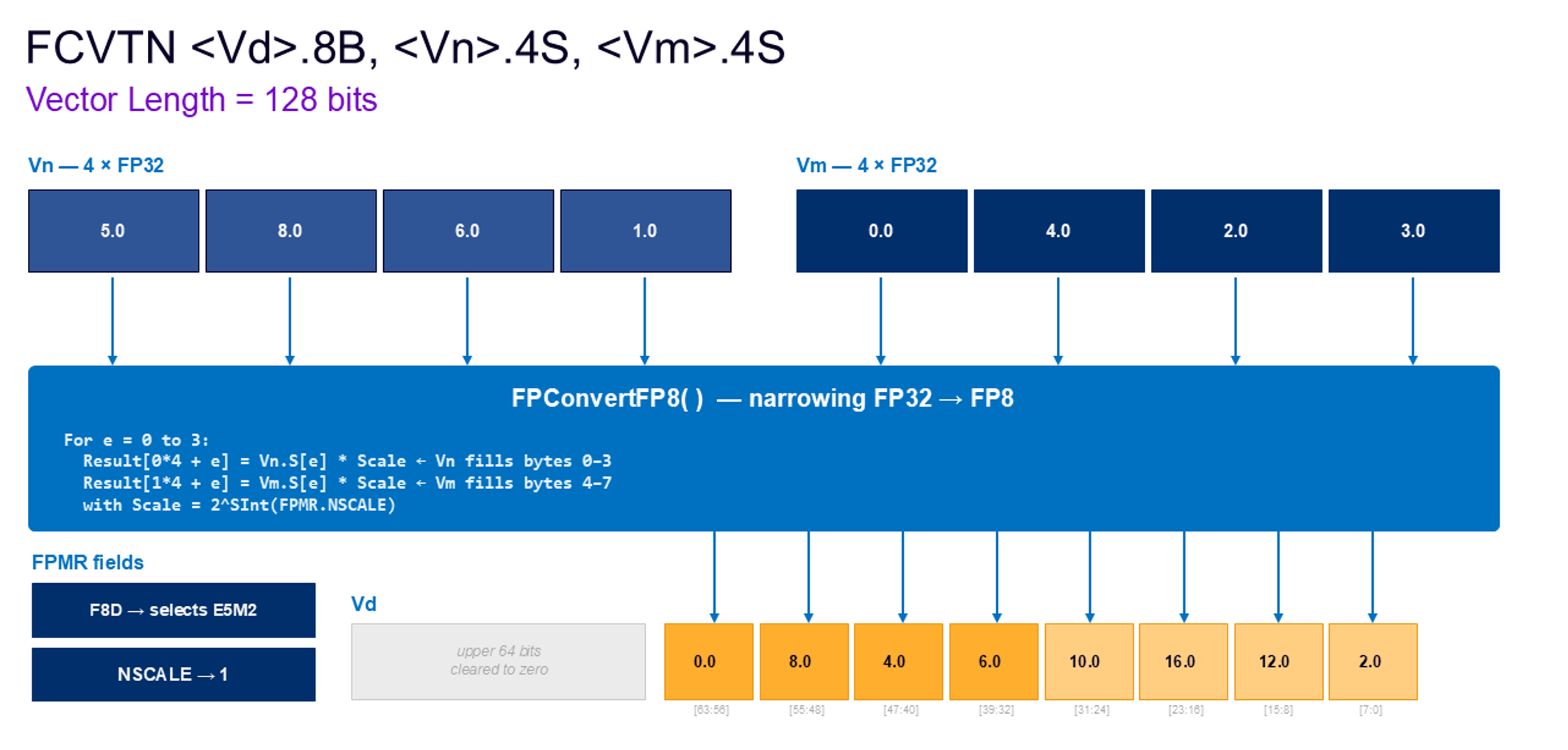
FCVTN narrows FP32 single-precision values from two source vectors into 8-bit FP8 elements in the destination vector. It reads four 32-bit elements from Vn and four 32-bit elements from Vm, applies the scale factor 2^SInt(FPMR.NSCALE), converts each scaled value to the FP8 format selected by FPMR.F8D, and packs the results into the lower 64 bits of Vd. Vn supplies FP8 result bytes in 0–3 and Vm supplies FP8 result bytes in 4–7; the upper 64 bits of Vd are zeroed. In this example, NSCALE = 1, so each FP32 input is up scaled by 2 before being narrowed to the selected FP8 format and written as an 8-byte FP8 result.
There is a variant FCVTN2, which writes the results to the upper half of the destination vector without affecting the lower half bits of the vector.
Floating-point scaling instructions
FSCALE is introduced for Advanced SIMD, SVE and SME2 and is a supporting instruction for efficient data rescaling. Rather than performing a general-purpose floating-point multiply, it adjusts floating-point values by changing their exponent, which makes it well suited for power-of-two scaling used around FP8 conversion and quantized compute flows.
The workflow of SME2 instruction FSCALE {Zdn1.S-Zdn2.S}, {Zdn1.S-Zdn2.S}, <Zm>.S is below.
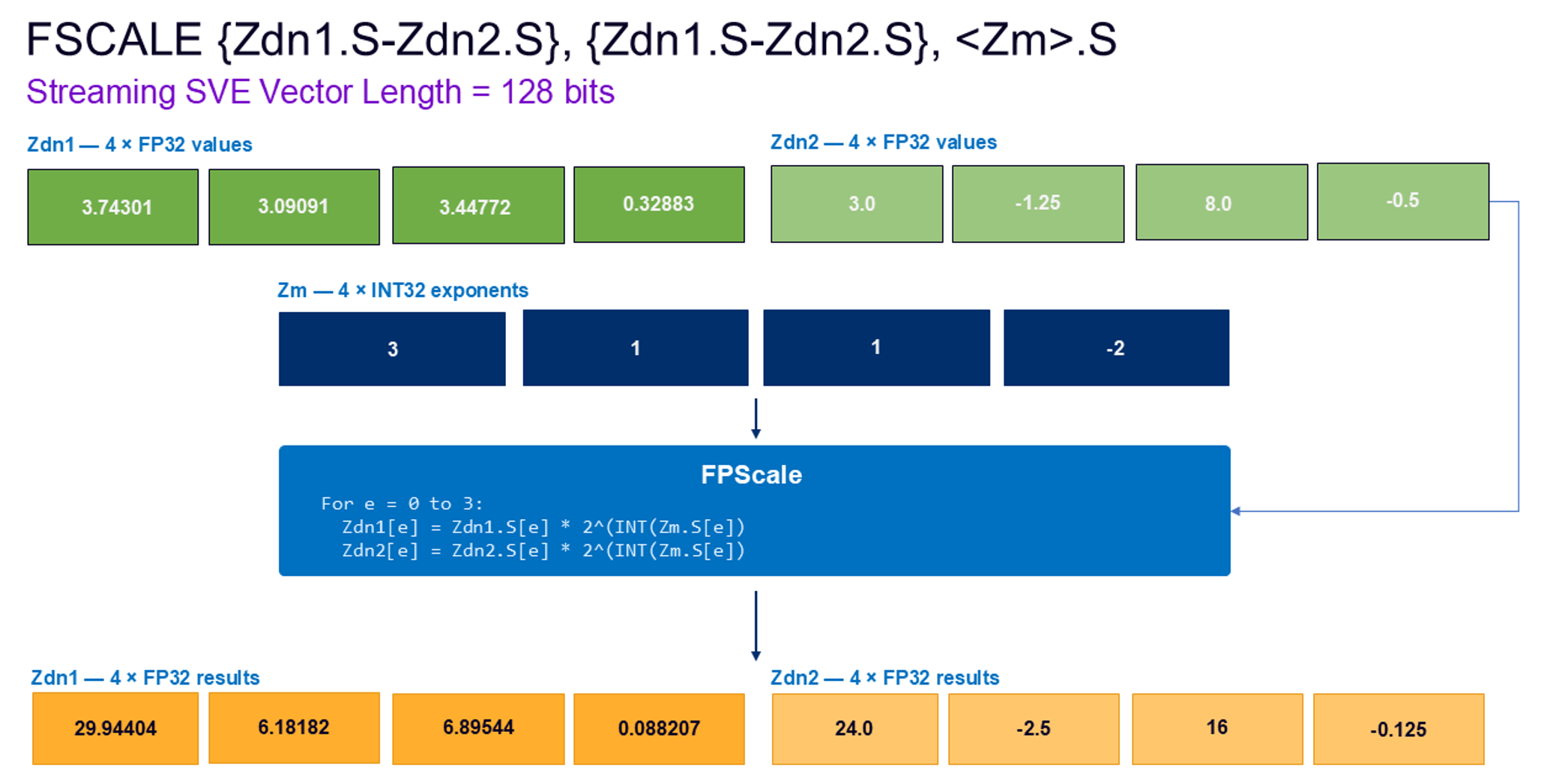
This SME2 multiple and single vector form applies exponent scaling to two FP32 Z vectors in parallel. For each element position, the element of Zm is interpreted as a signed integer exponent, and every first-source vector is destructively updated as Zdn[e] = Zdn[e] × 2.0^SInt(Zm[e]). The same exponent lane is applied independently to the matching lane in each vector, while the two destination Z vectors place the results back.
Widening multiply-accumulate instructions
FP8 widening multiply-accumulate instructions provide a direct way to multiply compact FP8 operands and accumulate the result into a wider floating-point format. They are useful when software wants more control over how FP8 values are combined than a dot-product instruction provides, while keeping accumulation in FP16 or FP32 for better numerical range and precision. They are especially useful for building custom kernel layouts, handling intermediate accumulation steps, or implementing compute patterns that do not map cleanly to a fixed 2-way or 4-way dot product.
For example, the diagram below is the workflow of SVE instruction FMLALLBB <Zda>.S, <Zn>.B, <Zm>.B .
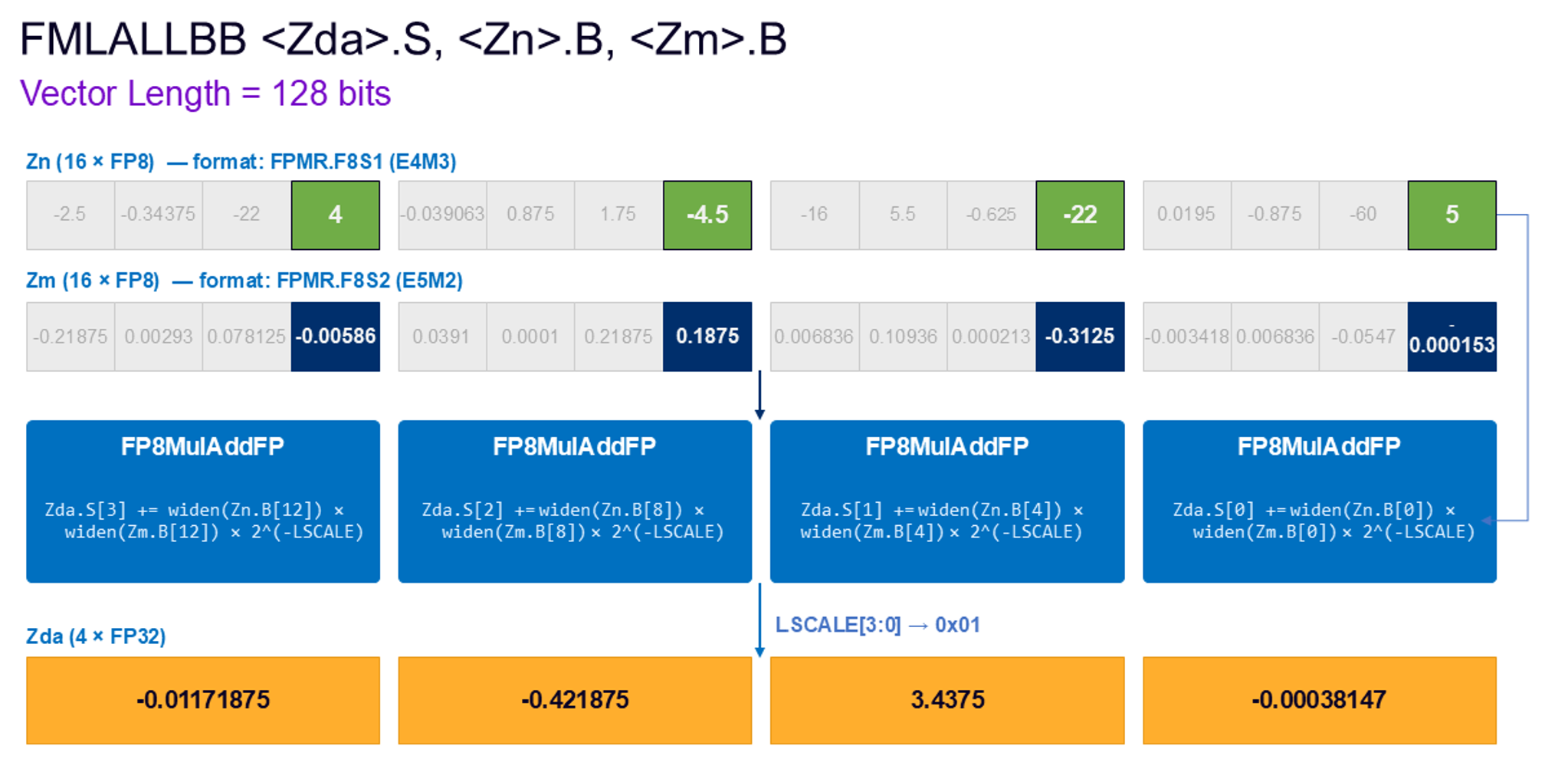
This instruction performs an FP8 multiply-add long-long operation. It selects the first 8-bit element from each 32-bit container in the first source vector and widens those values together with the selected FP8 element from the second source vector to single-precision format. The corresponding widened elements are multiplied, the intermediate products are scaled by 2^-UInt(FPMR.LSCALE), and the scaled products are destructively accumulated into the overlapping FP32 destination lanes without intermediate rounding.
The “BB” suffix in the instruction mnemonic means bottom-bottom, referring to the least significant byte within each 32-bit container for FMLALLBB. More related variants can select bottom-top (BT), top-bottom (TB), or top-top (TT).
When CPU enters the Streaming SVE mode, the workflow of SME multi-vector FMLALL instruction is below.
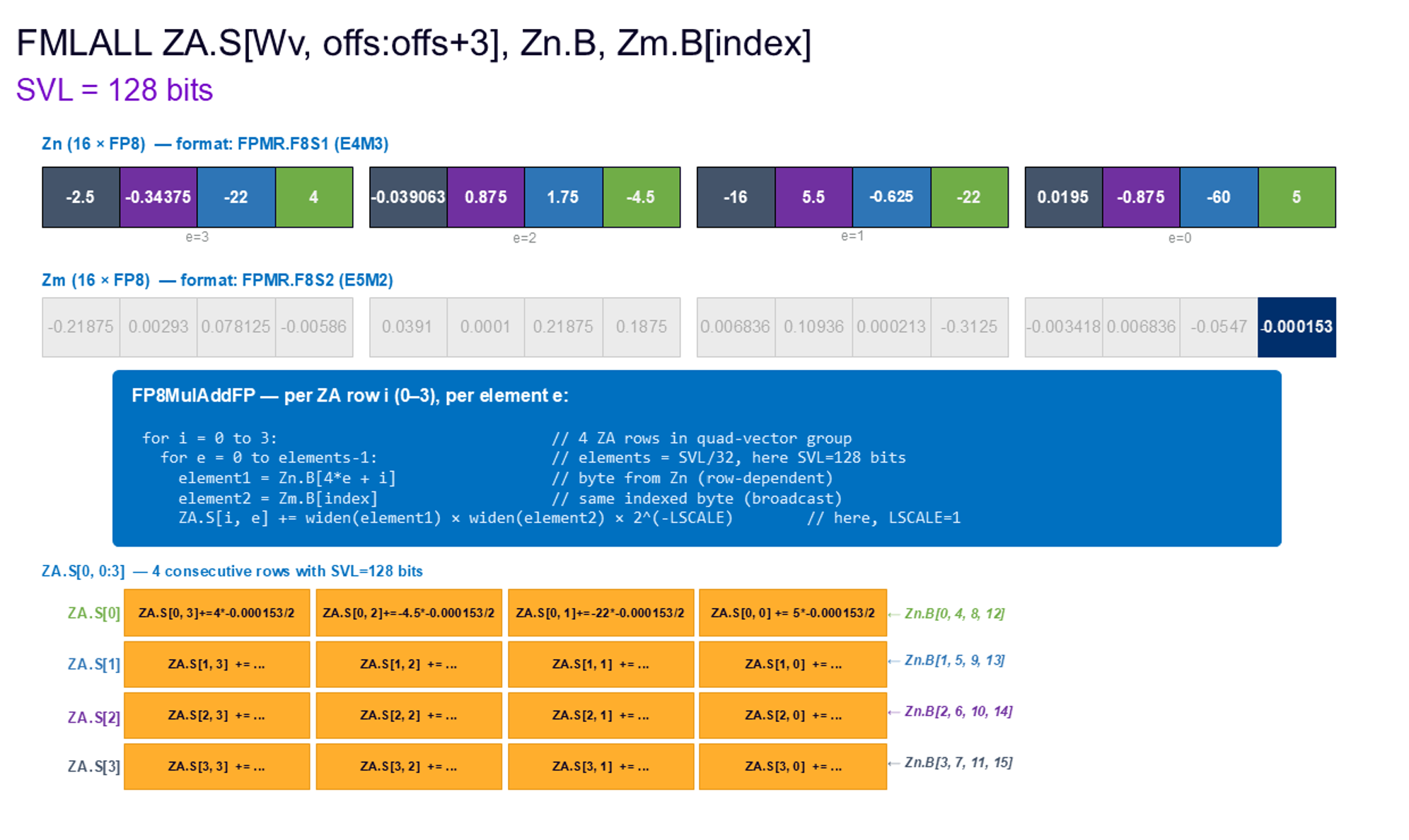
This instruction performs an 8-bit floating-point multiply-add long-long operation. It first widens every FP8 element in the first source vectors (Zn.B), together with the indexed element selected from the second source vector (Zm.B[0]), to FP32 format.
The widened values are multiplied element by element, and each intermediate product is scaled by 2^-UInt(FPMR.LSCALE). These scaled products are then destructively accumulated into the overlapping FP32 elements of the one ZA quad-vector (ZA.S[0] – ZA.S[3]), with no intermediate rounding.
Dot product instructions
FP8 dot product instructions provide a compact way to consume FP8 operands and accumulate the result into a wider floating-point format. These instructions accelerate the inner loops of neural-network kernels, especially matrix multiplication and convolution. They allow applications to store data in FP8 to reduce the bandwidth and cache usage, while accumulating results in FP16 or FP32 for better computing accuracy.
In the Arm ISA, dot product support is available across Advanced SIMD, SVE and SME, allowing software to use the same FP8 data representation from regular vector code through to high-throughput streaming kernels.
There is a newly added SME FP8 DOT instruction designed to accelerate low-precision dot-product accumulation in the ZA array.
Below is the workflow.
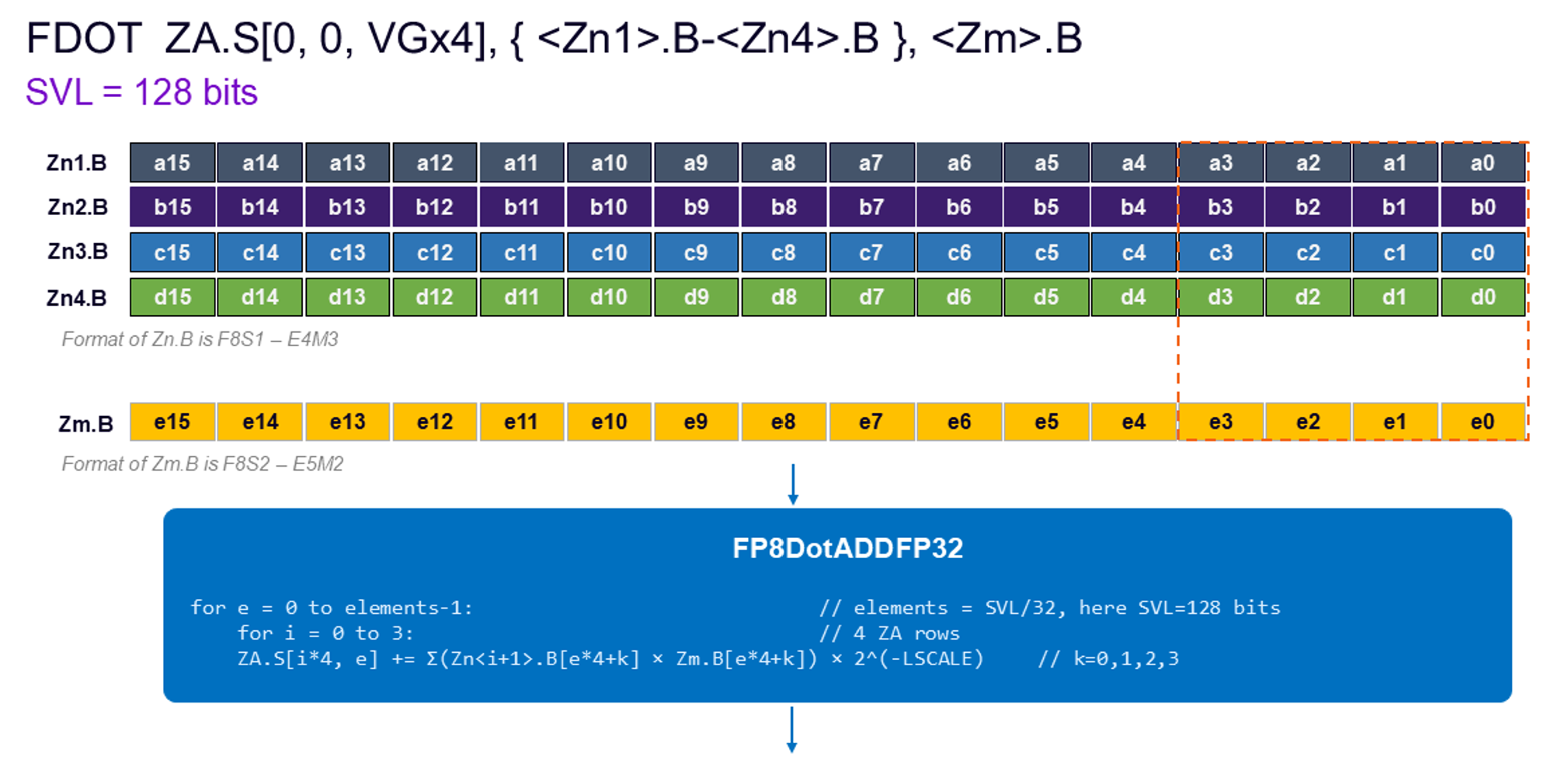
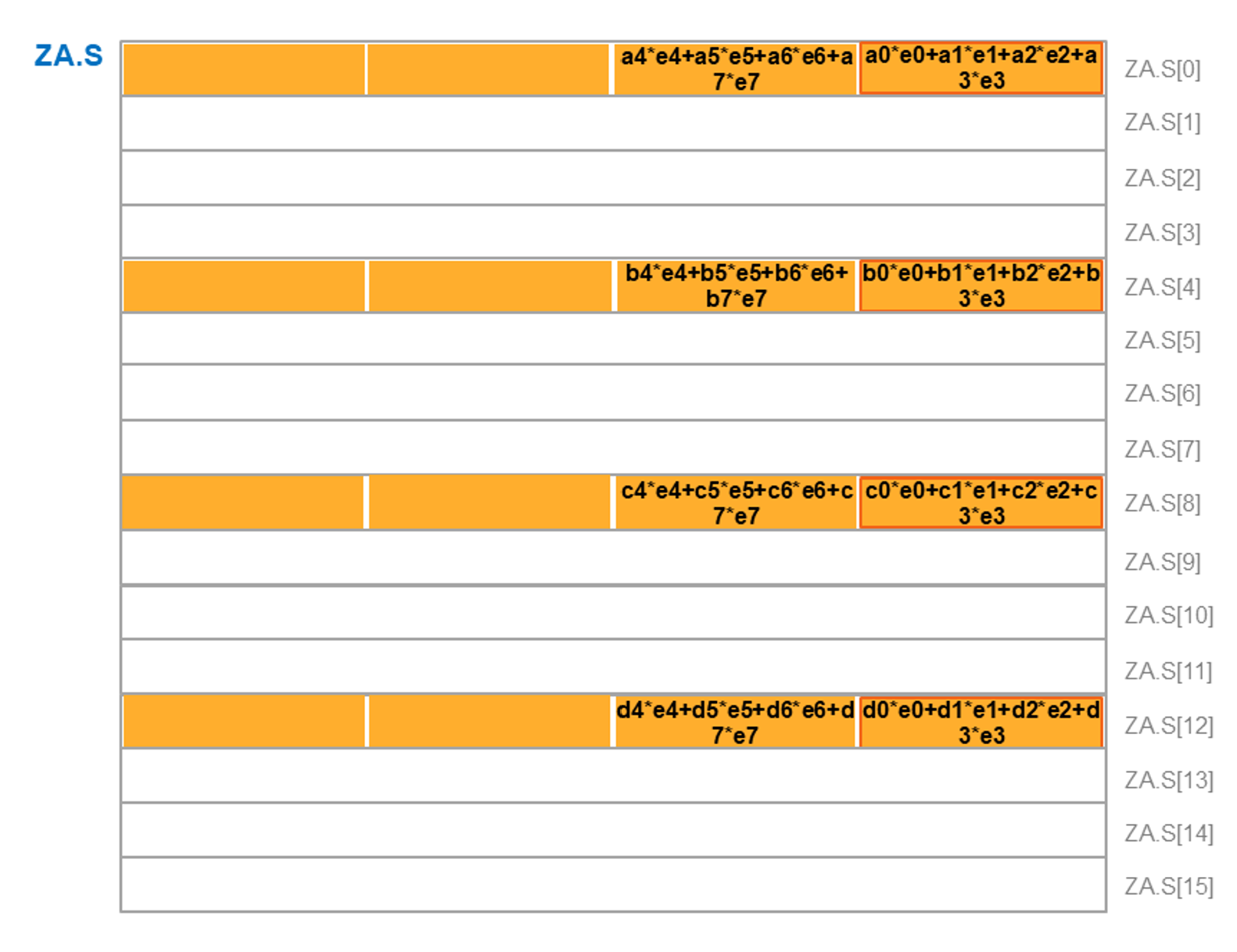
The instruction treats each corresponding 32-bit source element as a packed group of four 8-bit floating-point values, then computes a fused single-precision dot product for each destination lane. The resulting sum-of-products is scaled by 2^-UInt(FPMR.LSCALE) and destructively added to the matching ZA.S element without intermediate rounding, so each selected ZA lane receives one scaled FP32 contribution; VGx2 updates two ZA single-vector groups, while VGx4 updates four ZA single-vector as the example above shows.
Matrix multiply-accumulate instruction
Matrix multiply-accumulate instructions provide a direct way to compute small matrix blocks from the FP8 inputs and accumulate the results into a wider floating-point format. These instructions target the inner loops of matrix multiplication and convolution. Compared with separate multiply-add or dot-product instructions, matrix multiply-accumulate instructions map more closely to matrix computation and help reduce the instruction count.
The workflow of SVE FMMLA instruction is below.
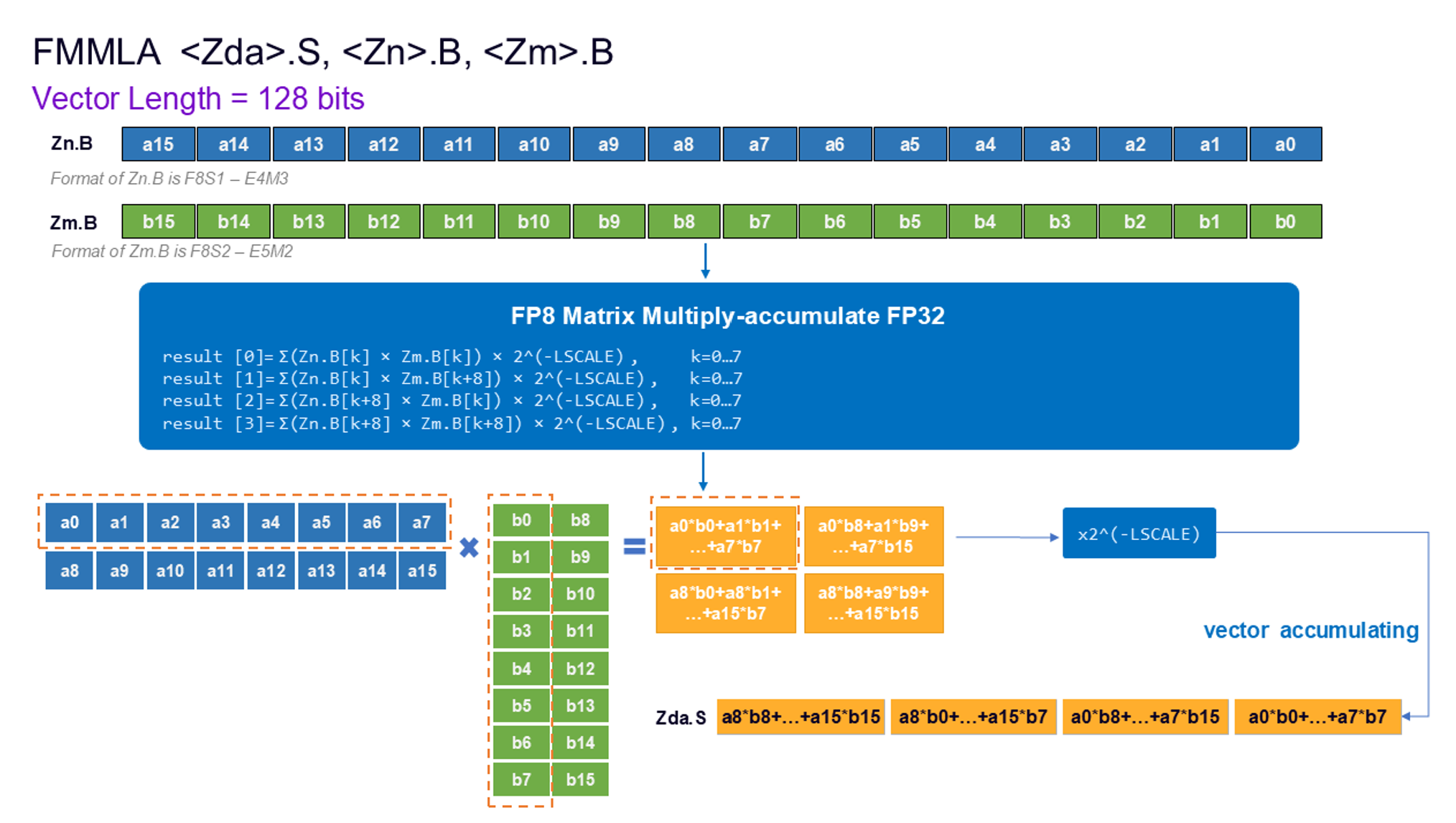
This instruction performs an 8-bit floating-point matrix multiply-accumulate and produces single-precision results. In each 128-bit segment, the first source is treated as a 2*8 matrix and the second source as an 8*2 matrix. Matrix multiplication produces a 2*2 result matrix. Each destination element is an 8-way dot product. The single-precision result is then scaled by 2^-UInt(FPMR.LSCALE) and added to the existing destination value without intermediate rounding.
Outer product instruction with FP8 input
FP8 outer product instructions are SME2 tile-based compute primitives for building high-throughput matrix multiplication kernels. Instead of producing results in regular vector registers, they accumulate FP8 input data directly into the ZA tile using wider FP16 or FP32 elements. This makes them a natural fit for GEMM-style workloads, where blocks of rows and columns are repeatedly combined and accumulated across the K dimension. Compared with vector dot-product instructions, outer-product instructions map more directly to tiled matrix computation and allow the kernel to keep partial results in ZA across multiple iterations. In the Arm ISA, this role is primarily served by FMOPA, which supports FP8 inputs with FP16 or FP32 accumulation in SME2.
Below is the workflow of SME instruction FMOPA ZAda.S, Pn/M, Pm/M, Zn.B, Zm.B.
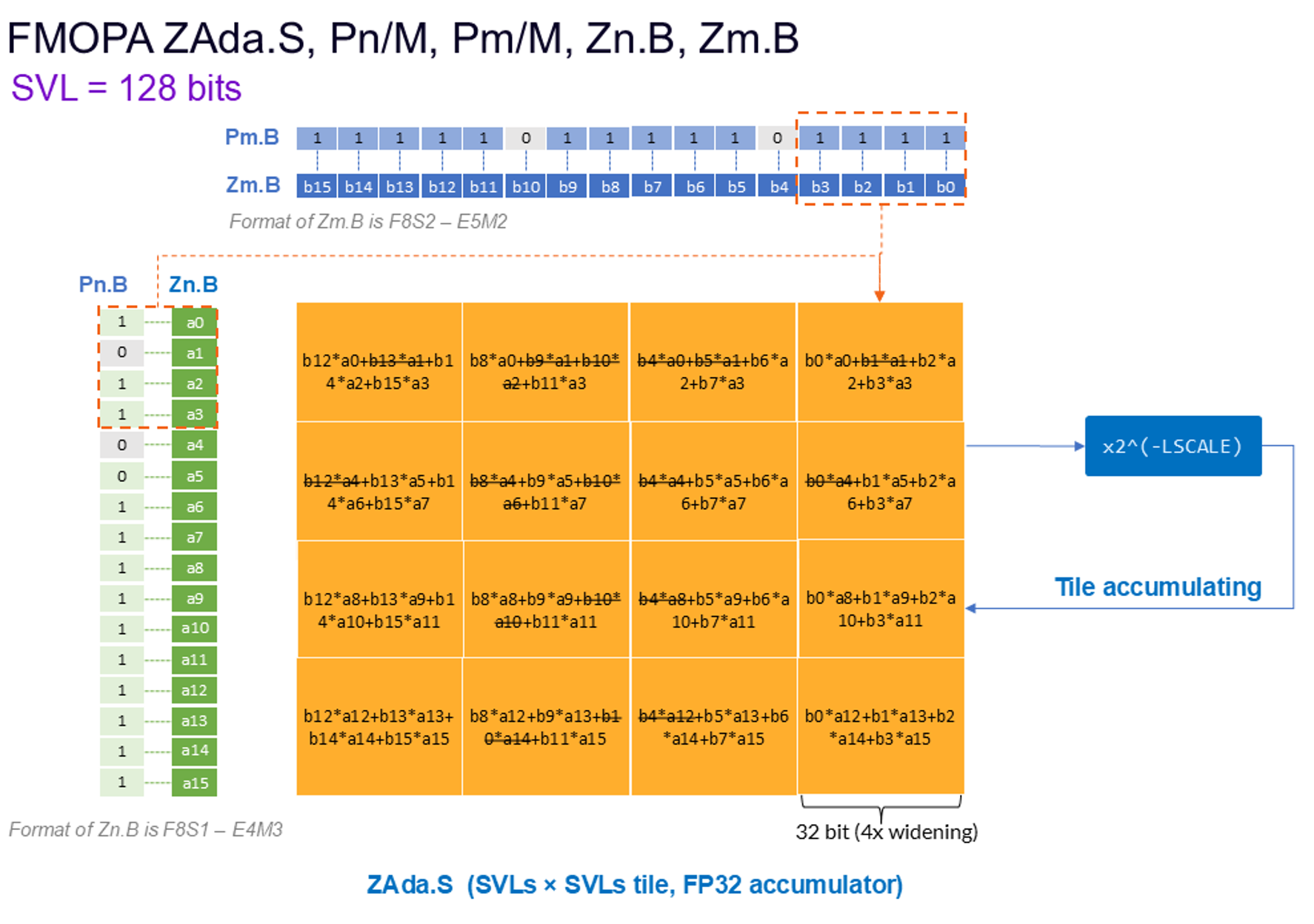
This instruction performs an 8-bit floating-point sum of outer products and accumulates the result into a 32-bit element ZA tile. The first source vector is treated as a SVLsx4 sub-matrix, where each 32-bit container provides four consecutive column elements for one row. The second source vector is treated as a 4 x SVLs sub-matrix, where each 32-bit container provides four consecutive row elements for one column. FP8 inputs are widened to single precision floating point values before multiplication.
The two source vectors are governed by independent predicates. An inactive 8-bit element contributes as 0.0 to the calculation.
The resulting SVLs by SVLs single-precision outer-product sum is scaled by 2^-UInt(FPMR.LSCALE) and then destructively added to the destination ZA tile
Further reading
For more detailed information about FP8, see the Arm Architecture Reference Manual for A-profile architecture and the 2023 architecture extension. For an introduction to Arm FP8 support, including the E4M3 and E5M2 formats, read Part 1: Introduction to Arm FP8 formats:

By Siyu Mou
Re-use is only permitted for informational and non-commercial or personal use only.
