ASL sign language to text using Arm Ethos-U NPU
Edge AI ASL recognition on Arm Ethos-U65 delivers low-latency, offline sign language translation with on-device privacy.
The problem
The World Health Organization estimates that over 70 million deaf people worldwide use sign language as their primary communication method. However, most hearing people do not understand sign language, which creates a persistent communication barrier in healthcare, education, public services, and daily interactions. Existing solutions do not meet these needs and human interpreters are expensive and scarce. The Registry of Interpreters for the Deaf reports severe shortages across the United States. Cloud-based sign language recognition apps require a constant internet connection. They can add 200ms to2s of latency that breaks conversational flow and raise privacy concerns because they stream video of private conversations to remote servers. This challenge requires a sign language recognition system that operates in real time and works fully offline. The system must preserve the privacy for both the signer and the viewer, All within the power and cost constraints of an embedded device.
Why it matters
Accessibility should not depend on the cloud. Sign language recognition is not a novelty feature. It is a critical accessibility tool. A deaf person at a hospital reception, a student in a classroom, or a customer at a service counter should be able to communicate without relying on interpreter availability, internet connectivity, or cloud infrastructure. The Arm Ethos-U NPU enables a full CNN classification model to execute ASL alphabet recognition in under 4 ms. This speed is fast enough to classify each video frame in real time while consuming minimal power.
Comparison: Cloud-based systems vs. Edge AI solution
|
Challenge |
Cloud-Based Systems |
Edge AI Solution |
|
Privacy |
Video of sign language streamed to remote servers |
All processing on-device |
|
Latency |
200ms–2s network round-trip |
~3.5ms NPU inference |
|
Reliability |
Fails without connectivity |
Works 100% offline |
|
Cost |
Ongoing API/subscription fees |
One-time hardware cost |
|
Conversational Flow |
Latency breaks natural pace |
Real-time response |
|
Data Security |
Sensitive video stored on third-party servers |
Never leaves the device |
The solution
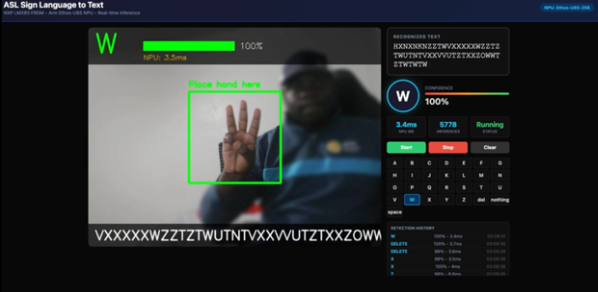
Real-time ASL recognition powered by Arm Ethos-U NPU. This open-source project implements real-time American Sign Language alphabet recognition on the NXP i.MX93 FRDM board with the Arm Ethos-U65 NPU. A USB camera captures hand signs which are classified into 29 distinct ASL alphabet characters. These include 26 letters, space, delete, and nothing with detected letters accumulating into readable text through a live web dashboard.
Key implementation highlights
- Ethos-U NPU acceleration: A CNN classification model runs on the Ethos-U65 NPU via the Ethos-U delegate with INT8 quantization and the Arm Vela compiler. Inference completes in about 3.5ms per frame which enables real-time classification at more than 20 FPS.
- 29-character ASL alphabet with temporal filtering: The system recognizes all 26 ASL alphabet letters and 3 control characters through CNN-based image classification. A–Z appends letters to the text output, space inserts a space, delete removes the last character, and nothing indicates that no action or hand is present).
- Privacy-first architecture: All video processing occurs on-device. No frames are transmitted externally. The system applies a Gaussian blur to the full camera frame except the hand region-of-interest. Faces and surroundings are never visible, including on the live dashboard.
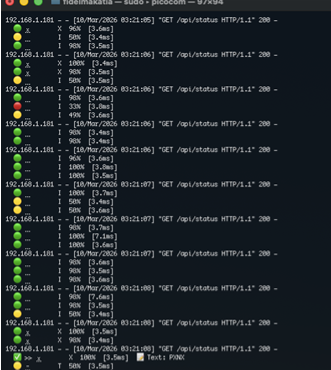
- Live video dashboard: The responsive web interface includes an MJPEG video feed with a blurred background and a sharp ROI box with a detection overlay, real-time text accumulation, alphabet grid highlighting the active letter, and emoji-annotated terminal output . You can access the dashboard from any browser on the local network.
Hardware setup
The Ethos-U65 NPU delivers up to 1 TOPS (Tera Operations Per Second) of neural network inference performance with minimal power consumption. This makes it suitable for always-on accessibility devices that must respond instantly to sign language input.
Hardware specifications
|
Component |
Specification |
|
NPU |
Arm Ethos-U65 (256 MAC units) |
|
Processor |
Arm Cortex-A55 + Cortex-M33 |
|
Board |
NXP i.MX93 FRDM |
|
Camera |
USB Webcam (640x480) |
|
Display |
HDMI Monitor (optional) |
|
Memory |
2GB RAM |
|
Storage |
MicroSD or eMMC |
Arm Ethos-U NPU: the key enabler
The Ethos-U65 NPU is designed for efficient edge neural network inference. For sign language recognition, its advantages are particularly compelling:
- Optimized operator support: The Arm Vela compiler maps TensorFlow Lite operations directly to NPU hardware. Standard Convolutions, Batch Normalization, MaxPooling, and activation functions all execute on the NPU without CPU fallback. The Conv2D and pooling layers that perform most of the computation run entirely on dedicated NPU silicon.
- Memory efficiency: The Ethos-U architecture minimizes data movement between memory and compute units. During inference, the ASL model uses just 158 KiB of SRAM and 359 KiB of DRAM. This fits within the NPU memory constraints.
- Power efficiency: Dedicated NPU hardware consumes under 1 W. This is critical for portable accessibility devices and embedded systems that operate within strict thermal and power budgets.
Model optimization with Vela
The ASL classification model is prepared for Ethos-U execution using Arm's Vela compiler:
vela asl_model_int8.tflite \
    --accelerator-config ethos-u65-256 \
    --system-config Ethos_U65_High_End \
    --memory-mode Dedicated_Sram \
    --config vela.ini \
    --output-dir /tmp/
Vela analyzes the model graph and fuses operations where possible, generating optimized command streams for the NPU. The compilation report confirms high NPU utilization:
Network summary for asl_model_int8
Total SRAM used 158.55 KiB
Total DRAM used 359.20 KiB
NPU operators 43 (89.6%)
CPU operators 5 (10.4%)
Batch Inference time 0.29 ms
The 5 CPU operators include Flatten reshape operations and 2 Fully Connected layers. These operations perform zero-compute data reshaping and matrix multiplication on the Cortex-A55 CPU. All convolution, batch normalizations, and pooling layers run on the NPU.
The --memory-mode Dedicated_Sram flag is required for correct NPU results on the i.MX93 platform. Using Shared_Sram produces models that load and execute without errors but generate incorrect inference output. This failure mode can be difficult to diagnose.
Performance metrics
|
Metric |
Value |
Notes |
|
NPU Inference Time |
~3.5ms |
INT8 on Ethos-U65-256 |
|
NPU Operator Coverage |
89.6% |
43/48 ops on NPU |
|
CPU Operators |
5 |
Flatten reshape + Dense layers |
|
End-to-End Latency |
<50ms |
Camera to text update |
|
Frame Rate |
20+ FPS |
Real-time processing |
|
Model Size |
4.5 MB |
INT8 quantized |
|
NPU Power Consumption |
<1W |
Typical operation |
|
Supported Characters |
29 |
A–Z + space, delete, nothing |
|
Confidence Threshold |
70% |
Configurable per deployment |
|
Temporal Filter |
3 frames |
Consecutive same-letter requirement |
Sign language recognition pipeline
The system follows a multi-stage pipeline optimized for real-time operation on resource-constrained hardware:
Image preprocessing
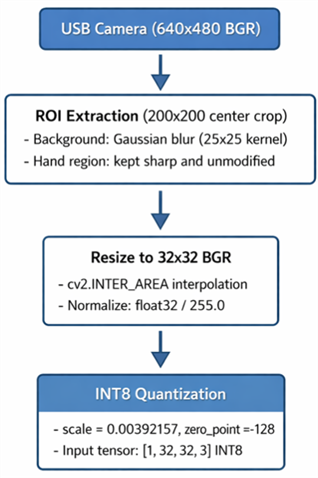
The model was trained with OpenCV cv2.imread(), which reads images in BGR format. The inference pipeline preserves this format. Frames from cv2.VideoCapture are used directly without converting the image to RGB. Consistent image formatting between training and inference is required for correct results. Converting to RGB before inference produces incorrect classifications.
Temporal filtering
Raw frame-by-frame classification can be noisy. Hand transitions, motion blur, and ambiguous poses can produce flickering predictions. The system applies temporal filtering to improve detection stability and reduce unintended inputs:
- A letter is only registered when it appears with at least 70% confidence for 3 consecutive frames.
- The nothing class is never registered because it indicates that no hand is present.
- The space class inserts a space character. The del class removes the last character.
- This filtering reduces false triggers while maintaining responsive detection.
CNN model architecture
The classification model is a standard CNN trained on the Kaggle ASL Alphabet dataset:
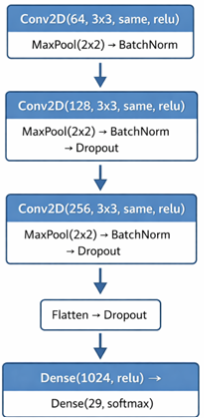
The model accepts 32 x 32 BGR images and outputs a 29-class softmax probability distribution. INT8 post-training quantization was performed from the original Keras HDF5 model. This preserves the correct BatchNorm running statistics. The model was converted with the TFLite's converter using representative dataset calibration. The quantized output is already a valid probability distribution. No additional softmax is applied during inference.
Quick start
- Clone the repository to your Ethos-U enabled board: ASL_to_Text_with_Ethos_U65_NPU.
- Install dependencies: pip3 install numpy opencv-python flask.
- Verify NPU is available: ls /dev/ethosu0.
- Copy the model and compile with Vela using --memory-mode Dedicated_Sram.
- Run the system: python3 -u app.py.
- Open dashboard: http://<board-ip>:5004.
- Position your hand inside the ROI box and sign ASL letters.
Resources
- Arm Ethos-U NPU Documentation
- Vela Compiler for Ethos-U
- TensorFlow Lite for Microcontrollers
- NXP i.MX93 Applications Processor
- ASL Alphabet Dataset (Kaggle)
- Arm NN SDK
- ML Inference Advisor
About the author
Fidel Makatia, PhD, Texas A&M University Distinguished Arm Ambassador, specializes in integrated circuits design and optimized machine learning model deployment on Arm-based hardware. Former Autodesk Software Engineer with deep expertise in hardware IP including SerDes and NPUs, plus extensive embedded systems background.

Re-use is only permitted for informational and non-commercial or personal use only.
