End-to-end int8 Conformer on Arm: Training, quantization, and deployment on Ethos-U85
End-to-end guide to training, quantizing, and deploying an int8 Conformer speech model on Arm, using ExecuTorch and Ethos-U85 for efficient edge AI today.

This blog post is published on behalf of Alexey Vilkin, Alex Tawse, Kshitij Sisodia, and George Gekov
Introduction
Running high-quality speech and audio models at the edge is challenging because of strict constraints on latency, memory, power consumption, and model size. Unlike cloud deployments, edge systems often operate offline. They must preserve user privacy and deliver predictable real-time performance. These constraints apply to use cases such as on-device speech-to-text, voice assistants, voice-controlled IoT devices, industrial interfaces, and always-on audio applications.
Conformer models combine convolutional layers with transformer-based self-attention and deliver state-of-the-art speech recognition accuracy. Efficient execution on embedded hardware requires careful handling of quantization and deployment.
In this blog post, we present an end-to-end workflow to train, quantize, and deploy an int8 Conformer model on Arm embedded platforms. Using ExecuTorch, we quantize the model and deploy it efficiently on the Arm Ethos-U85 NPU.
The Ethos-U85 is a third-generation embedded NPU. It supports transformer architectures at the edge, and scales from 128 to 2,048 MAC units, delivering up to 4 TOPS of compute at 1 GHz. Importantly, the U85 supports int8 weights and int8 or int16 activations, and is about 20% more energy efficient than its predecessor, Ethos-U65.
By demonstrating an int8 Conformer on Ethos-U85, we show that modern transformer-based speech recognition models can run efficiently in the Arm hardware and software ecosystem.
Quick Start
You can deploy the demo today using the Arm ML Embedded Evaluation Kit (MLEK) using Arm’s Fixed Virtual Platform (FVP) emulators.
For a step-by-step guide on how to do this, scroll down to the Run the Demo section.
Model training
For the demo we selected a popular open-source implementation of the Conformer model. Conformer is a transformer-based speech recognition network, suitable for embedded devices and capable of delivering state-of-the-art accuracy. The model did not include pre-trained weights, so we first trained a strong FP32 baseline to serve as the foundation for subsequent quantization and deployment on the Ethos-U85. After inference speed testing, we selected the Conformer-S architecture. It uses a 144-dimensional encoder, 16 layers, 4 attention heads, and a CTC loss function for speech-to-text alignment. The dataset includes the standard LibriSpeech training and evaluation subsets.
We used a SentencePiece tokenizer trained directly on the LibriSpeech dataset. It creates a compact 128-token vocabulary that ensures a simple, self-contained pipeline without external dependencies. The tokenizer uses a unigram model and remains consistent across training and evaluation.
In early experiments, we trained the model with a basic character-level vocabulary consisting only of English letters. This approach worked, but it led to slower convergence and noticeably higher Word Error Rates (WER). Subword units shorten target sequences by merging frequent morphemes and short words. This injects a weak language prior, stabilizes the acoustic-to-token mapping for CTC, and improves both convergence and accuracy.
As part of preprocessing, our pipeline extracts 80-dimensional log-mel spectrograms at 16 kHz. We experimented with several data augmentation methods. Frequency masking, time masking, and random speed perturbations produced consistent WER improvements during training.
During initial experiments, we encountered convergence issues. These issues are common in Conformer-style models. We resolved these issues by aligning batch size with the learning rate schedule. We also applied weight decay to encourage smaller weight values. This often improves downstream int8 quantization accuracy.
With this setup, the model achieved a Word Error Rate of 6.43% on the test-clean subset. We used this result as the FP32 baseline for quantization. At this point, we concluded training as our internal assessment confirmed that this accuracy level met the demo requirements.
There remains room to further leverage the Conformer-S architecture. In future iterations, we plan to expand the dataset beyond LibriSpeech. We also plan to explore more diverse augmentations, as we observed early signs of overfitting near the end of training. For simplicity, our current system uses the raw Conformer output. Adding a lightweight language model, such as an N-gram or small LSTM, could further reduce WER, as reported in several related studies.
During training, dynamic sample sizes were used. On-device inference requires processing fixed-length audio segments. We evaluated several chunking strategies and found that aggregating predictions across overlapping chunks yields the best balance between accuracy and latency. This approach enables real-time inference with smaller audio segments and maintains high recognition quality.
Post-Training Quantization (PTQ)
For the post-training quantization and later deployment of the model, we chose ExecuTorch. The Arm backend in ExecuTorch already supports hundreds of models, including Conformer. In the previous section, you learned how we trained the model. To deploy the model with ExecuTorch, we follow a few simple steps:
- First, export the model to the ATen operator set using the torch.export.export API.
- Second, to target the Ethos-U85 NPU, use the Ethos-U quantizer in ExecuTorch to quantize the model. Define the Ethos-U quantizer as follows:
compile_spec = EthosUCompileSpec( target="ethos-u85-256", system_config="Ethos_U85_SYS_Flash_High", memory_mode="Shared_Sram", extra_flags=["--output-format=raw", "--debug-force-regor"], ) quantizer = EthosUQuantizer(compile_spec) config = get_symmetric_quantization_config(is_per_channel=True) quantizer.set_global(config) - Thirdly, we use per-channel quantization to achieve good int8 accuracy.
quantized_graph_module = prepare_pt2e(graph_module, quantizer) # Annotate the graph with observers print("Calibrating...") for feats, feat_lens, *_ in calibration_loader: quantized_graph_module(feats, feat_lens) # Pass true data, similar to what the model will see when running inference quantized_graph_module = convert_pt2e(quantized_graph_module) - Calibrate the model. Calibration selects optimal quantization parameters for each layer as we pass from the FP32 datatype to int8. In ExecuTorch, follow these steps to calibrate the model:
partitioner = EthosUPartitioner(compile_spec) edge_program_manager = to_edge_transform_and_lower( quant_exported_program, partitioner=[partitioner], compile_config=EdgeCompileConfig( _check_ir_validity=False, ), ) - We then call to_edge_transform_and_lower. The to_edge_transform_and_lower step lowers the neural network to TOSA and compiles the model.
- Finally, we transform the program to the ExecuTorch backend and save the pte file.
executorch_program_manager = edge_program_manager.to_executorch(
    config=ExecutorchBackendConfig(extract_delegate_segments=False)
)

save_pte_program(
    executorch_program_manager, f"conformer_quantized_{npu_variant}_{memory_mode}.pte"
)
The full code for the post-training quantization with ExecuTorch is available here. You can also access a quantized variant of the workload on Hugging Face if you do not want to perform the post-training quantization.
This produces a pte file that we save to the external memory of the SoC. The pte file contains the weights, biases, and the command stream for the NPU. The Ethos-U reads the pte file and performs inference autonomously. To learn how you can deploy the model quickly on device, see the next section.
Deployment on Arm
The Arm ML Embedded Evaluation Kit (MLEK) project is the primary tool for deployment and evaluation on the Arm Ethos-U85.
ExecuTorch integration enables efficient execution of PyTorch models on embedded targets. For more information about this support in the Arm backend for ExecuTorch, see the Arm blog post on ExecuTorch at the edge.
The figure below shows the updated software stack enabling ExecuTorch runtime within MLEK.
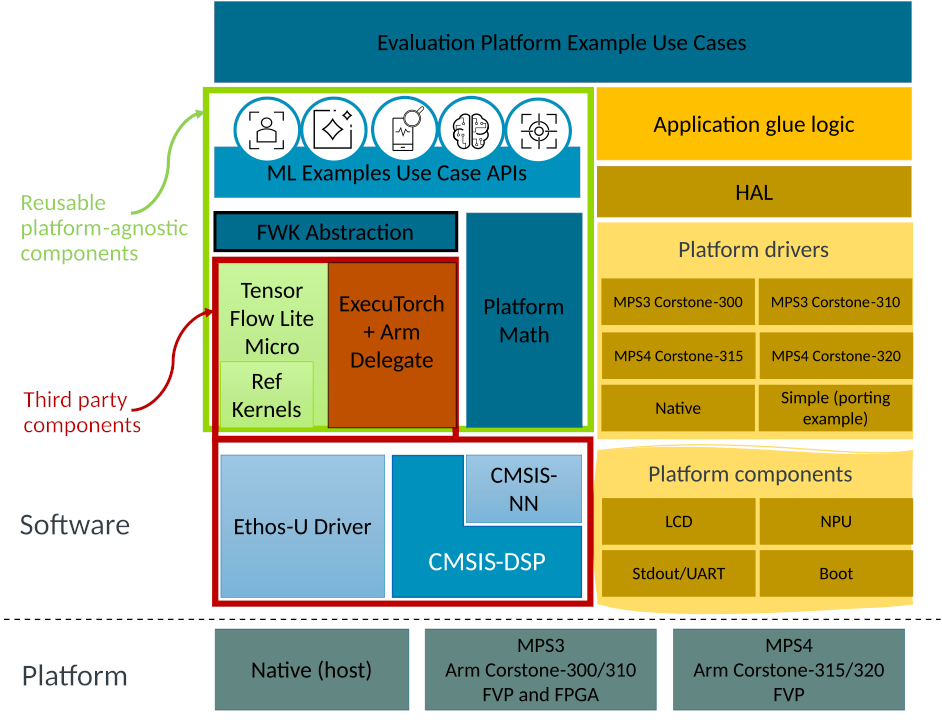
Figure 1: Updated MLEK software architecture showing ExecuTorch integration alongside TensorFlow Lite Micro under a shared abstraction layer. Reusable platform-agnostic APIs enable example use cases to run across frameworks and targets.
Support for ExecuTorch 1.0.0 was added to the MLEK in the 25.12 release. For our Conformer deployment, we re-used an existing Automatic Speech Recognition (ASR) example and adapted it to run the quantized Conformer model end-to-end on the Ethos-U85. The next section describes this integration in more detail.
PyTorch Conference 2025 demo
We showcased a full end-to-end automatic speech recognition (ASR) demo using Conformer and ExecuTorch at the PyTorch Conference 2025.
The demo application was developed as part of the Arm ML-Embedded-Evaluation-Kit (MLEK) project. We updated the existing ASR application to include pre-processing that matches the PyTorch Mel Spectrogram implementation. We also added post-processing to decode the Conformer output tokens using vocabulary labels from the SentencePiece tokenizer used for training Conformer.
As we built the demo application, we shared the implementation with our partner organization Alif. They deployed the demo onto their new Alif Ensemble E8 evaluation board. This meant at the PyTorch Conference we were able to show the first example of Arm Ethos-U85 silicon running a transformer-based model using PyTorch and ExecuTorch.
Developers who want to run the demo today can use the ASR use case in the Arm MLEK project for Corstone-3xx targets. You can also deploy the demo on the Alif Ensemble E8 development board.
Run the demo on Corstone-320 FVP
Arm provides an example application for running a pre-trained Conformer model on Ethos-U85 using the Arm Corstone-320 FVP (Fixed Virtual Platform). Follow the steps to build and run the application:
- Ensure prerequisites are installed:
- Arm Corstone-320 FVP: https://developer.arm.com/Tools%20and%20Software/Fixed%20Virtual%20Platforms/IoT%20FVPs
- Arm GNU Toolchain for AArch32 bare-metal target: https://developer.arm.com/downloads/-/arm-gnu-toolchain-downloads
- Clone and initialise the Arm ML Embedded Evaluation Kit (MLEK) project:
git clone https://gitlab.arm.com/artificial-intelligence/ethos-u/ml-embedded-evaluation-kit.git cd ml-embedded-evaluation-kit git checkout 9e9957c6 git submodule update --init --recursive - Build the project for Ethos-U85:
python set_up_default_resources.py --parallel $(nproc) --ml-framework executorch --use-case asr cmake -B build --preset mps4-320-gcc -DML_FRAMEWORK="ExecuTorch" -DUSE_CASE_BUILD="asr" -DETHOS_U_NPU_TIMING_ADAPTER_ENABLED="OFF" cmake --build build -j $(nproc) - Run the ASR application on Corstone-320 FVP:
~/FVP_Corstone_SSE-320/models/Linux64_GCC-9.3/FVP_Corstone_SSE-320 \
  -a build/bin/ethos-u-asr.axf \
  -C mps4_board.subsystem.ethosu.extra_args="--fast"
The application will begin to detect speech in a set of sample audio clips. While inference is running, visual output can be seen showing the input audio waveform and the generated mel spectrogram. The mel spectrogram data is padded to an audio length of 15 seconds and used as input to the Conformer model.
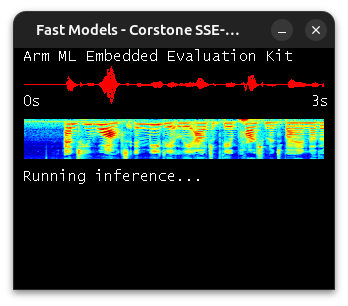
Conformer will be used to detect speech in example audio clips bundled with the application. In the console we will see which specific audio files are being used as input to the model, as well as information about the input/output tensor shapes and memory utilisation:
INFO - Number of input tensors:  2
INFO - Tensor: 480000 bytes; 120000 elements
INFO - 	Shape:	[1, 1500, 80]
INFO - 	Type:	fp32
INFO - Tensor: 4 bytes; 1 elements
INFO - 	Shape:	[1]
INFO - 	Type:	int32
INFO - Number of output tensors: 2
INFO - Tensor: 192984 bytes; 48246 elements
INFO - 	Shape:	[1, 374, 129]
INFO - 	Type:	fp32
INFO - Tensor: 4 bytes; 1 elements
INFO - 	Shape:	[1]
INFO - 	Type:	int32
INFO - Total memory usage:
INFO - 	Method memory: Used: 1080898; Peak: 1080898; Available: 2097152
INFO - 	Temp memory: Used: 0; Peak: 117; Available: 33554432
INFO - Model initialisation complete
INFO - Initialising audio interface: Static sample audio files
INFO - Using sample audio: another_door.wav
After a short amount of time, we will see the decoded output in the console:
INFO - Decoded output: and he walked immediately out of the apartment by another doorThe source audio files can be found in resources/asr/samples – listen to these and compare with the decoded text printed in the console.
We also see reported performance figures, but for now these should be disregarded. Measuring performance accurately is covered in the next section.
Performance
In the previous section, we ran the application on FVP in fast mode. This mode helps assess functionality, but the reported performance numbers are not accurate. To obtain accurate performance figures, build and run the application again without fast mode. This process can take a long time to complete, possibly more than 1 hour.
Follow these steps to build and run the application with accurate performance figures:
# Build
rm -rf build
python set_up_default_resources.py --parallel $(nproc) --ml-framework executorch --use-case asr
cmake -B build --preset mps4-320-gcc -DML_FRAMEWORK="ExecuTorch" -DUSE_CASE_BUILD="asr"
cmake --build build -j $(nproc)

# Run
~/FVP_Corstone_SSE-320/models/Linux64_GCC-9.3/FVP_Corstone_SSE-320 \
  -a build/bin/ethos-u-asr.axf
If we build and run the application with the above steps, we see performance figures similar to the following:
INFO - NPU ACTIVE: 206370332 cycles
INFO - NPU ETHOSU_PMU_SRAM_RD_DATA_BEAT_RECEIVED: 13858306 beats
INFO - NPU ETHOSU_PMU_SRAM_WR_DATA_BEAT_WRITTEN: 7968438 beats
INFO - NPU ETHOSU_PMU_EXT_RD_DATA_BEAT_RECEIVED: 26978241 beats
INFO - NPU ETHOSU_PMU_EXT_WR_DATA_BEAT_WRITTEN: 18985466 beats
INFO - NPU IDLE: 724 cycles
INFO - NPU TOTAL: 206371056 cycles
The output reports several performance metrics. For example, NPU ACTIVE measures the number of clock cycles used by Ethos-U85 to complete the Conformer model inference. The Conformer model we are using has a fixed input size of 15 seconds of audio. If the system ran in hardware at 1.0 GHz, the data indicates that inference would complete in 0.206s. The MLEK project documentation describes the performance counters, including memory bandwidth and latency configuration.
Conclusion and next steps
In this blog post, we demonstrated an end-to-end workflow for train, quantize, and deploy an int8 Conformer-based speech recognition model on Arm embedded platforms. Using ExecuTorch and the Arm Ethos-U85 NPU, we showed that transformer-based speech models run efficiently at the edge while meeting strict performance and energy constraints.
This work shows how the Arm hardware and software ecosystem enables developers to bring state-of-the-art speech and audio models to embedded devices without sacrificing efficiency or accuracy.
For next steps, we suggest learning more about deploying optimized AI workloads with ExecuTorch on Arm. We also suggest experimenting with the ML Embedded Evaluation Kit (MLEK) and exploring the Ethos-U NPU family to optimize edge AI deployments.

Re-use is only permitted for informational and non-commercial or personal use only.
