From simulation to real Wi-Fi: Building distributed ROS 2 robotics systems on Arm
Move ROS 2 robotics from simulation to real Wi-Fi on Arm using Zenoh to keep sensor data complete and usable across devices and constrained wireless links
By Odin Shen

This blog post is co-authored by Odin Shen, Kwashie Andoh, and Habib Ogunbanwo
A ROS 2 robotics system that works on a development workstation will not necessarily behave the same way on a real network. On a single host or high-speed wired connection, RViz can display maps, Navigation2 can plan routes, and camera, LiDAR, and point-cloud topics can update continuously. Once the robot and control station are distributed across physical devices and connected over Wi-Fi, bandwidth, latency, and packet loss determine whether the receiver gets complete and usable data.
Across three Arm Learning Paths, we built a practical workflow that moves from ROS 2 simulation to distributed deployment and wireless traffic optimization. The goal is not merely to make ROS 2 nodes discover one another. It is to ensure that important sensor data remains useful on the network where the robot actually operates.
Establish a reproducible ROS 2 baseline
Before investigating distributed communication, you need a known-good robotics workload that behaves consistently and can be measured repeatedly.
The first Learning Path establishes the robotics workload inside the robot container on an Arm server. That container runs ROS 2 Jazzy, Gazebo, Navigation2, and the sensor publishers used throughout the series, with ROS 2 graph and message communication provided by rmw_zenoh. At this stage, the focus is to validate the robot workload and establish a repeatable baseline before introducing a remote operator station.
The environment generates representative robotics traffic, including camera images, laser scans, point clouds, maps, transforms, and navigation data. Developers can verify that the simulation, navigation stack, and sensor topics work correctly before reusing the same workload for distributed deployment and network experiments.
This baseline matters. If the system is already unstable locally, moving it onto Wi-Fi makes it difficult to determine whether a problem comes from the ROS 2 application, simulation rate, device performance, or the network itself.
Follow Build a ROS 2 and Zenoh simulation environment on an Arm server to reproduce the baseline environment.
Distribute ROS 2 across Arm devices
With the baseline established, the next step is to split the ROS 2 system across separate execution environments.
The second Learning Path turns the control container into the remote operator station. The robot container continues to run the Gazebo simulation, Navigation2, and a Zenoh router, while the control container connects to that router in client mode and runs RViz remotely. A Raspberry Pi then joins the same ROS 2 system as a separate physical edge device over the network through another client session.
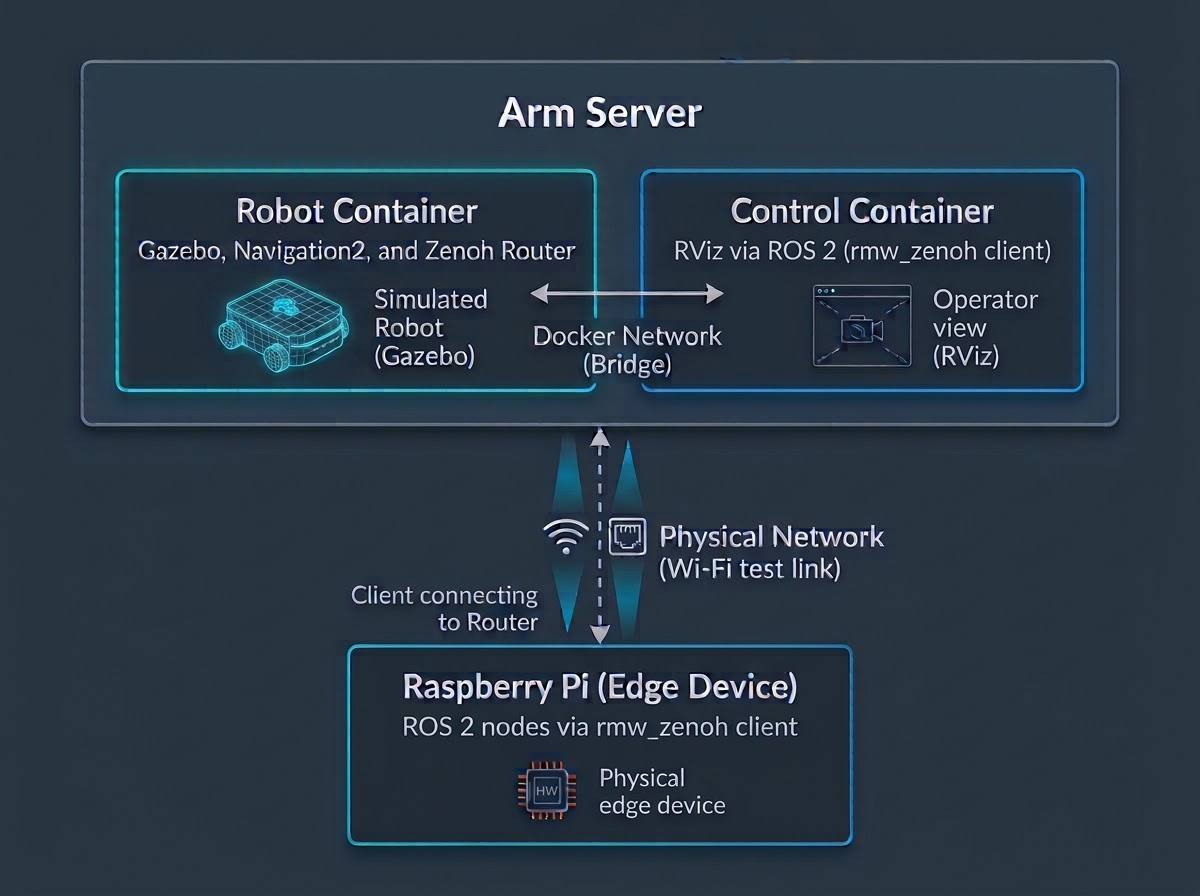
This router-client topology requires each remote endpoint to establish only an outbound connection to the router. This approach is easier to control across container network namespaces, NAT boundaries, and firewalls. Remote nodes do not need direct connection to every other node.
The implementation uses native rmw_zenoh, so ROS 2 nodes communicate directly over Zenoh without a zenoh-bridge-ros2dds translation layer between DDS and Zenoh. Cross-device sessions are explicitly configured in client mode and connect to a designated Zenoh router. This avoids relying on traditional DDS multicast discovery across Wi-Fi.
This topology is a deployment choice, not a limitation of rmw_zenoh. Other systems can use peer mode, multiple routers, or a combination of topologies to match their network boundaries.
ROS 2 applications continue to use their existing topics, services, actions, and tools. Developers do not need to rewrite ROS 2 nodes as native Zenoh applications, and operators can continue to work with the ros2 CLI and RViz.
There is an important distinction when validating a distributed ROS 2 system:
ros2 topic listThis command confirms graph discovery, but it does not prove that message data is arriving. Data delivery must be measured separately:
ros2 topic hz /scan
ros2 topic hz /camera/image_raw
A stable, non-zero receive rate confirms that messages are crossing the network boundary. The Learning Path Distribute a ROS 2 robotic system across Arm devices with Zenoh demonstrates this architecture. It also compares ROS namespaces, ROS_DOMAIN_ID, and Zenoh namespaces for isolating multiple robots.
Connectivity does not guarantee usable data
At this point, the system appears ready: the Raspberry Pi can see the ROS graph, the operator can launch RViz, and messages can travel in both directions between the robot and control station.
The real constraint appears when high-volume sensor traffic moves onto the wireless link.
The test environment produces three ROS 2 streams with very different traffic profiles:
|
ROS 2 topic |
Purpose |
Approximate source traffic |
|
/scan |
Navigation and obstacle awareness |
0.4 Mbps |
|
/camera/image_raw |
Visual monitoring and perception |
85 Mbps |
|
/camera/points |
3D perception |
700 Mbps |
Together, these streams generate close to 800 Mbps. A constrained 2.4 GHz Wi-Fi connection might provide only 50 to 100 Mbps of usable throughput. In the emulated experiment, we reduced the available bandwidth to 25 Mbps to make the effects of each policy easier to observe.
Without traffic tuning, the small /scan messages generally continue to arrive, while the camera frame rate falls and becomes irregular. A single point-cloud frame is approximately 7.37 MB. When these messages are sent over a link operating far below the source data rate, they must be transferred in segments. The default congestion behavior can discard data before a complete frame reaches the receiver.
The point-cloud connection can therefore consume bandwidth while the ROS 2 receiver gets no complete, usable message.
This exposes an important distinction: a busy network is not necessarily delivering useful robot data. One complete point-cloud frame at a lower rate can be more valuable than fragments from several frames that the receiver cannot reconstruct.
Measure under repeatable network constraints
Changing policies directly on a live Wi-Fi connection makes it difficult to separate the effects of the configuration from temporary radio interference. The third Learning Path therefore starts with Linux traffic control (tc) and the network emulator (netem) to create a repeatable constrained link between containers on the same Arm server.
The emulated link can introduce a bandwidth cap, latency variation, packet loss, reordering, duplication, and corruption. After every Zenoh policy change, the same measurements are repeated:
- Receive rate and timing regularity for /scan.
- Receive rate and jitter for /camera/image_raw.
- Average bandwidth and complete message size for /camera/points.
- Network traffic transmitted by the Zenoh router.
This process replaces subjective observations such as "the stream looks smoother" with results that can be compared across configurations. After the controlled experiments, the same measurements are repeated with a Raspberry Pi over real Wi-Fi to validate that the conclusions extend beyond the emulator.
Results over real Wi-Fi
The real Wi-Fi measurements show why link utilization alone is a poor measure of success. Different policies used similar or lower bandwidth but delivered very different amounts of complete ROS 2 data.
|
Configuration |
Camera image rate |
Point-cloud delivery |
Link traffic |
|
Untuned |
4.2 Hz |
No complete frame |
About 62 Mbps, with substantial unusable traffic |
|
Compression and access control |
11.89 Hz |
Blocked intentionally |
About 29 Mbps, all useful |
|
Compression and QoS |
11.88 Hz |
About one complete frame per second |
About 63 Mbps, all useful |
The comparison demonstrates the key result: similar link rates can produce very different amounts of usable robot data. The best policy depends on whether the remote application needs a full-rate camera stream, complete point-cloud frames, or neither.
Select a policy based on robot requirements
There is no single wireless configuration that is correct for every robot. The appropriate policy depends on which data the remote application actually needs.
Compression reduces the bandwidth consumed by camera images and other compressible data, but it does not guarantee that very large messages will arrive intact. Access control can prevent an unnecessary point-cloud topic from leaving the router while allowing local robot nodes to continue using it. Downsampling limits the forwarded camera rate, trading frame rate for more regular delivery.
When the remote application requires complete point-cloud frames, Zenoh QoS, priority, and congestion control can determine how the available bandwidth is used. In the experiment, /scan and /map are assigned interactive_high, camera images use data_low, and the point cloud uses background.
A single point-cloud frame, approximately 7.37 MB, is serialized into hundreds of transport segments. Standard drop-tail policies can randomly drop packets across different competing frames. This can make the affected frames undecodable at the receiver. For large payloads, Zenoh's block_first congestion control guarantees message integrity by allowing a frame already in transit to finish transmitting before shedding subsequent frames under network saturation. The delivered point-cloud rate is lower, but the receiver consistently gets complete and usable frames.
|
Deployment requirement |
Zenoh mechanism |
Configuration used in the experiment |
|
The remote station needs camera images and laser scans, but not point clouds |
Compression and access control |
Block /camera/points at the router with a key expression so unnecessary data does not consume the link |
|
The camera stream still exceeds sustained link capacity |
Downsampling and compression |
Limit the forwarded frame rate to produce a lower but more stable stream |
|
The remote station must receive complete point-cloud frames |
QoS and congestion control |
Assign point clouds to background and use block_first for large payloads so an in-progress frame can complete |
|
Navigation data requires preferential delivery |
Priority queuing |
Assign /scan and /map to interactive_high, and camera traffic to data_low |
These policies do not increase the physical capacity of the Wi-Fi link. They determine which ROS 2 messages consume that capacity and whether the receiver gets data that is complete, timely, and useful for the application.
Follow Tune Zenoh for ROS 2 traffic over wireless networks to reproduce the complete experiment and compare compression, access control, downsampling, and QoS over both emulated and real Wi-Fi links.
Move from simulation to deployment
Together, the three Learning Paths form an end-to-end workflow: establish a reproducible ROS 2 workload on an Arm server, distribute the system across containers and Raspberry Pi, and then shape sensor traffic according to the capacity of the real wireless network.
The objective is not to force every byte of robot data across the link. It is to deliver the data that matters in a form the remote application can use. When ROS 2 nodes discover one another, the distributed system is only beginning to work. It becomes deployment-ready when critical messages remain complete, timely, and usable on the network where the robot actually operates.

By Odin Shen
Re-use is only permitted for informational and non-commercial or personal use only.
