Building Img2LaTeX: the Arm SME2 speedup already on the phone
Discover how enabling Arm SME2 in Img2LaTeX reduced time to first token by 41% on iPhone, accelerating private, on-device AI using Gemma 3n and XNNPACK

Welcome to Arm Project Spotlight, a series celebrating developers who are building innovative projects with Arm technology and sharing the challenges, discoveries, and lessons behind their work.
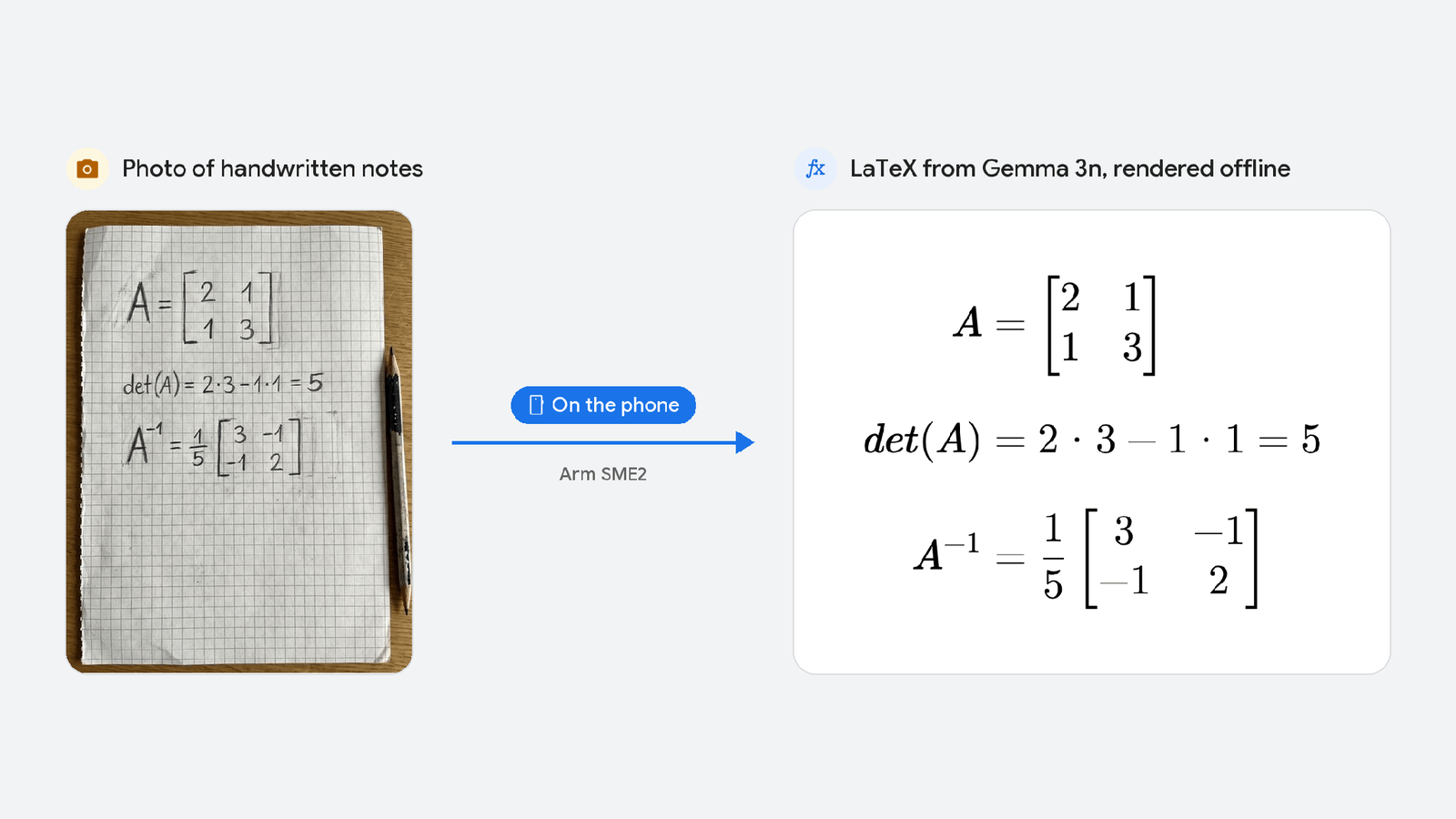
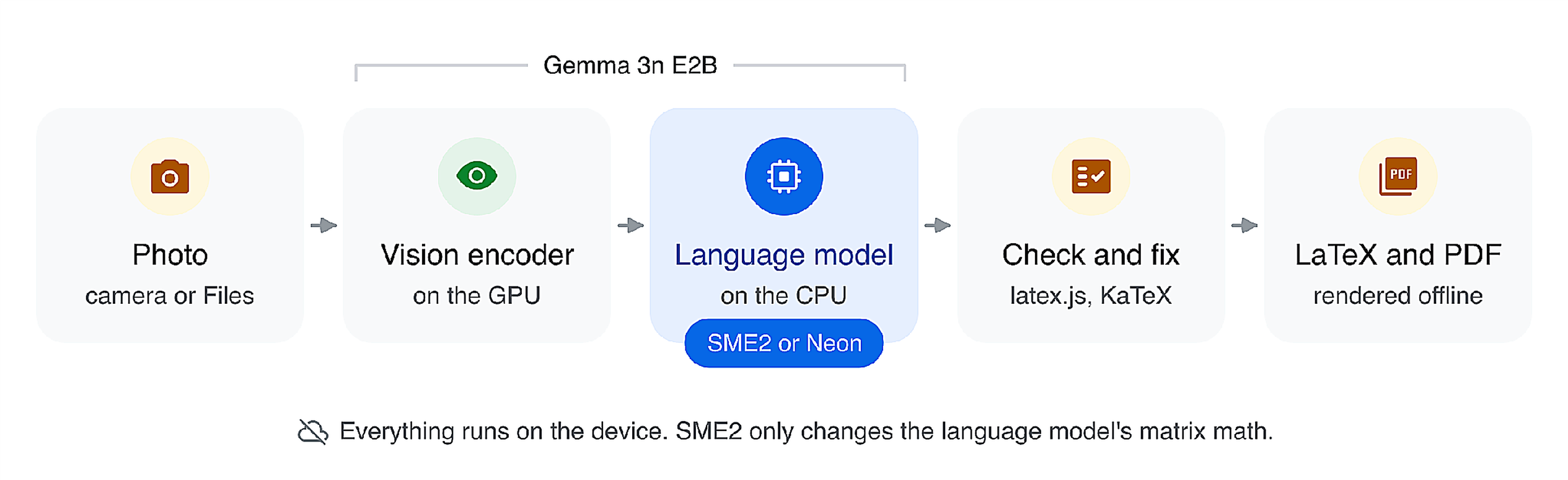
I wanted people to photograph a page of handwritten math and get LaTeX back clean without their notes ever touching a server. Img2LaTeX does that. Google’s Gemma 3n vision-language model runs entirely on the iPhone.
It worked, but it was also slow in the one place people would notice most. You would tap Generate and watch a spinner for about five seconds before the first word of LaTeX showed up.
The fix had been sitting on the phone the whole time. The AI runtime inside my app already included Arm SME2 kernels: they just were not switched on. Turning them on cut that wait by 41% on an iPhone 16 Pro Max and by 44% on an M4 MacBook Air. Here is how I found them, the two traps I hit turning them on, and why the first word gained the most.
Why it must run on the phone
The photos people take are their own notes and homework, and I did not want any of them leaving the device. There is no server, no account and no tracking. After a one-time model download, Img2LaTeX works in Airplane Mode. The privacy guarantee is not a setting you have to trust; it is how the app is built.
That decision moves the hardest part of the problem onto the phone's CPU. Gemma 3n E2B has about two billion effective parameters, most of them stored as Int4 weights, and almost everything it does is matrix multiplication. Every token it reads or writes goes through those two billion parameters: roughly two billion multiply-adds per token.
Before it writes a single word, it also must read the whole prompt. That step is called prefill. The prompt is my instructions plus 256 tokens that describe the photo: 416 tokens in all. At two billion multiply-adds each, that is roughly 800 billion multiply-adds before the first word appears. Add encoding the photo and you get the five seconds.
What SME2 changes
Arm's Scalable Matrix Extension (SME), part of Armv9-A, and its successor SME2 put dedicated matrix hardware inside the CPU. To understand how this speeds up the matrix multiplications in Gemma, it helps to look at an operation called the outer product.
A dot product takes two vectors and gives you one number. An outer product takes the same two vectors and gives you a whole matrix: every element of one times every element of the other.
SME's FMOPA instruction computes that matrix and accumulates the results in ZA, a special two-dimensional storage area inside the CPU. ZA is organized into tiles, smaller matrix-shaped blocks that instructions can operate on directly.
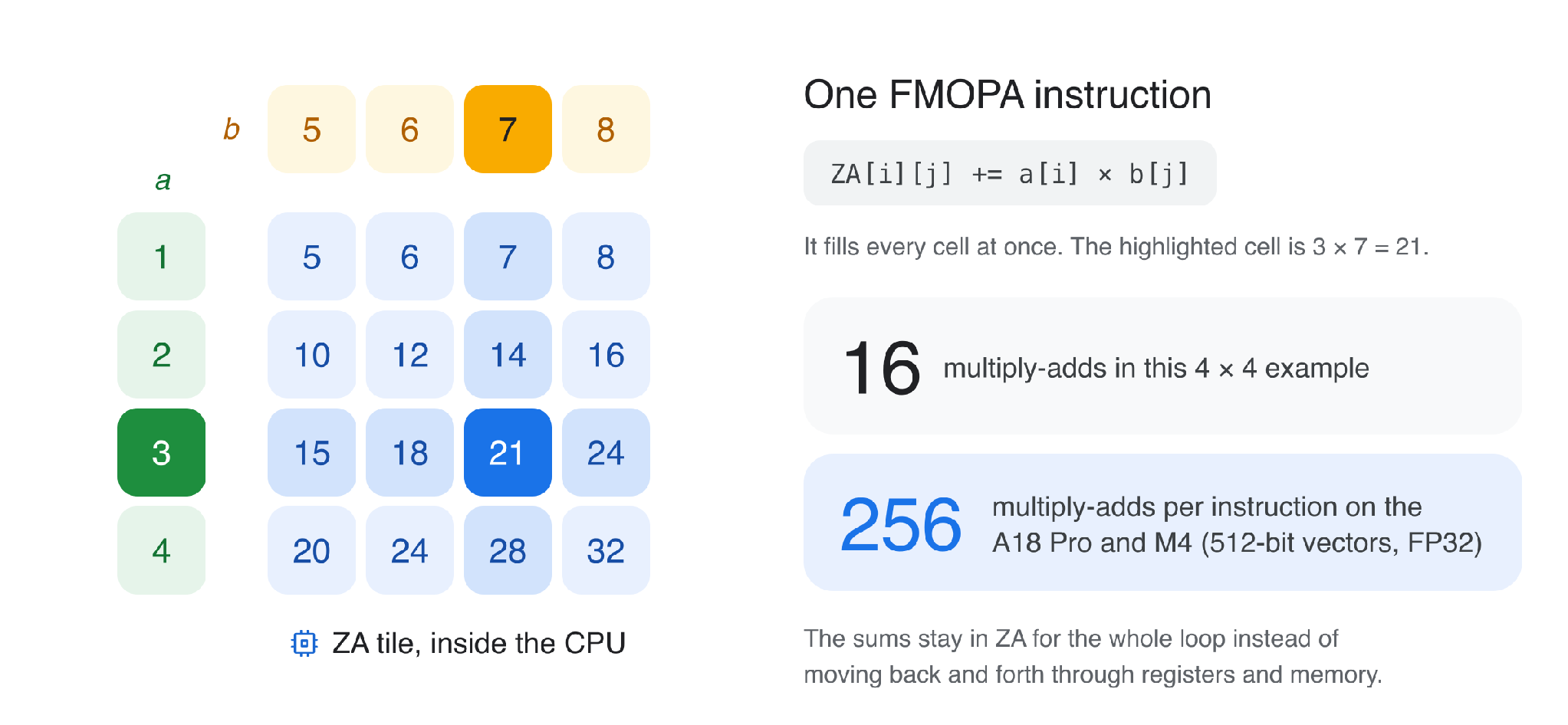
The diagram shows a small 4 × 4 tile, where one FMOPA instruction performs 16 multiply-adds. On real hardware, the tile size depends on the CPU's streaming vector length. The A18 Pro and M4 both use 512-bit streaming vectors, allowing one FP32 FMOPA instruction to update a 16 × 16 tile: 256 multiply-adds in a single instruction. The running sums stay in ZA throughout the loop instead of moving repeatedly between registers and memory.
The rest of SME2 builds around that idea. Streaming SVE mode is where this code runs. Multi-vector instructions work on several vectors at once. Predicate-as-counter cuts the instructions spent on loop counting. Lookup-table instructions unpack low-bit data like Int4 weights.
I did not have to write any of it. Img2LaTeX runs Gemma through Google's MediaPipe, MediaPipe calls XNNPACK, and XNNPACK calls Arm KleidiAI, a library of hand-tuned kernels with SME2 versions built in. In theory, a phone with SME2 gets the speedup for free.
The profile that did not add up
With SME2 support already built into the runtime, I thought the app was taking advantage of it. But when I went to profile the actual execution, I found something unexpected: none of the SME2 kernels were running.
Instruments showed that every matrix multiply in the language model was running on Neon, Arm's 128-bit vector instructions. The A18 Pro supports SME2, and the MediaPipe library inside my app contained 307 symbols with "sme2" in their names, including Arm KleidiAI's kernels. Yet none of them were being used.
The culprit was one decision XNNPACK makes when it first starts: use SME2 only if the CPU supports it and a default flag is on. In the XNNPACK inside my copy of MediaPipe Tasks GenAI (0.10.24), that flag was off. The XNNPACK team had switched the default off in June 2025, "until we can test it reliably and continuously", and switched it back on at the end of July. My app landed on the wrong side of that change, and a phone with a matrix unit ran the model on Neon.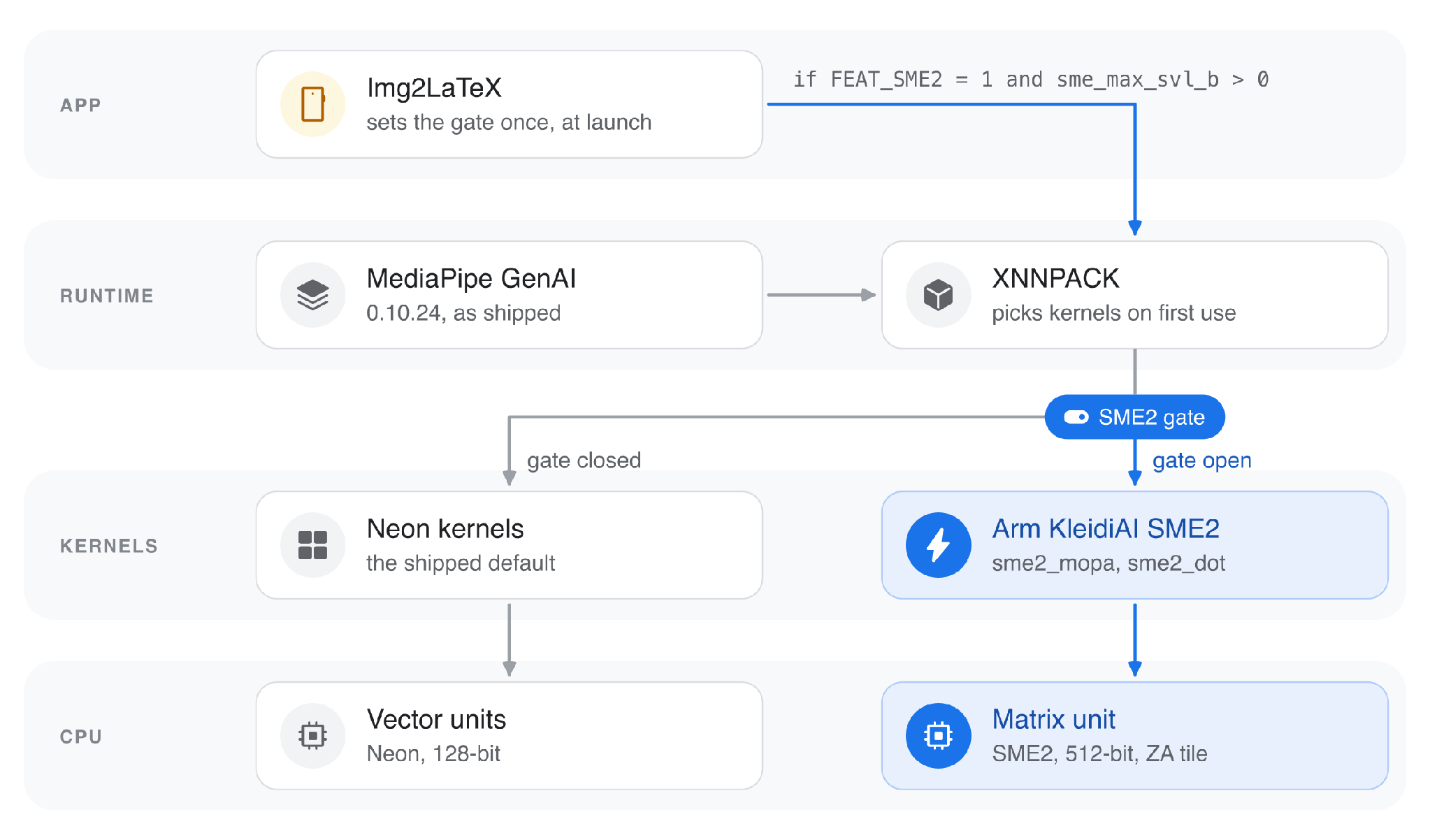
Flipping the switch and the two ways it bit me
That version of XNNPACK still has an internal setter for the flag, and the setter only works before XNNPACK initializes. So Img2LaTeX calls it once at launch, before any model loads, behind a check:
// Before any model is loaded. XNNPACK reads this once, on first init.
int sme2_usable(void) {
  int sme2 = 0, svl = 0;
  size_t len = sizeof(int);
  sysctlbyname("hw.optional.arm.FEAT_SME2", &sme2, &len, NULL, 0);
  len = sizeof(int);
  sysctlbyname("hw.optional.arm.sme_max_svl_b", &svl, &len, NULL, 0);
  return sme2 && svl > 0;   // the CPU has SME2 AND the OS lets apps run it
}
xnn_internal_set_arm_sme2(sme2_usable() && user_setting_on);The first trap was the OS. Some iOS versions report SME2 support without allowing apps to execute SME instructions. Checking FEAT_SME2 alone can therefore cause a crash. The fix is to also check sme_max_svl_b and fall back to Neon if it returns zero.
The second trap was the cache. XNNPACK saves repacked weights to disk, but the file does not record which instruction set built it. After switching from Neon to SME2, the app crashed while loading the old cache. Img2LaTeX now rebuilds the cache whenever the mode changes (see the fix).
Last, the app reads back what XNNPACK chose and shows it on the Generate screen. If the label says SME2, XNNPACK chose its SME2 kernels. The switch itself lives in Settings.
Results
The wait for the first word dropped from 5.02 to 2.96 seconds on the iPhone. The whole answer, start to finish, went from 11.3 to 8.7 seconds.
Changes are calculated from unrounded medians. With greedy decoding, each setting gave identical text on all 18 runs, although the output differed between Neon and SME2.
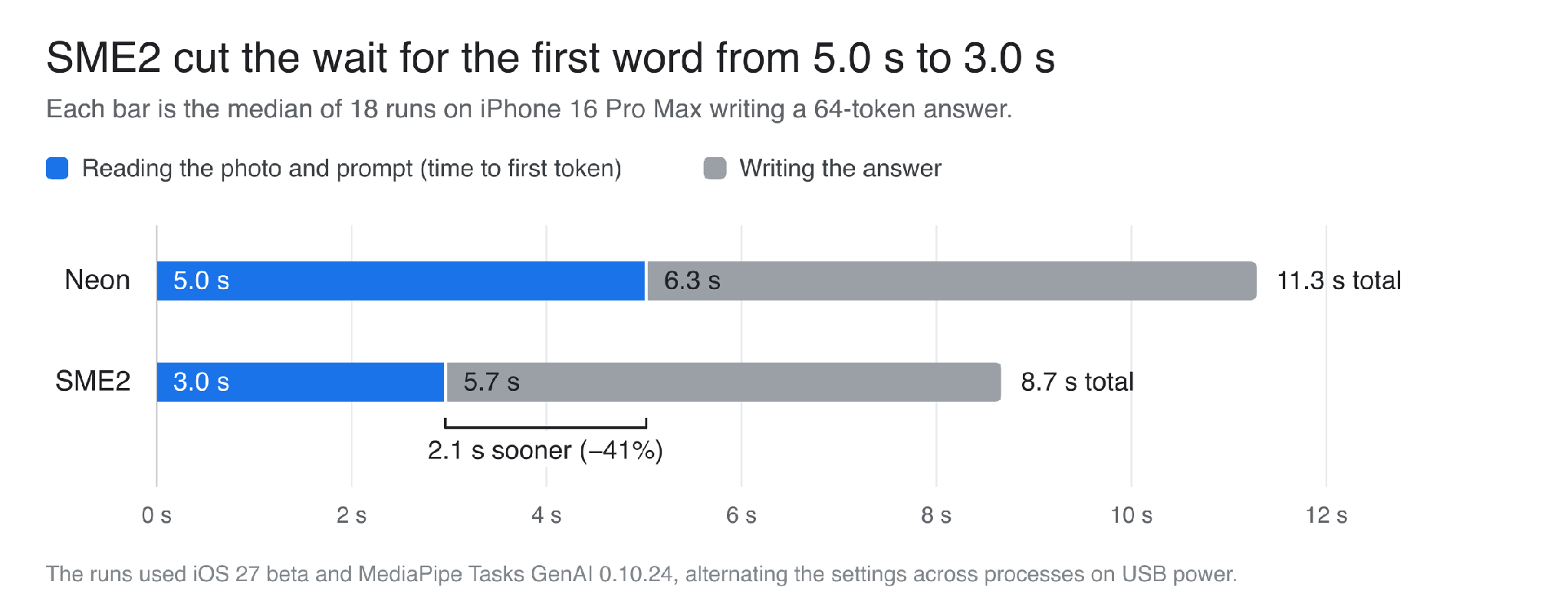
| iPhone 16 Pro Max (A18 Pro) | Neon | SME2 | Change |
|---|---|---|---|
| Time to first token | 5.02 s | 2.96 s | −41% |
| Decode speed | 10.1 tok/s | 11.0 tok/s | +9.7% |
| Whole generate call | 11.3 s | 8.7 s | −23% |
| Peak memory | 1,841 MB | 1,868 MB | +1.5% |
I ran these on an iPhone 16 Pro Max with iOS 27 beta, Gemma 3n E2B Int4 and MediaPipe Tasks GenAI 0.10.24. Both settings used the same release binary, the same photo and prompt (a 416-token prefill), greedy decoding and 64 output tokens. Each setting got 18 measured runs from 6 processes, alternating Neon and SME2, on USB power, and the table shows medians. The phone was warm for most of the session, so absolute speeds are lower than on a cool phone; alternating the settings keeps that from favoring either one. Raw data and scripts are in the project's research folder.
Medians can hide a lot, so here is every run. That includes an M4 MacBook Air, where Img2LaTeX runs as an iPad app, switch included.
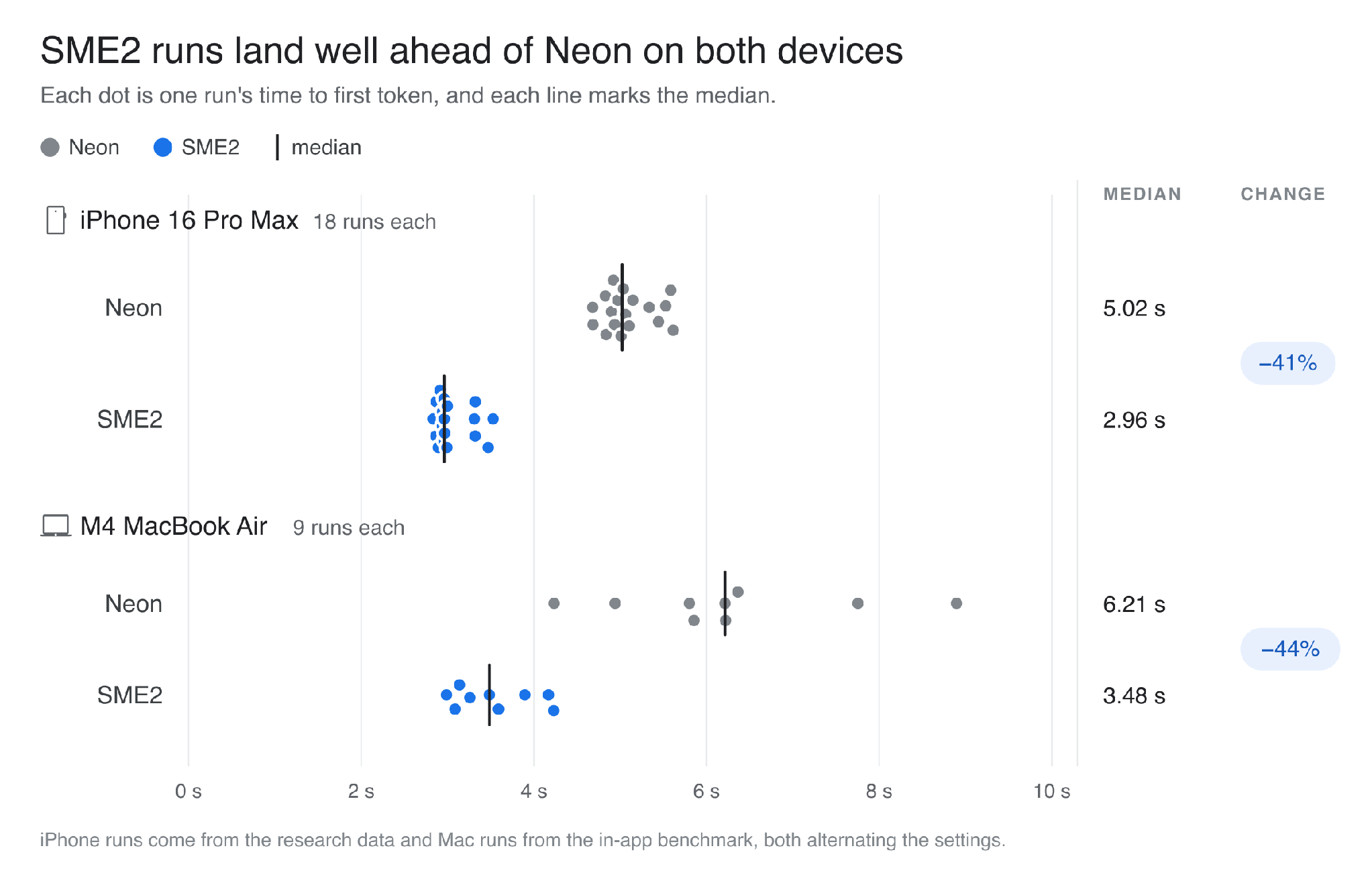
| M4 MacBook Air | Neon | SME2 | Change |
|---|---|---|---|
| Time to first token | 6.21 s | 3.48 s | −44% |
| Decode speed | 8.2 tok/s | 10.2 tok/s | +25% |
| Whole generate call | 21.8 s | 15.9 s | −27% |
I ran these on an M4 MacBook Air (32 GB) with macOS 27, using the app's built-in benchmark on its bundled photo of a handwritten matrix. Decoding was greedy, and each answer ran to its natural end (118 to 130 tokens). Each setting got 9 measured runs (3 processes with 3 runs each), alternating the settings, with other apps open, and the table shows medians. This check is smaller and noisier than the iPhone one, so I trust the prefill gain and would not read much into the decode number yet.
Why the first word gained the most
Prefill and decode run through the same weights, but they work the hardware in completely different ways.
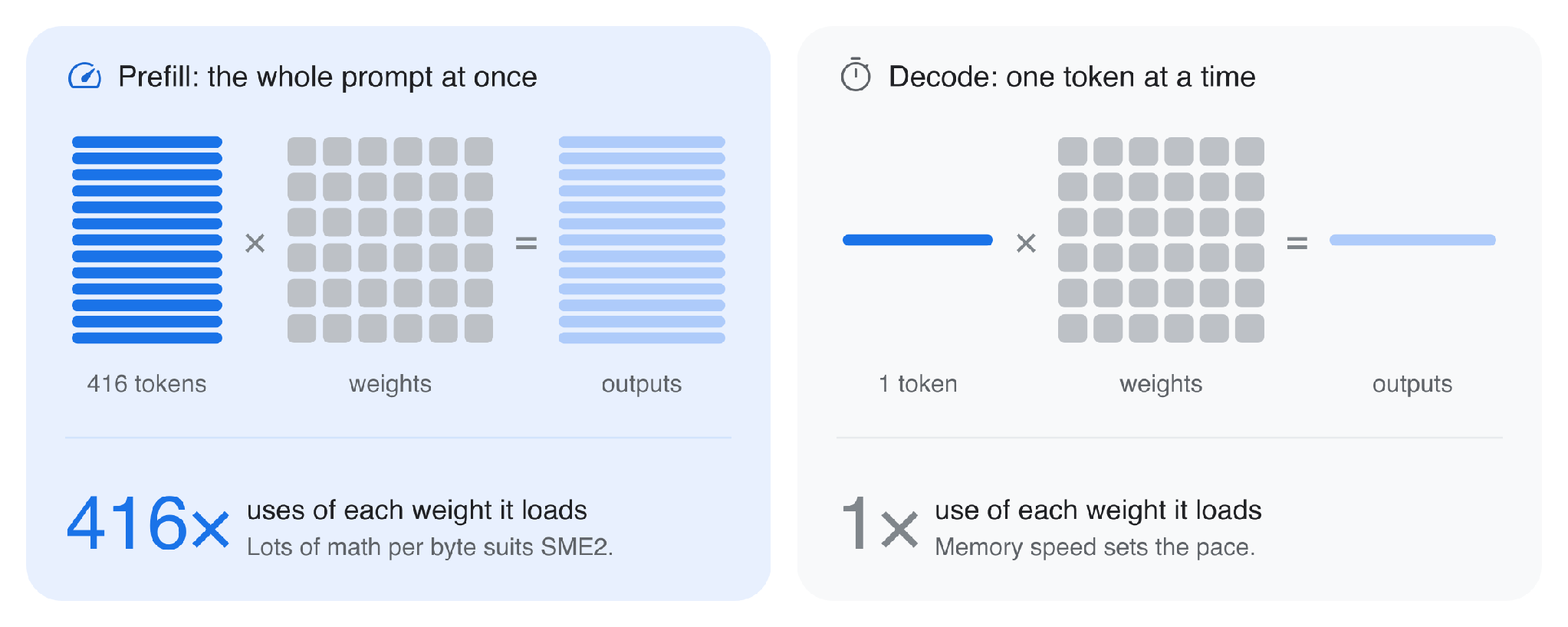
During prefill, all 416 prompt tokens go through each weight matrix together. Every weight that comes in from memory gets used 416 times. That is a lot of math per byte, exactly the work SME2's outer products are built for.
During decode, the model writes one token at a time. Each step pushes a single row through every weight matrix, so every weight is fetched again for one token's worth of work. Memory bandwidth likely sets the pace, and faster math helps far less.
SME2 also only covers part of the model. The largest Int4 layers use a static quantization format (XNNPACK’s qs8_qc4w) that has no SME2 kernel in this build, so they stay on Neon even with the switch on. What moves to SME2 are the float and Int8 matrix multiplies and one smaller Int4 path. The vision encoder's GPU work does not change either
.
Main takeaways
- Check what your runtime actually ships. MediaPipe’s source tree has pinned an XNNPACK with SME2 on by default since 0.10.32 (January 2026), but the prebuilt iOS GenAI pods stop at 0.10.24, the build I measured. Google now points LLM apps to LiteRT-LM, so that is where I’d look for SME2 on by default. I haven’t measured it yet.
- "Supported" isn't "running". The chip can have SME2, the OS can block it, and your runtime can still pick something else. Read back what your runtime chose, profile once to see which kernels run, and keep a tested Neon fallback.
- Tag your caches. If your runtime saves packed weights, store which instruction set built them. Otherwise the first launch after a mode change can crash, like mine did.
- Measure prefill and decode separately. They respond to SME2 differently, and one tokens-per-second number hides that. Use the same binary, the same input, greedy decoding and, if you can, a fixed output length, and alternate the settings across separate processes. Img2LaTeX has a benchmark built in (Analytics → SME2 Benchmark) if you want to try it on your own device.
What is next
The next win I'm watching for is in the Int4 layers. XNNPACK has since added SME2 kernels for Int4 fully connected layers, and SME2's lookup-table instructions are made for this kind of low-bit data, so more of the model should move over once the app runs on a newer runtime that includes them, such as LiteRT-LM. I have not tested that yet. I am curious how much of the remaining Neon execution time these kernels can reduce.
On-device AI only works if it is fast enough that people stop noticing the trade-off. SME2 closes a lot of that gap, and in my app it had been sitting there the whole time, waiting on one flag.
If you run the benchmark on your own SME2 device, I would love to see your numbers..
- Img2LaTeX is on the App Store for iPhone, iPad and Apple silicon Macs.
- The source code is on GitHub, with build steps for all three. The SME2 switch is in Pic2PDF/SME2/.
- The iPhone study’s method, raw runs, profiles and scripts are in the research folder.
- The app downloads Gemma 3n from a public mirror of Google’s release and checks its SHA-256 before using it.
Acknowledgements
Thank you to Geremy Cohen and Eric Sondhi at Arm, and to the teams behind MediaPipe, XNNPACK, Arm KleidiAI and Gemma.
Continue your development journey with Arm
Interested in exploring Arm SME2 and accelerating on-device AI? Discover these resources to build on what you've learned:
Arm Learning Paths
Accelerate matrix multiplication performance with SME2 Explore SME2 instructions, optimize matrix multiplication, and benchmark performance.Run LLM inference on Android with KleidiAI, MediaPipe, and XNNPACK Learn how these technologies work together to accelerate AI inference on Arm.
Measure LLM inference performance with KleidiAI and SME2 on AndroidExplore SME2 acceleration and benchmark the performance of optimized LLM inference.
Arm Developer Program
Join the Arm Developer ProgramConnect with fellow developers, build your technical skills, and get recognition for the projects you create using Arm technology.
Re-use is only permitted for informational and non-commercial or personal use only.
