Reducing ray-traced shadow costs for foliage with OMM: Moku results on Arm Mali G2
Discover how opacity micromaps accelerate ray-traced foliage shadows on Arm Mali G2, with Moku benchmarks showing performance gains of up to 31% in scenes
By Patrick Wang

This blog post is co-authored by Patrick Wang and Felipe Lira
Hardware Raytracing in games
Over the years, the demand for high fidelity graphics has substantially increased. Advances in hardware capabilities and processing power have made it possible to explore new techniques that were otherwise not possible in real-time before. Hardware Raytracing (HWRT) made it possible for games to adopt a hybrid rendering approach that mixes rasterization and raytracing. Stochastic based techniques such as ReSTIR and Unreal's MegaLights trace rays from GBuffer to sample lights.
The benefit of this approach is that it makes performance more predictable. Stochastic based techniques rely on the observation that despite scenes having many lights, only a small number of lights have significant contributions to each pixel. Therefore, a fixed sampling budget is used combined with clever heuristics to sample the most important lights. This means the cost of light evaluation does not scale with the number of shadow casting lights. Instead, quality varies per-pixel. This workflow is more artist friendly. However, one performance challenge remains: the cost of each ray can vary depending on the material it hits. Alpha-masked geometry, such as foliage, is common in games. Resolving visibility requires material evaluation.
Opacity Micromaps (OMMs) is a technique that can substantially improve performance of raytracing alpha-masked geometry and is now available in Arm Mali G2. In this blog post, we look at what OMMs are and how they can benefit game production. We use results from Moku, an Unreal Engine sample developed by Arm for mobile.
Why masked geometry makes ray-traced shadows expensive
Visually complex elements, such as leaves and thin meshes, are rarely represented with equally complex geometry. Instead, they are commonly modeled from simple triangle cards and triangle opacity information comes from alpha masked textures.
When tracing a visibility ray, if the ray hit intersects with an opaque geometry, no further processing needs to be done; the candidate is committed. However, for non-opaque geometry, visibility needs to be determined, which requires returning control from the traversal unit to shader core to sample opacity information. At the graphics API level, this is commonly achieved by invoking an any-hit shader (AHS) or in the case of inline tracing, sampling the alpha mask texture and if necessary, proceeding with ray traversal.
In Unreal Engine 5.6.1, MegaLights first performs a lightweight ray query, and if the ray hits a surface that needs material evaluation, it can trace a continuation ray with AHS.
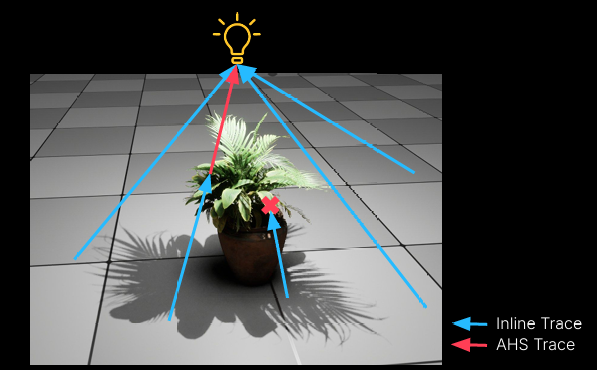
[K. Narkowicz and T. Costa 2025] MegaLights: Stochastic Direct Lighting in Unreal Engine 5. Advances in Real-Time Rendering in Games, SIGGRAPH 2025. Epic Games.
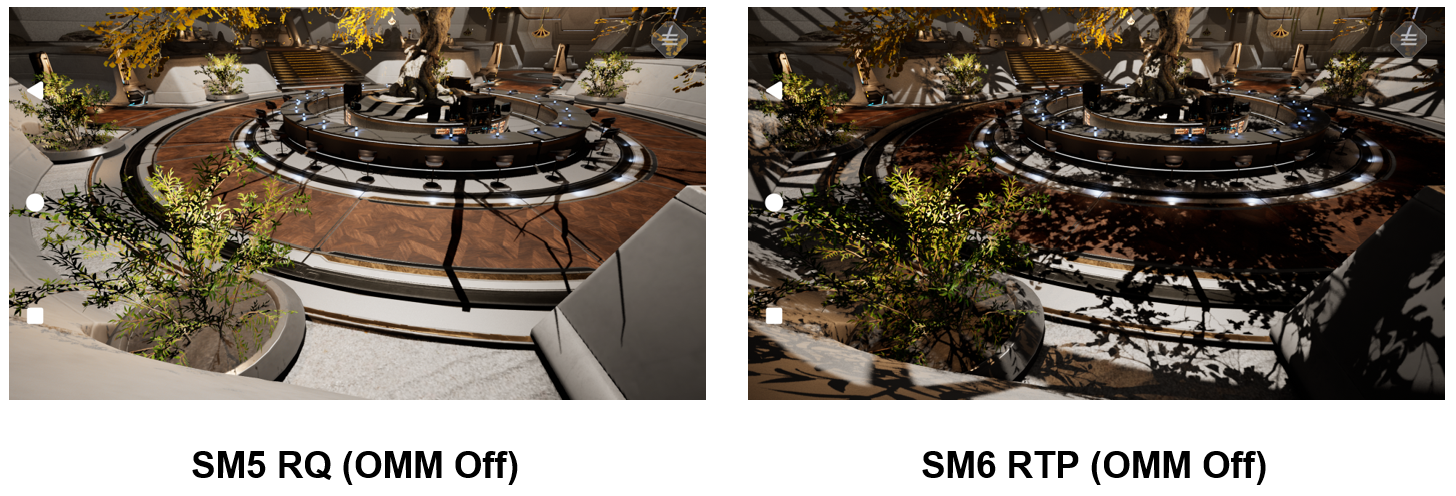
When the platform does not support the raytracing pipeline (RTP), or when Unreal uses the SM5 ray query (RQ) path, material evaluation will not be performed by MegaLights, causing shadows to not resolve correctly for alpha-masked geometry. See in the image comparison below how the shadows from foliage are missing from the RQ path.
Moving opacity decisions earlier with OMM
OMMs aim to improve ray-tracing performance by encoding per-triangle opacity information directly into the acceleration structures. This enables the RTU to conservatively classify some intersections as opaque or transparent without returning control to shader to perform material evaluation.
The OMM baker preprocesses geometry and alpha-masked textures, generating opacity data. This data represents micro-triangle opacity states and descriptors that are used to build OMM data that is attached to the triangle geometry when the acceleration structure is built.
The traversal unit can then read the opacity information at a candidate hit and resolve it using four states:
opaque: Accept the hit.transparent: Ignore the hit and continue traversal.Unknown opaqueorunknown transparent: Conservatively defer the decision to the shader or material path.
The content pipeline and traversal flow look like this:
Mesh + UV + alpha information
          │
          ▼
       OMM baker
  opacity states / descriptors
          │
          ▼
   Build micromap resource
          │
          ▼
Attach micromap to triangle geometry
and build acceleration structure
          │
          ▼
Ray traversal reaches triangle geometry
          │
          ▼
Read the corresponding microtriangle
opacity state
          │
     ┌────┼───────────┐
     ▼    ▼           ▼
  opaque  miss   possible hit
                  shader handling
Arm Mali G2 supports OMM in its ray-tracing hardware. During traversal, the hardware uses micromap data associated with triangle geometry to classify the intersected microtriangle.
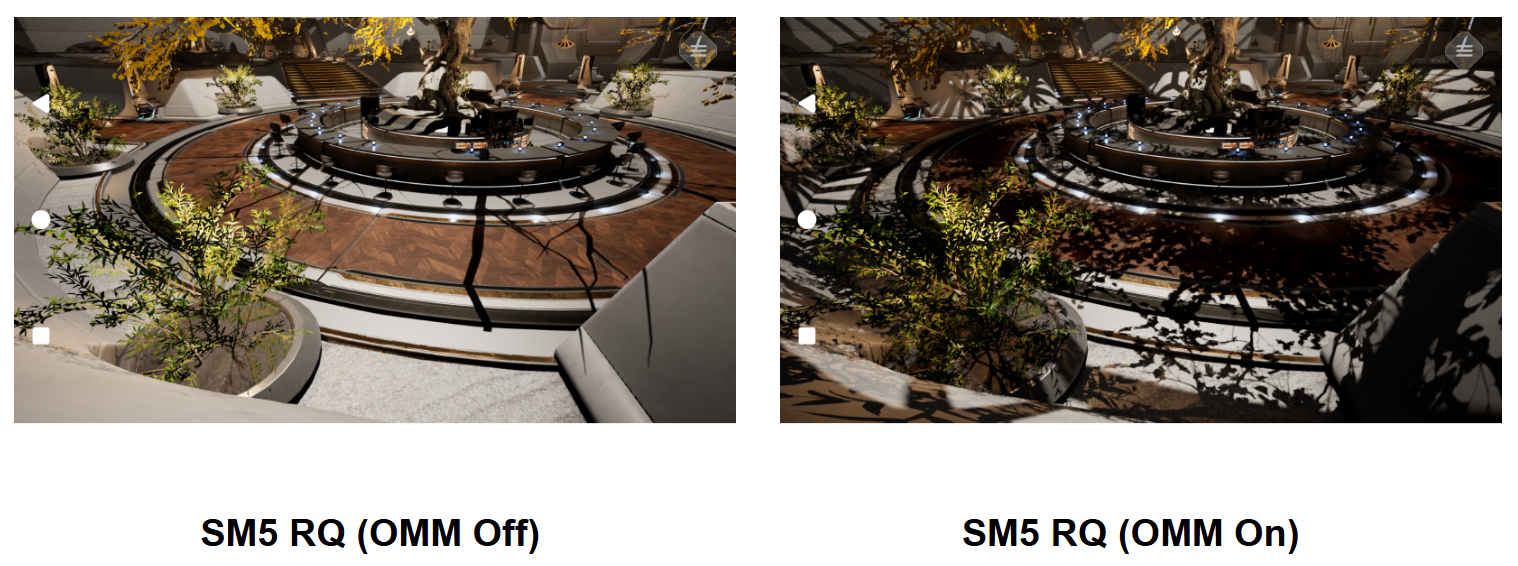
On the SM5 RQ path, OMM substantially improves the quality of scenes with alpha-masked geometry. The following comparison shows OMM off and on.
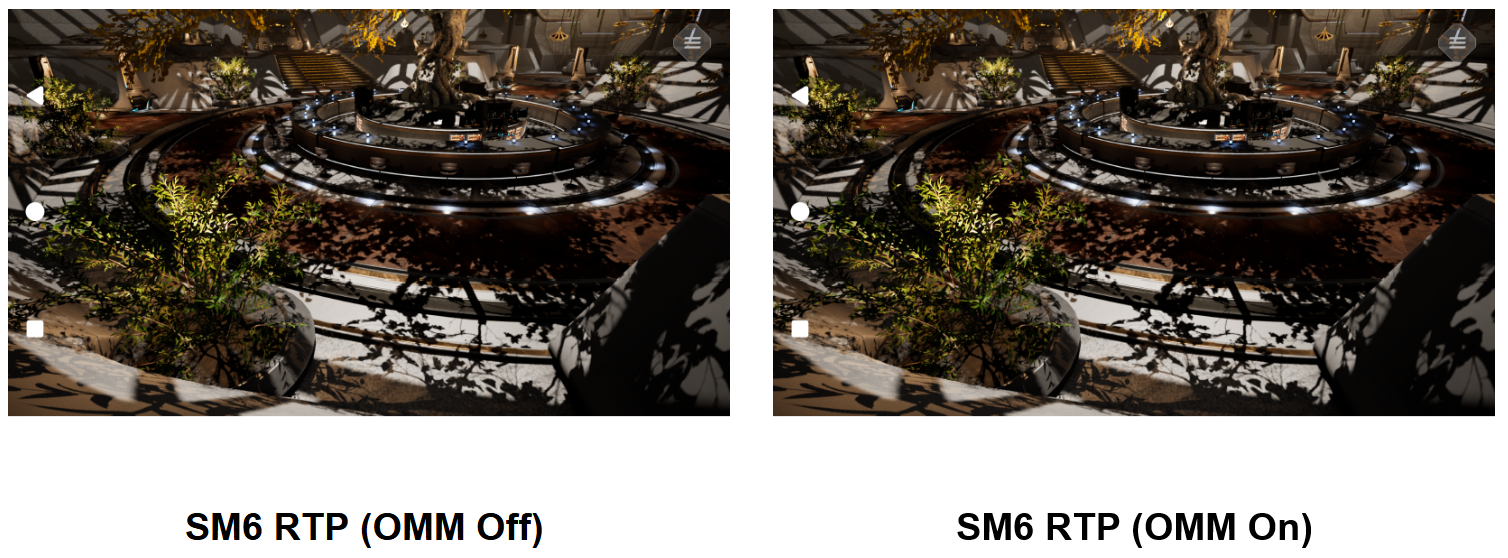
When running the game on SM6 RTP path with material evaluation enabled, OMM significantly improves performance without reducing quality. This is because it reduces the number of invoked AHS and the number of times the ray tracing unit has to return control to shader to perform material evaluation.
Enabling OMM on Unreal Engine on mobile
Unreal Engine does not support OMM out of the box. We had to modify the engine to enable it.
We based our work on THE NVIDIA RTX branch for Unreal Engine. It already supported OMM, including tools to bake OMMs, initialize acceleration structures for DX12, and configure opacity micro maps in the Static Mesh Editor.
Our main contribution was to add OMM support to Vulkan RHI and make necessary modifications and optimizations to run MegaLights and OMMs on mobile. We also enabled SM6 on Android to compare mobile performance with OMM enabled and disabled.
Evaluating OMM with production-style content in Moku Central Garden
Moku is an Unreal Engine sample project developed by Arm to present and evaluate mobile graphics techniques in a complete, production-style environment. It is not a synthetic microbenchmark containing only a small set of test triangles. Its scenes combine architecture, vegetation, materials, lighting, shadows, and authored camera sequences, producing content compositions closer to those encountered by game developers.
We used the Moku Central Garden scene to evaluate OMM on Arm Mali G2. The scene is organized around a courtyard garden, where a large central tree, surrounding shrubs, foreground foliage, and architectural surfaces create multiple layers of occlusion. Lights passing through the leaves produce dense, fine-grained shadows across the ground, walls, and a circular platform. This scene relies heavily on alpha-tested geometry, making it a representative workload for OMM.
Moku also provides multiple reference cuts that use predefined viewpoints or camera movements to feature different parts of the scene. This evaluation covers Ref0, Ref1, Ref2, Ref3, Ref4, Ref5, and Ref10. The following assets represent three different test patterns.
Ref1: 30-Second Dynamic Camera Sequence
Ref1 uses approximately 30 seconds of continuous camera movement to observe OMM over a longer dynamic sequence.
Ref2: 5-Second Dynamic Camera Sequence
Ref2 condenses camera movement into approximately five seconds, representing a shorter and more focused dynamic test.
Ref10: Static View
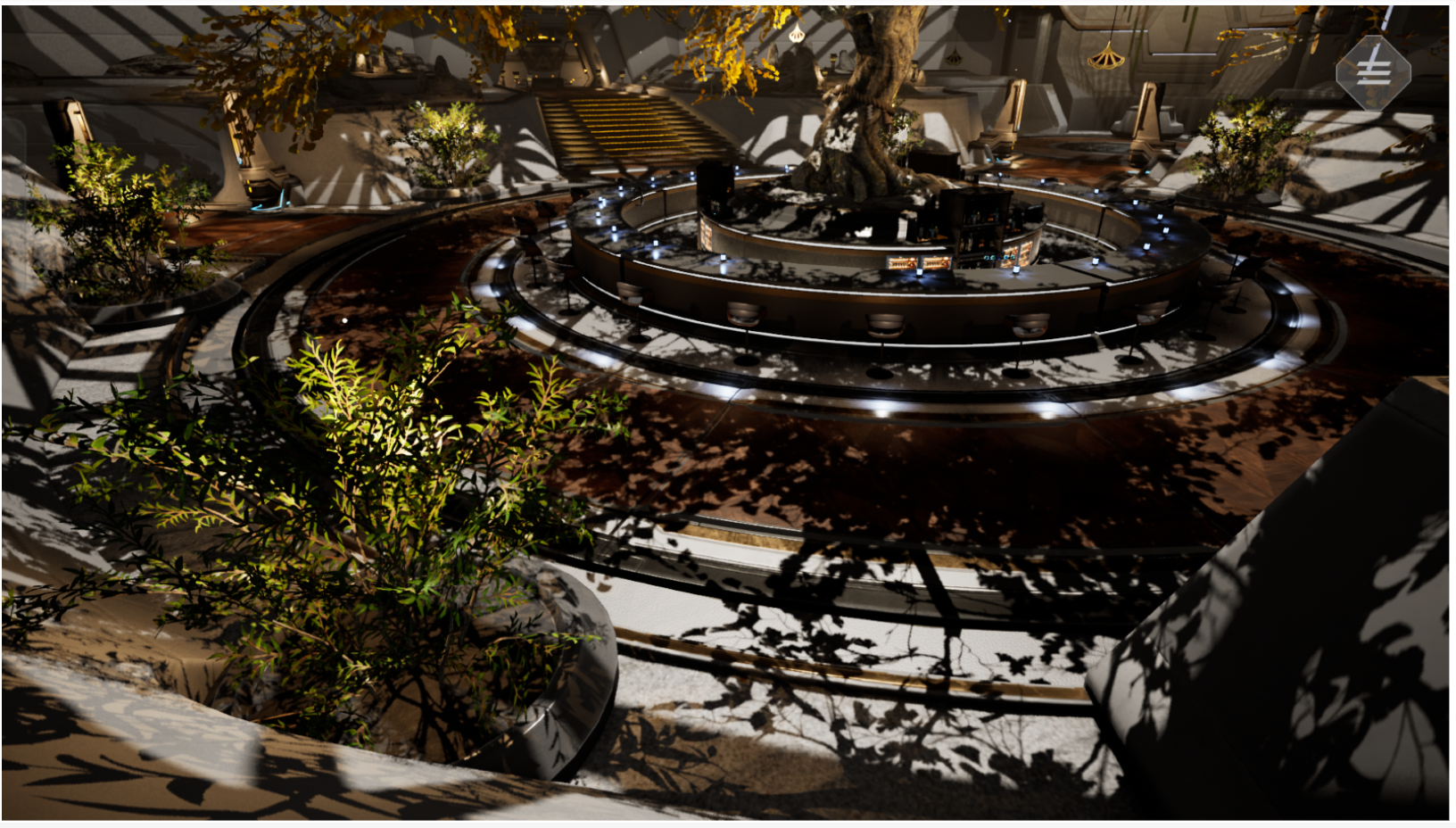
Ref10 holds the camera on the central tree, foreground shrubs, and multiple layers of foliage. Strong lighting creates extensive overlapping shadows, highlighting the conditions that make masked foliage challenging for ray-traced shadows.
These cuts serve different purposes. The long dynamic sequence covers continuous changes across the scene, the short dynamic sequence concentrates the workload into a brief interval, and the static view keeps the composition fixed for a direct OMM Off/On comparison. The remaining cuts extend coverage across more viewpoints and scene compositions, reducing the risk that the results reflect only one camera setup.
Positive Results Across Seven Reference Cuts
Ref10 is the primary foliage example in this article, while the complete dataset includes Ref0, Ref1, Ref2, Ref3, Ref4, Ref5, and Ref10. Each cut compares OMM Off and OMM On with the same content and uses the same method to calculate the average frame rate.
|
Reference cut |
OMM Off |
OMM On |
Uplift |
|
Ref0 |
23.86 FPS |
27.51 FPS |
+15.3% |
|
Ref1 |
24.77 FPS |
28.71 FPS |
+15.9% |
|
Ref2 |
23.52 FPS |
30.82 FPS |
+31.0% |
|
Ref3 |
31.39 FPS |
33.23 FPS |
+5.9% |
|
Ref4 |
26.54 FPS |
31.78 FPS |
+19.8% |
|
Ref5 |
22.44 FPS |
26.50 FPS |
+18.1% |
|
Ref10 |
23.30 FPS |
29.64 FPS |
+27.2% |
All seven reference cuts show a positive result, with performance uplift ranging from 5.9% to 31.0%. Ref2 delivers the largest uplift, while Ref3 shows the smallest but remains positive. In Ref10, the primary foliage example, performance increases from 23.30 to 29.64 FPS, an uplift of 27.2%.
Why is it faster? A matched-workload view in Streamline
We used Arm Performance Studio Streamline to capture hardware counters for Ref10 with the Shader Model 6 ray tracing pipeline (SM6 RTP), both with and without OMM. These profiling captures are distinct from the reference-cut runs in the FPS table above.
First check that the workload is matched
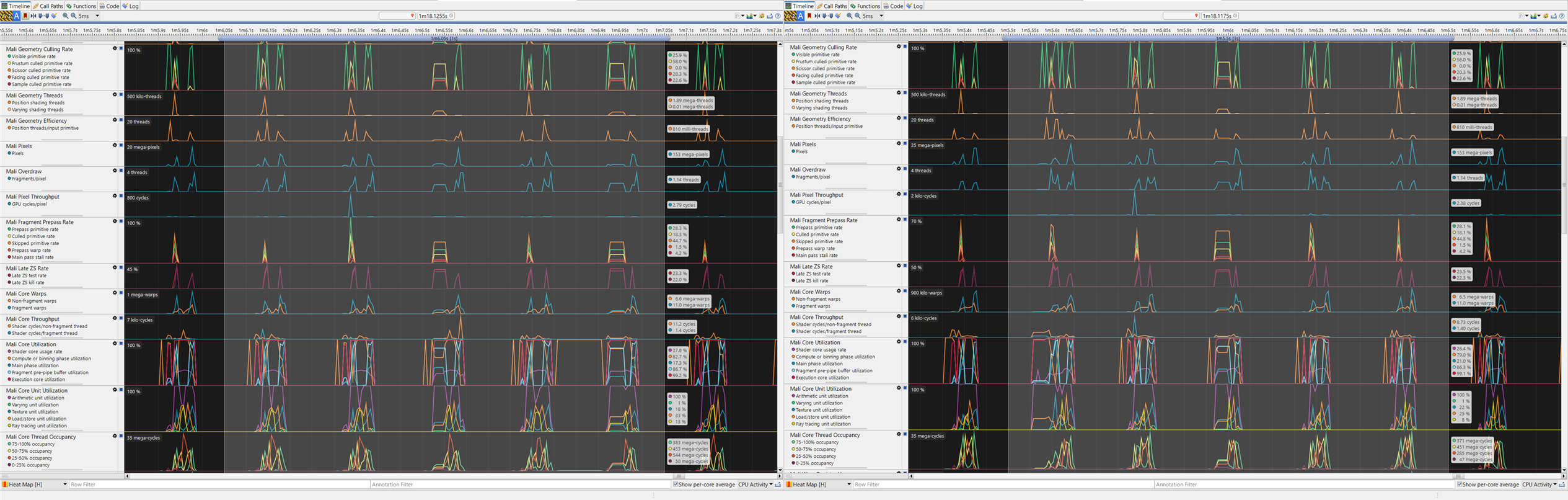
The input primitive count, pixel count, and fragment work are effectively identical. The OMM result is therefore not explained by removing foliage, lowering scene complexity, or processing fewer pixels.
Lower overall GPU cost with little change in memory traffic
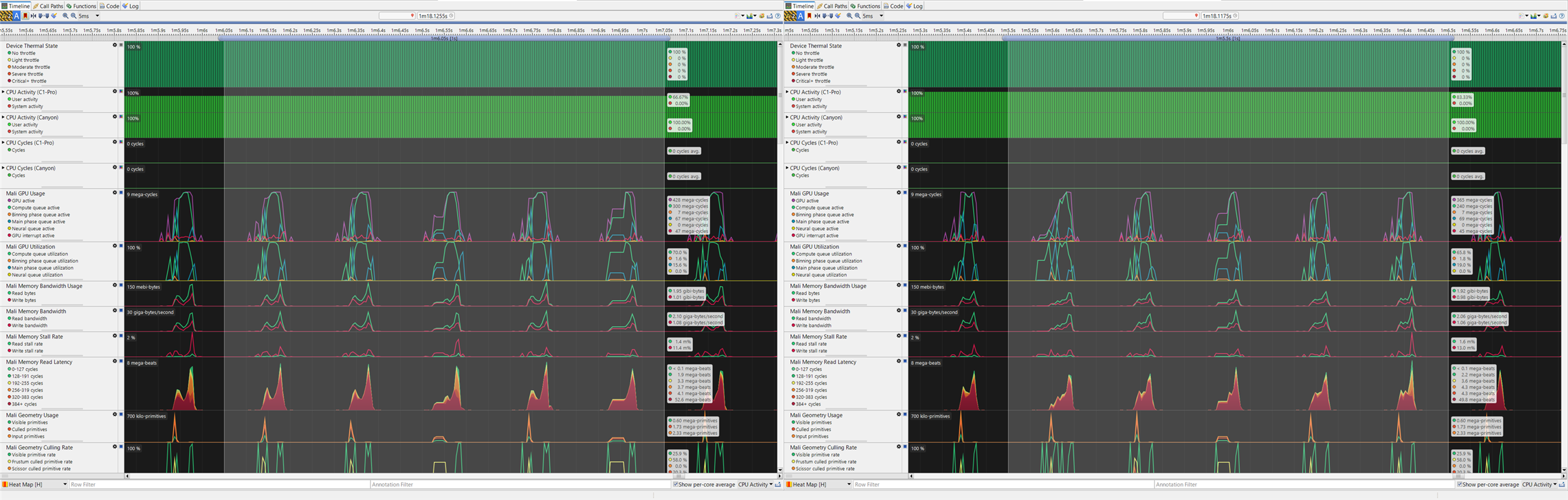
|
Selected-range total |
OMM Off |
OMM On |
Change |
|
GPU active |
428 Mcycles |
365 Mcycles |
-14.7% |
|
Compute queue active |
300 Mcycles |
240 Mcycles |
-20.0% |
|
Main phase queue active |
67 Mcycles |
69 Mcycles |
+3.0% |
|
Memory read |
1.95 GiB |
1.92 GiB |
-1.5% |
|
Memory write |
1.01 GiB |
0.98 GiB |
-3.0% |
|
Read bandwidth |
2.10 GB/s |
2.06 GB/s |
-1.9% |
|
Write bandwidth |
1.08 GB/s |
1.06 GB/s |
-1.9% |
GPU active cycles decrease by 14.7%, and compute-queue activity decreases by 20.0%. Memory traffic changes by less than 3%, while main-phase activity increases slightly. The result is not a broad reduction across the whole frame; the larger changes appear in the ray tracing path.
OMM removes much of the wasted traversal work
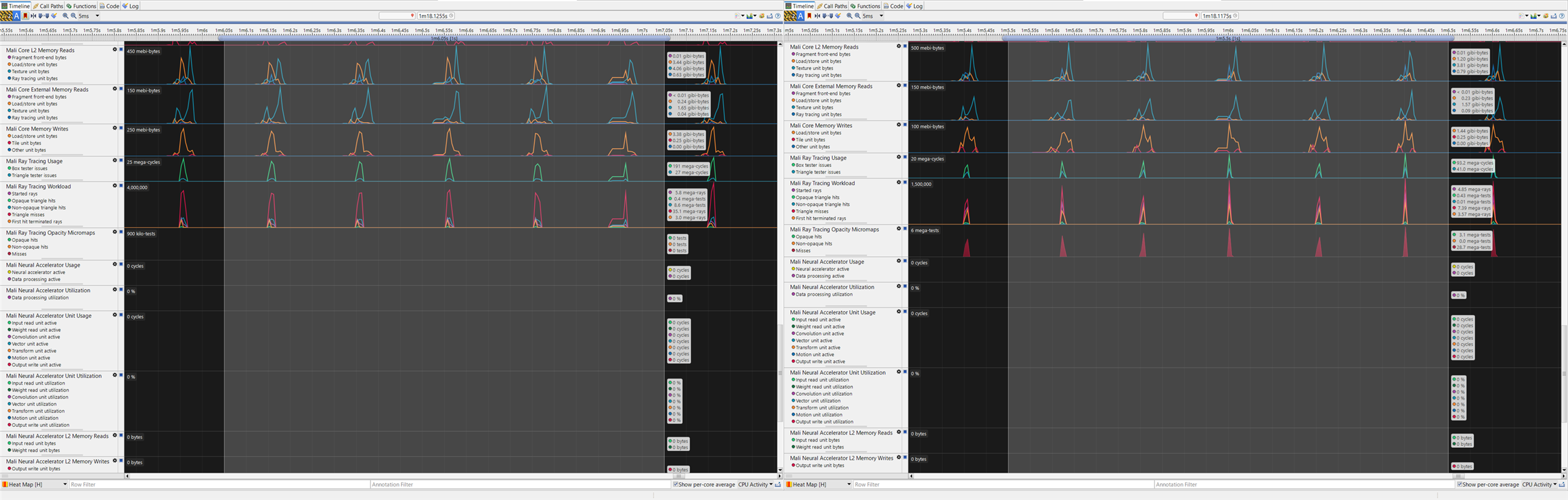
|
Selected-range RT total |
OMM Off |
OMM On |
Change |
|
RT box tester issues |
191 Mcycles |
93.2 Mcycles |
-51.2% |
|
RT triangle tester issues |
27 Mcycles |
41 Mcycles |
+51.9% |
|
RT tester total |
218 Mcycles |
134.2 Mcycles |
-38.4% |
|
Started rays |
5.8 million |
4.85 million |
-16.4% |
|
Non-opaque triangle hits |
8.6 million |
0.01 million |
-99.9% |
|
Triangle misses |
35.1 million |
7.39 million |
-78.9% |
|
First-hit terminated rays |
3.0 million |
3.57 million |
+19.0% |
The clearest change is the near elimination of non-opaque triangle hits. Triangle misses decreased by 78.9%, box tester issues decreased by 51.2%, and started rays decreased by 16.4%. The reduction in started rays is consistent with OMM resolving more opacity states during traversal, reducing the need for continuation rays and AHS processing. These counters represent candidate intersections, traversal activity, and ray launches that contribute to the cost of masked geometry without OMM.
Triangle tester issues move in the opposite direction, increasing from 27 to 41 Mcycles. A plausible interpretation is that traversal spends less time on box tests and misses, then reaches more useful triangle tests and first-hit termination paths. This is an inference rather than a direct counter-proven cause, but the total RT tester cost still decreases by 38.4%.
RTU counters confirm less traversal and resume work
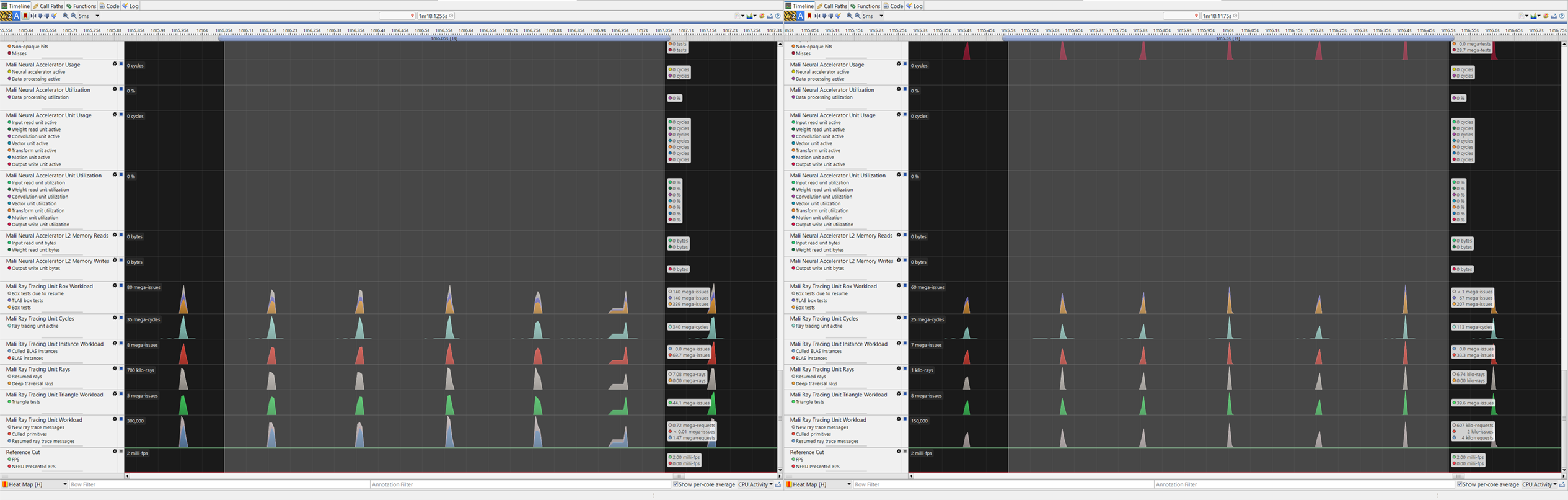
|
Selected-range RTU total |
OMM Off |
OMM On |
Change |
|
RTU active |
340 Mcycles |
113 Mcycles |
-66.8% |
|
RTU box tests |
339 million issues |
207 million issues |
-38.9% |
|
RTU TLAS box tests |
140 million issues |
67 million issues |
-52.1% |
|
RTU box tests due to resume |
140 million issues |
<1 million issues |
approximately -99% |
|
BLAS instances |
69.7 million issues |
33.3 million issues |
-52.2% |
|
RTU triangle tests |
44.1 million issues |
39.6 million issues |
-10.2% |
|
Resumed ray trace messages |
1.47 million |
0.41 million |
-72.1% |
RTU active cycles decrease by 66.8%, while resumed ray trace messages and box tests caused by resume fall sharply. This supports the same mechanism seen in the higher-level counters: OMM lets traversal resolve more opacity decisions without repeatedly returning to the non-opaque path.
What does OMM resolve during traversal?
|
Selected-range OMM total |
OMM Off |
OMM On |
|
OMM opaque hits |
0 |
3.1 million tests |
|
OMM non-opaque hits |
0 |
0 |
|
OMM misses |
0 |
28.7 million tests |
The OMM-specific counters appear only in the enabled capture. They show that traversal is consuming the baked micromap data to accept opaque microtriangles and skip transparent regions. This is consistent with non-opaque triangle hits falling from 8.6 million to 0.01 million tests.
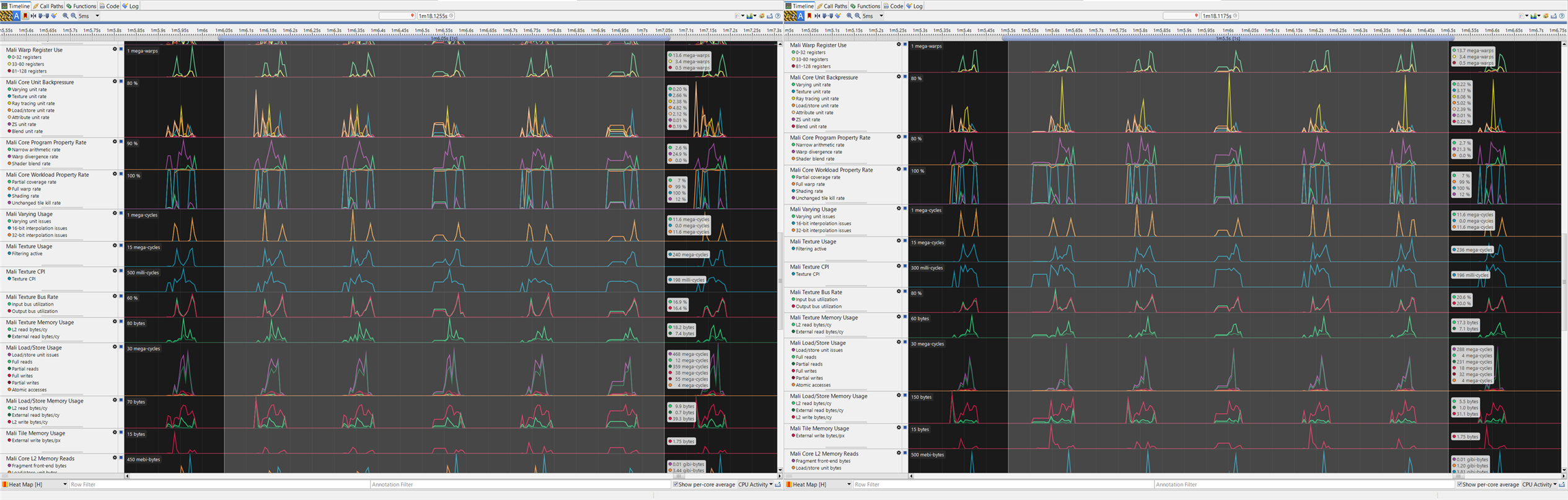
Figure: Core-unit utilization, thread occupancy, register use, backpressure, varying, and texture counters. These counters retain wider context; the mechanism analysis above focuses on matched geometry, GPU, RT, and OMM measurements.
Balancing OMM accuracy and cost in Unreal Engine
Treat unknown as work that has not been eliminated
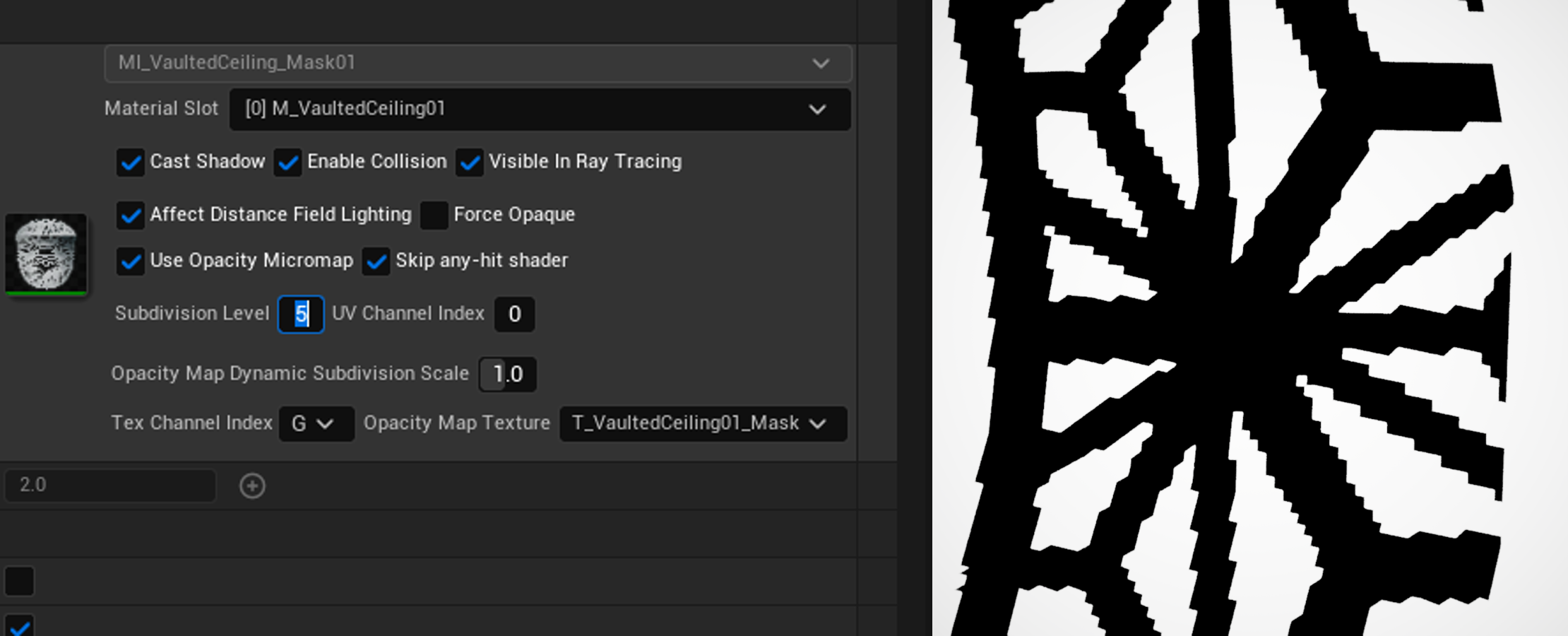
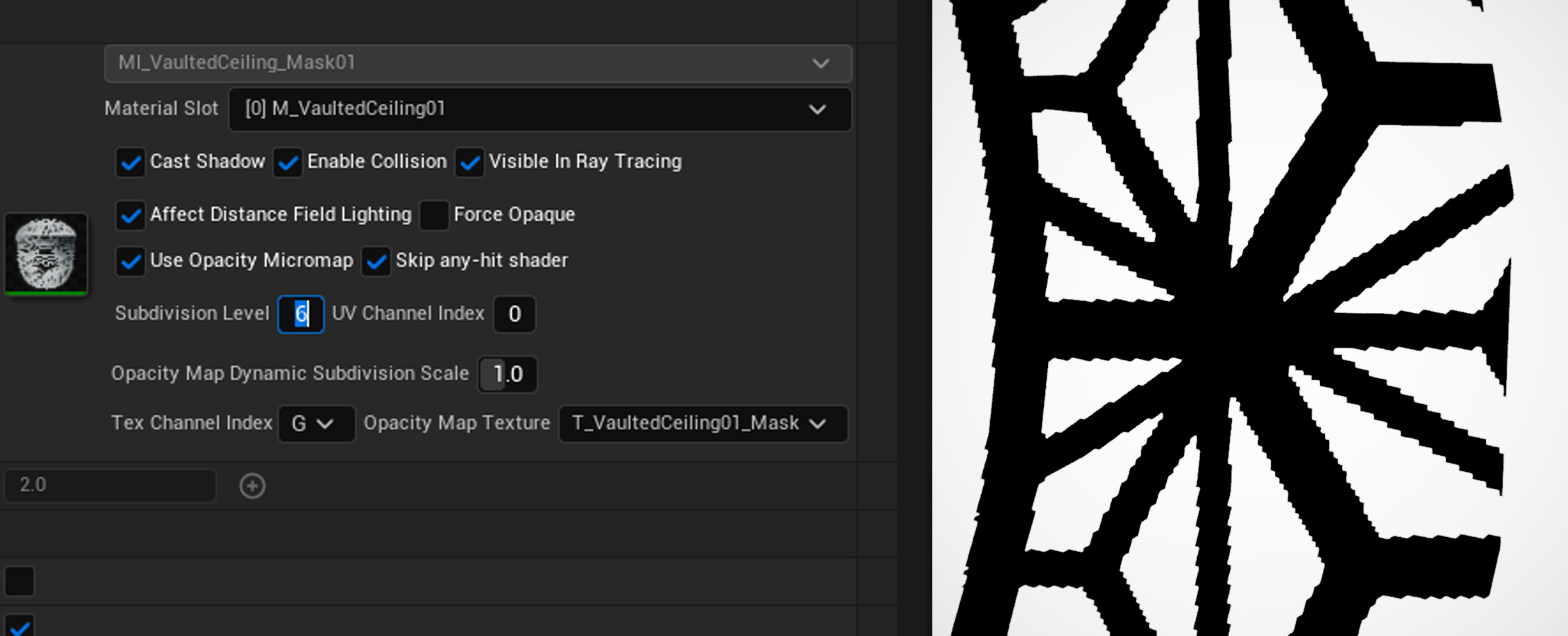
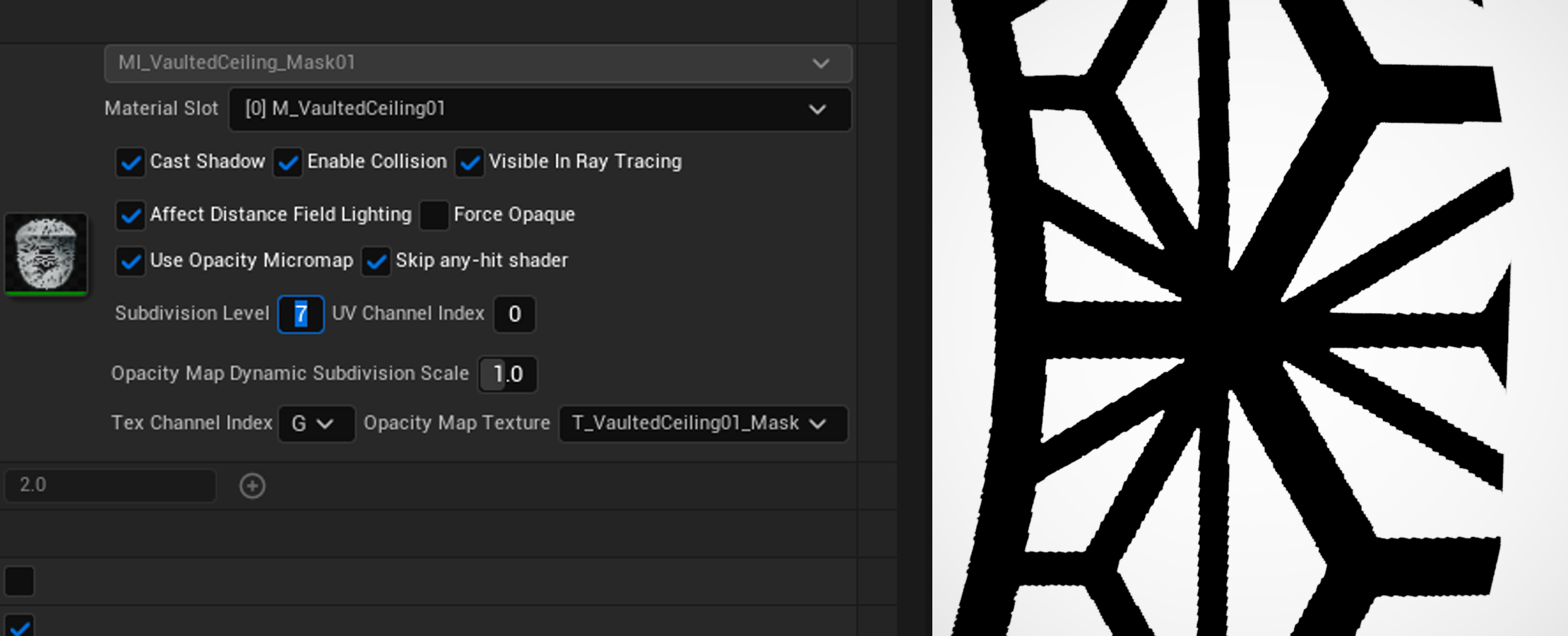
Subdivision controls how closely a micromap can follow an alpha-mask boundary. At subdivision level L, one source triangle can contain up to 4^L microtriangles. A low level creates less data and is faster to build, but each microtriangle covers a larger part of the opacity texture. More boundary regions can remain unknown, so traversal cannot resolve them conclusively.
Increasing subdivision can classify more of the boundary as opaque or transparent. It can also increase baked data size, memory use, micromap build time, and acceleration-structure setup cost. The right level is the lowest one that provides acceptable classification and shadow quality for the asset; the highest available level is not automatically the best setting.
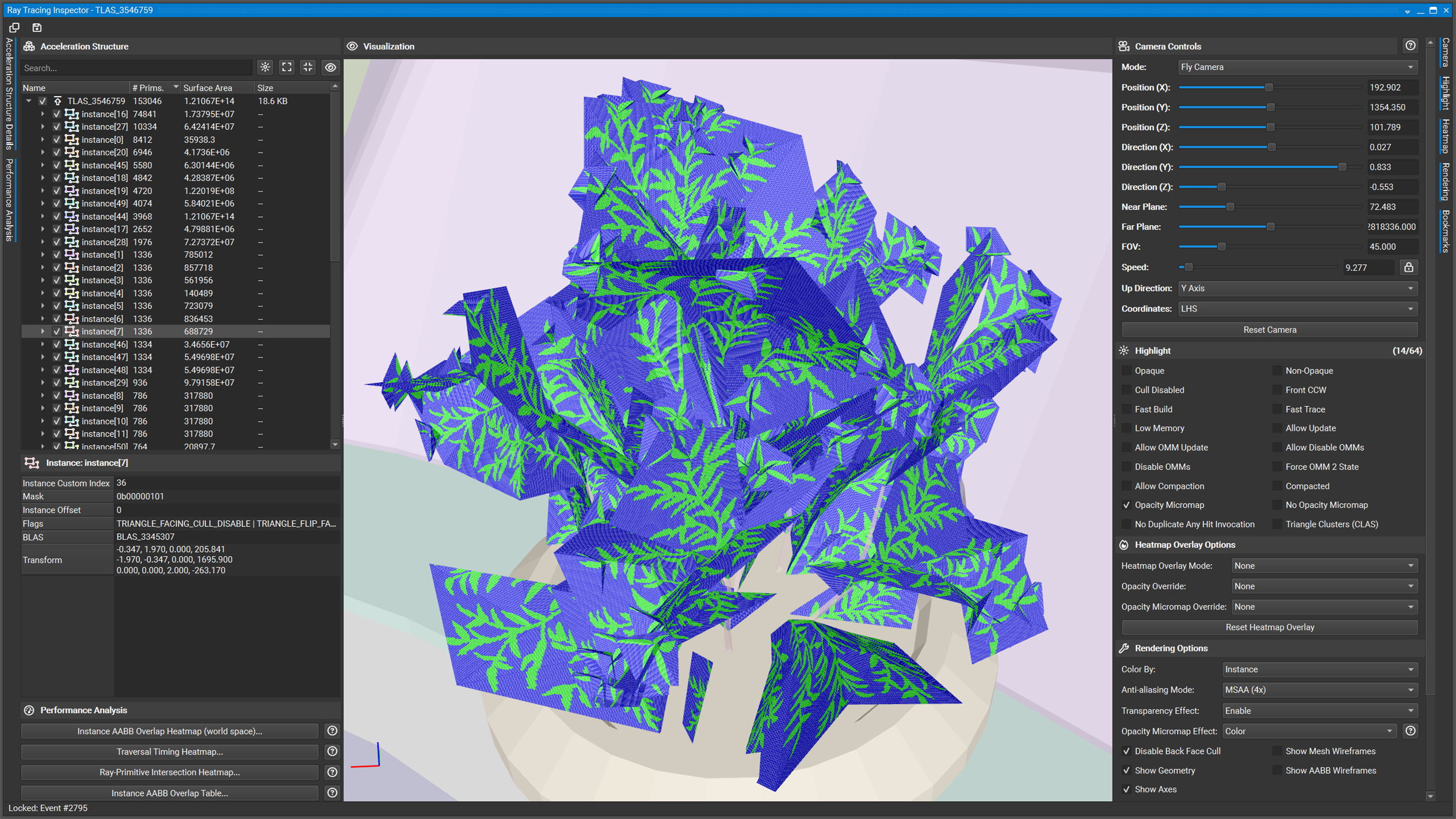
Nsight Graphics can confirm that the selected acceleration structure carries an opacity micromap and can be used to inspect the baked result. Boundary regions that remain unresolved should be treated as potential runtime work, not as a successful classification.
Preview subdivision in the Unreal editor
You can inspect subdivision quality before collecting a performance capture:
- Open the candidate mesh in the Static Mesh Editor and select the material section that uses the alpha mask.
- Enable Use Opacity Micromap, choose the opacity texture and channels, set Subdivision Level, and rebuild the OMM data through the project's baking workflow.
- Open the viewport view-mode menu and select Ray Tracing Debug > Instances.
- Inspect the cutout boundary for stair-stepping, softened detail, missing visible regions, or a level-to-level change that is no longer visible.
- Repeat with the same camera, material mode, and opacity settings. Stop increasing subdivision when the next level does not provide a useful visual improvement.
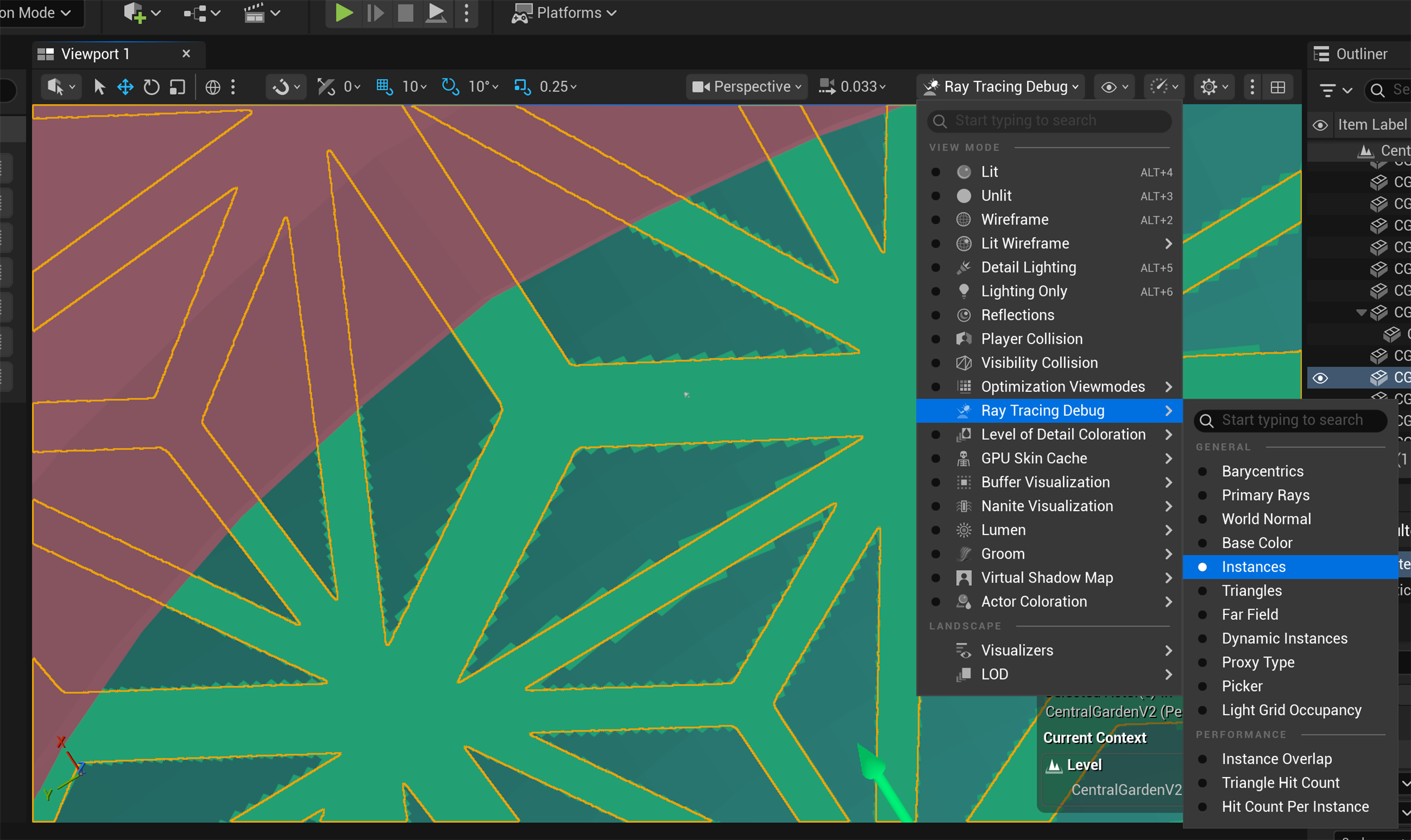
Use Ray Tracing Debug > Instances to preview the ray-tracing geometry after baking. This viewport check reveals subdivision-related silhouette aliasing; use Nsight Graphics separately to confirm the acceleration-structure and micromap state.
The Vaulted Ceiling mask below shows the workflow across four consecutive levels. In each image, the baking controls are on the left and the resulting viewport preview is on the right.
Subdivision 5
Subdivision 6
Subdivision 7
Subdivision 8
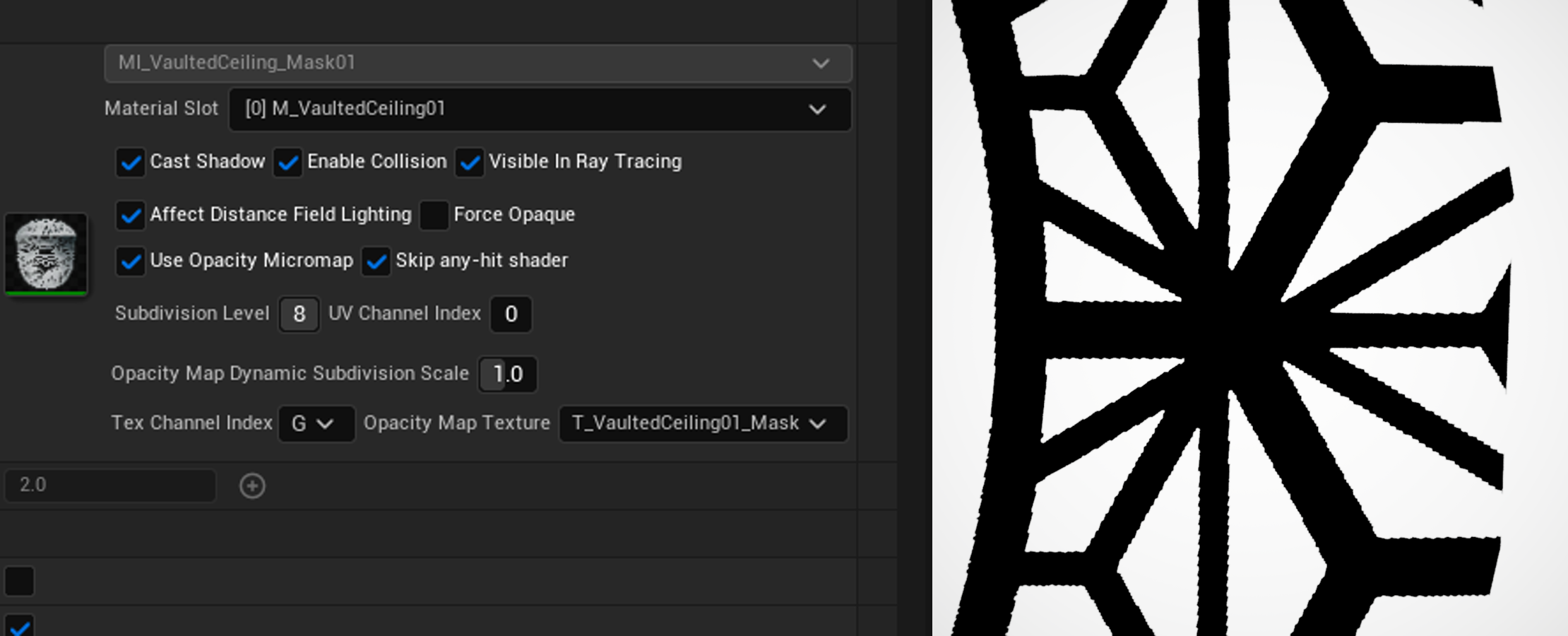
This is a quality-selection workflow, not a rule that every asset should use level 8. Compare adjacent levels, select the first level that preserves the required silhouette, and then validate its memory, build, and traversal cost.
Choose How Unreal Engine Resolves the Remaining Candidates
Unreal Engine exposes the MegaLights material policy through:
r.MegaLights.HardwareRayTracing.EvaluateMaterialMode|
Mode |
Unreal Engine behavior |
Practical trade-off |
|
0 |
Do not evaluate materials. This is the default in the evaluated UE 5.6.1 path. |
Removes UE material-evaluation cost, but the masked silhouette depends on the baked OMM classification and its subdivision level. |
|
1 |
Evaluate materials in the tracing ray. |
Preserves material-defined opacity, but complex materials add cost to unresolved candidates. |
|
2 |
Evaluate materials in a separate retrace pass. |
Retains material-level opacity detail while separating the work; it still pays for the material evaluations that OMM could not avoid. |
Mode 0 provides the clearest OMM-only path: traversal uses the baked microtriangle states without asking UE to recover texture-level opacity detail. Subdivision therefore becomes direct quality control. A coarse level can produce a softened or blocky cutout silhouette, while a finer level follows the authored mask more closely. Use the viewport workflow above to choose the lowest acceptable level instead of applying one subdivision value to every asset.
If texture-level precision is required, mode 2 provides a more conservative quality choice. OMM can still resolve known states during traversal, while a continuation AHS is used to evaluate material for unknown states. In this mode, a low subdivision level is less likely to damage the final silhouette, but it can leave more candidates for material evaluation. Material complexity therefore remains part of the cost.
Prefer FastBuild on Arm
The acceleration-structure initializer can request FastBuild. On Vulkan, the same preference also selects the micromap fast-build flag. Arm recommends FastBuild over FastTrace for this path, reducing acceleration-structure and micromap build time when loading, streaming, or rebuilding geometry.
Use FastBuild consistently for OMM-enabled content on Arm. Keep the build preference identical when comparing OMM Off and OMM On so that the measurement isolates the effect of OMM.
Which content should be evaluated for OMM first?
OMM is not specific to vegetation. Three content categories are strong initial candidates:
- Dense foliage: Tree leaves, shrubs, grass cards, vines, and scenes with extensive foliage shadows.
- Cutout structures: Chain-link fences, grilles, railings, lattice panels, and decorative cutouts.
- Character details: Eyelashes, and other alpha-tested card geometry.
The practical criteria are whether a scene contains a large amount of masked geometry, whether ray-based visibility tests intersect that geometry frequently, and whether its opacity pattern can be described reliably in advance.
OMM may offer limited benefit when a scene consists primarily of opaque geometry or when masked assets do not participate in the ray tracing path. It is also a poor default choice when opacity changes every frame or when a material graph is too complex for the baker to reproduce its runtime behavior. OMM targets alpha-tested and cutout content; it is not a general-purpose acceleration mechanism for alpha blending.
Conclusion
Foliage is challenging for ray tracing because alpha-masked cards require candidate intersections to be classified as opaque or transparent. Without OMM, non-opaque hits can return control from ray traversal to shader cores to evaluate opacity through the material path. OMM improves acceleration structure traversal by baking microtriangle opacity states into data associated with geometry. Arm Mali G2 ray-tracing hardware can consume this data during traversal without context switching.
The matched Ref10 Streamline capture validates this mechanism in production-style Moku content. With hardware-accelerated OMM enabled, the measured non-opaque triangle-hit workload was nearly eliminated and RTU activity fell substantially under the same scene workload. This demonstrates that OMM can reduce the ray-tracing cost of alpha-masked geometry by resolving more opacity decisions during traversal.
The size of the benefit depends on the content. OMM is most effective when rays frequently intersect alpha-masked geometry and the baked micromap classifies most regions without shader evaluation. Workloads dominated by opaque geometry, infrequent masked intersections, or many unresolved regions may see a smaller improvement. OMM is not an automatic win for every scene.
Evaluate Opacity Micromaps for ray-traced game assets Learning Path
References
• Vulkan VK_KHR_opacity_micromap (Ratified, Revision 1; accessed 17 July 2026): https://registry.khronos.org/vulkan/specs/latest/man/html/VK_KHR_opacity_micromap.html
• Vulkan VK_EXT_opacity_micromap: https://docs.vulkan.org/refpages/latest/refpages/source/VK_EXT_opacity_micromap.html
• Microsoft DirectX Raytracing functional specification: https://microsoft.github.io/DirectX-Specs/d3d/Raytracing.html
• NVIDIA OMM SDK: https://github.com/NVIDIA-RTX/OMM
• NVIDIA RTX Branch of Unreal Engine (NvRTX): https://developer.nvidia.com/game-engines/unreal-engine/rtx-branch
• NVIDIA technical blog, Path Tracing Optimizations in Indiana Jones—Opacity MicroMaps and Compaction of Dynamic BLASs: https://developer.nvidia.com/blog/path-tracing-optimizations-in-indiana-jones-opacity-micromaps-and-compaction-of-dynamic-blass/

By Patrick Wang
Re-use is only permitted for informational and non-commercial or personal use only.
