Vulkan Best Practices for Mobile Developers
Vulkan is a powerful graphics API which allows for complete control of your application, enhancing the visual fidelity and performance. However, the API can be quite complex for developers as there are many ways of doing the same thing.
By Ben Walshe

Vulkan is a powerful graphics API which allows for complete control of your application, enhancing the visual fidelity and performance. However, the API can be quite complex for developers as there are many ways of doing the same thing. It can be difficult to find the best method of maximising performance on mobile - what works best for desktop applications may not be the optimal choice for mobile implementations. While there are a lot of excellent repositories and tutorials for Vulkan, there are not many which focus on mobile, and just a few that give an introduction into the API.
First hand experience
Working with a range of developers and studios to optimize content, Arm learned a plethora of Vulkan best practices that work particularly well for mobile. We have actively moved towards trying to help developers with actual samples they can download, set up and get running on their devices, along with tutorials explaining the step by step process for each sample.
Introducing Vulkan Best Practice for Mobile Developers:
- A suite of micro benchmarks showing bad vs good implementations of Vulkan constructs.
- Accompanied tutorials explaining what we recommend and why.
- Easy switch from bad to good implementations with on the fly performance graphs.
- Expansive list of runnable samples with full source code available online.
- Hardware counters displayed on (non-rooted) devices.
- In-detail explanations, backed-up with data, of best-practice recommendations.
- Guides to using profiling tools and analysing the results.
- Multi-platform (Android, Windows, Linux & Experimental macOS).
Not a one off...
At its core, our project is meant to address the challenge of attaining maximum performance on mobile using Vulkan; by presenting investigations for each Vulkan feature and advising developers on what works best for them. At the moment there are only a few samples, but towards the end of 2019, we plan on having a plethora of samples, tutorials and downloads to help you get Vulkan working for you on mobile.
View the Best Practice Samples on GitHub
The Vulkan samples broken down into sections
- General
- Vulkan Essentials
- Vulkan Swapchains
More detailed look at swapchains, and how you might want to use them - Pipelines
- Render Passes
- Render Subpasses
- Command Buffers
- AFBC
Each sample tests a specific Vulkan feature and gives the developer on-screen controls of the multiple ways of doing something - showing the real-time performance impact with hardware counters on the display. Each sample is accompanied with an in-depth tutorial explaining in detail what is happening under the hood.
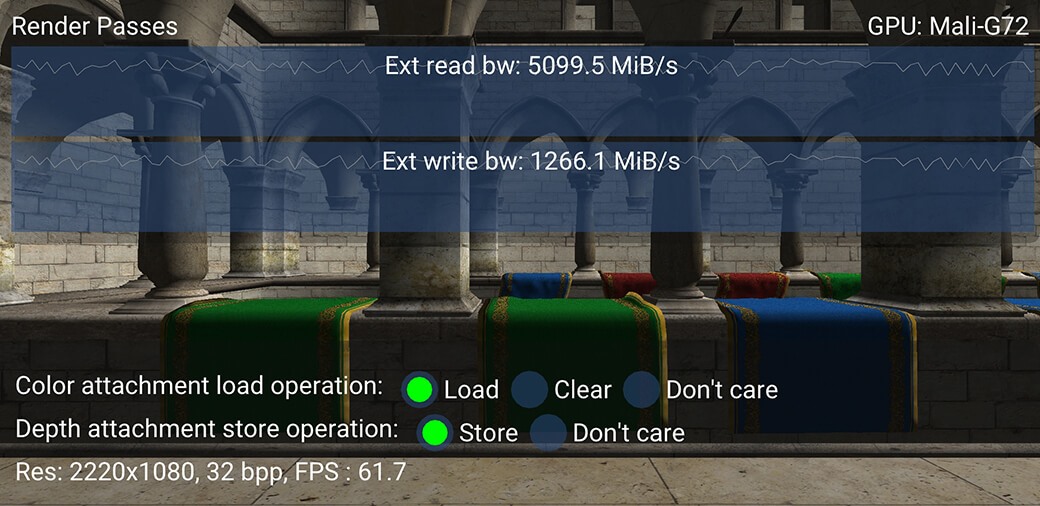
Figure 1: Render Pass Sample
An open source project - Get involved!
The best practice guide will be available on GitHub in source code form, so developers can openly try it themselves as well as create more samples and contribute to the project.
One thing to note, this is not vendor specific, our hardware counters interface is on, enabling developers to add their own hardware counters to it. Naturally, all the CPU counters work seamlessly on any Arm platform. Lastly, the framework also supports glTF, so adding scenes and other models is very easy.

By Ben Walshe
Re-use is only permitted for informational and non-commercial or personal use only.
