Bringing Harbor container registry support to Arm Neoverse
Learn how Harbor gained upstream arm64 support through native builds, multi-architecture releases, and upstream collaboration for Arm-based cloud platforms

Harbor is a CNCF Graduated open-source registry that stores, signs, scans, and replicates container images and OCI artifacts. As more Kubernetes and cloud native platforms run on Arm-based infrastructure, includingAWS Graviton, Google Axion, Azure Cobalt, and Arm Neoverse systems, upstream arm64 support in Harbor became an important requirement.
This article explains how upstream collaboration added native arm64 support across Harbor’s build, packaging, and release workflows. The work landed in the main Harbor repository. It preserved the existing amd64 release path and added the release infrastructure needed for arm64 artifacts and multi-architecture image publishing.
By the end of this blog, you will understand what changed upstream, why Harbor’s architecture required changes beyond a single container build, and how the contribution was validated through build, package, and release evidence.
Why Harbor on Arm matters
Container registries sit directly in the software delivery path. Every image push, Kubernetes deployment, vulnerability scan, and replication job depends on a registry that is available and close to the workloads it serves.
For teams standardizing on Arm-based infrastructure, Harbor support on arm64 removes architecture-specific exceptions from the registry path:
- Build, store, scan, and deploy workflows no longer require a Harbor-specific x86 exception.
- Arm-based Kubernetes clusters do not require an x86-only registry node for Harbor.
- Harbor release artifacts support offline and air-gapped deployments, not only container images.
- The main Harbor repository becomes the upstream location for arm64 build and packaging fixes.
The goal was upstream support, not a special Harbor distribution for Arm.
Enable Harbor on arm64
The core enablement landed in Harbor PR #22311, “Full Multi-Architecture Enablement for Harbor (amd64 + arm64).” The pull request merged on May 12, 2026 after 45 commits and changes across Harbor’s build, packaging, and release workflow.
The changes covered four areas.
1. Native arm64 package coverage
Harbor’s build and packaging workflow gained an architecture-aware matrix that produces artifacts for both amd64 and arm64. The arm64 package path uses GitHub-hosted ubuntu-24.04-arm runners instead of QEMU emulation for the release workflow.
2. Architecture-aware build plumbing
The build system now propagates the target architecture through the relevant Makefile and Docker build paths. Harbor services can be built as native linux/amd64 or linux/arm64 images while preserving the existing amd64 build path.
This separation was important. The Arm contribution had to add arm64 parity without changing the existing amd64 artifact path.
3. Per-architecture release packages
Harbor supports online and offline installation, including air-gapped environments. Arm support therefore had to include more than container images. The release workflow needed to produce per-architecture packages so operators can install Harbor on Arm servers through the existing release model.
4. Multi-architecture image publishing
The publishing workflow creates multi-architecture manifests so a single Harbor image tag resolves to the correct platform. On an Arm server, an image pull resolves to linux/arm64. On an x86 server, the same tag resolves to linux/amd64.
This is the intended developer experience:
docker pull goharbor/harbor-core:<release-tag> No alternate registry. No special tag for most users. No manual architecture selection during a standard image pull path.
Architecture: why this was more than one image
Harbor is not a single container. It is a distributed application with API services, registry services, background jobs, scanning, caching, a database, storage integration, and a web portal. The official Harbor architecture diagram shows why the arm64 work extended across multiple service images and release artifacts.
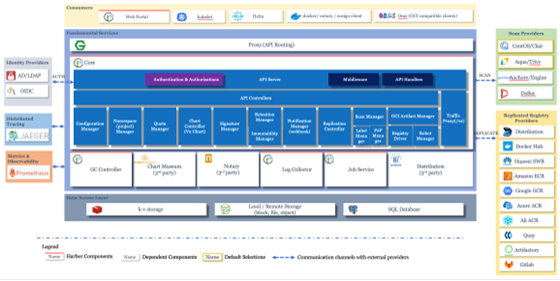
Figure 1: Official Harbor architecture diagram from the Harbor architecture wiki.
In a Harbor deployment, the registry service stores OCI content, Core handles API and project logic, JobService runs background tasks, Trivy provides scanning, Valkey supports caching and job-related state, and PostgreSQL stores Harbor metadata. If one required image or base dependency remains amd64-only, an arm64 installation can fail, require emulation, or depend on a non-upstream workaround.
The Arm-specific diagram below shows the same Harbor workflow using native linux/arm64 release artifacts on Arm Neoverse-based servers.
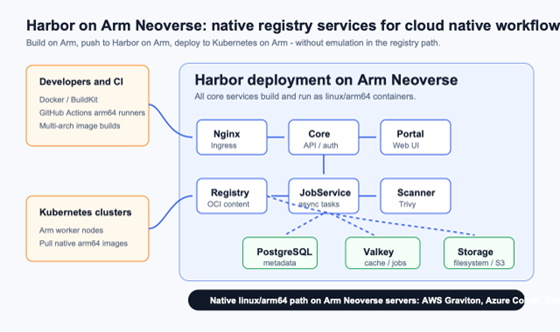
Figure 2: Simplified Harbor-on-Arm view showing the native arm64 path from build to registry to Kubernetes deployment.
At a high level, the workflow is:
- Developers and CI systems build container images for one or more architectures.
- Images and manifest lists are pushed to Harbor.
- Harbor component images are built and published as native arm64 images.
- Arm Kubernetes nodes pull native arm64 images from the same Harbor registry.
Build on Arm. Push to Harbor.. Deploy on Arm Kubernetes
Challenges
Multi-architecture enablement in a project like Harbor requires more than docker buildx and a new platform flag. The main challenges were the project’s existing build, packaging, and release assumptions.
Preserve the amd64 path
Harbor already had an establishedamd64 release path. The arm64 work needed to add architecture support without unnecessarily changing that release path. The implementation therefore preserved existing amd64 behavior where possible and added architecture-specific handling only where required.
Keep offline installers working
Public issues showed that users wanted arm64 offline packages, not only container images. The package workflow therefore had to produce per-architecture online and offline artifacts, sign and publish them, and preserve the existing amd64 naming convention where needed.
Handle package gaps
Architecture support can fail because of dependencies even when the main application code builds successfully. Harbor uses Photon OS as the base image for its service. During arm64 enablement, Valkey was a key package gap because the Photon repositories did not provide an arm64 package.
Harbor PR #23282, “fix: build valkey from source to support arm64,” addressed that gap with a conservative approach:
- Keep the existing amd64 installation path unchanged.
- Use a multi-stage Docker build for arm64.
- Compile Valkey from the upstream release tarball.
- Build Valkey with TLS support.
- Copy only the runtime binaries into the final image.
- Preserve backward-compatible redis-server and redis-cli symlinks.
The pull request validated that valkey-server 9.1.0 starts cleanly on arm64, basic SET and GET operations work, and amd64 behavior remains unchanged.
Publish real multi-architecture base images
A follow-up issue appeared in the base image publishing workflow. The goharbor/photon:5.0 base image was built by both amd64 and arm64 jobs and pushed to the same tag. The job that completed last could overwrite the tag with a single-architecture image.
Harbor PR #23334 fixed this by publishing goharbor/photon:5.0 as a single multi-architecture manifest list. This mattered because multi-architecture application images depend on correctly published base images.
Validation and release readiness
The enablement work verified that Harbor’s build, packaging, and release workflows operate on both amd64 and arm64.
|
Area |
Validation focus |
|
Build and package workflow |
Harbor package jobs run for amd64 and arm64 |
|
Native runners |
arm64 package jobs use GitHub-hosted ubuntu-24.04-arm runners |
|
Release packages |
Online and offline release plumbing accounts for both architectures |
|
Image publishing |
Component images can be assembled into multi-architecture manifests |
|
Base images |
goharbor/photon:5.0 is published as a multi-architecture manifest |
|
Valkey |
arm64 source build starts, supports TLS, and passes basic cache operations |
|
Existing amd64 path |
Existing amd64 package and build behavior is preserved |
The most important validation principle was parity: Harbor on Arm should use the same upstream release model, not a separate distribution channel.
For a registry, release readiness involves more than starting containers. Harbor has to package, publish, and install consistently. The arm64 work therefore focused on the complete release workflow:
- Keep the existing amd64 installation path stable where possible.
- Use native arm64 builds instead of QEMU to increase confidence in the packaging workflow.
- Produce per-architecture installer artifacts for online and offline deployments.
- Publish manifest lists so standard image pulls resolve to the correct architecture.
- Treat dependency gaps, such as Valkey packaging, as arm64 release blockers.
- Keep follow-up fixes in the main Harbor repository instead of relying on long-lived external forks.
This approach moves an enablement effort from “it runs” to “it can be released and maintained.”
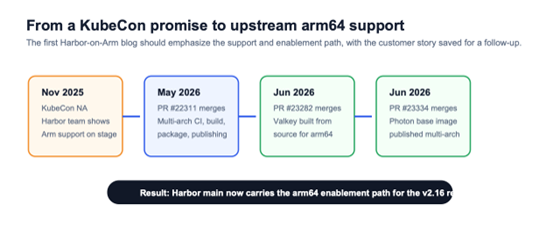
Figure 3: Harbor arm64 enablement moved from public community demand and KubeCon visibility into merged upstream changes.
Community demand and the KubeCon moment
Harbor users had requested Arm support in public issues for several years. The requests covered official images, release packages, source builds, and multi-architecture image support.
Representative examples include:
#3505: arm64 builds, opened in October 2017.
#12935: arm64 offline package, opened in September 2020.
#22491: request for official arm64 images for Harbor v2.14.0, opened in October 2025.
#23069: Source build on Apple Silicon pulls amd64 dev base images, opened in April 2026.
After PR #22311 merged, maintainers closed long-running arm64 requests, including #3505 and #22491, as resolved.
The work was also highlighted at KubeCon + CloudNativeCon North America 2025. The slide below highlights multi-architecture builds, Harbor on Arm, and PR #22311.
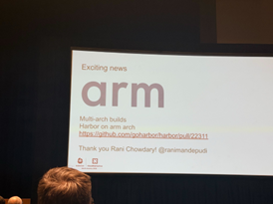
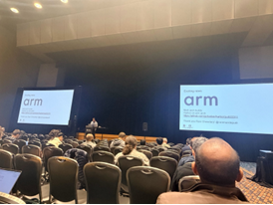
Figure 4: KubeCon + CloudNativeCon North America 2025 photos showing the Harbor on Arm slide and PR #22311.
The conference presentation highlighted the work. The engineering work that followed delivered a reviewed, repeatable upstream release path.
What this enables for developers
The release workflow is designed so an Arm server can use standard Harbor release artifacts:
wget harbor-offline-installer-<version>-arm64.tgz
tar xzf harbor-offline-installer-<version>-arm64.tgz
cd harbor
./install.sh
For published multi-architecture tags, image pulls should follow standard Docker and OCI behavior:
docker pull goharbor/harbor-core:<version>The same command resolves to the native image for the host architecture.
For contributors building from source, architecture-specific build and packaging issues now appear in the main Harbor repository, where maintainers and contributors can review and fix them together.
Lessons learned
This work highlights several lessons for other upstream Arm enablement efforts:
- Native CI matters. It catches architecture-specific issues in the workflows that produce release artifacts.
- An upstream-first approach is better than maintaining long-lived forks.
- Multi-architecture support involves more than application code. Release tooling, package naming, signing, upload paths, and manifests all matter.
- Base images must also support multi-architectures. Otherwise, component images inherit the same limitation.
- Preserving the existing amd64 path is part of the feature, not an optional refinement.
What is next
This first phase establishes the upstream Arm enablement path in Harbor. Future work includes:
- Continued dependency parity work where upstream packages lag on arm64.
- Benchmark registry operations on Arm Neoverse-based servers.
- Expand deployment guidance for Kubernetes, offline installers, and air-gapped environments.
- Publish customer deployment stories when approvals and production details become available.
The final point warrants a separate article. This article focuses on upstream support and enablement. A follow-up article can focus on real-world deployment experience, operational lessons, and production impact.
Conclusion
Harbor on Arm is more than a successful build. It moves Arm cloud native development closer to a complete upstream experience: build, store, secure, and deploy on Arm.
The key achievement is how the support was added. The work followed Harbor’s existing release model instead of creating a separate Arm-specific maintenance path. This keeps development and maintenance in the upstream project, where support for a CNCF Graduated project belongs.
This approach reflects Arm’s ongoing investment in the CNCF ecosystem: enabling Arm support within the projects that developers already use through the review and release processes that maintainers already trust.
Start exploring
The work is upstream and visible in the Harbor project:
- Harbor repository: github.com/goharbor/harbor
- Multi-architecture enablement: PR #22311
- Valkey arm64 support: PR #23282
- Multi-arch Photon base image publishing: PR #23334
- Harbor architecture overview: Architecture Overview of Harbor
- Community demand examples: #3505, #10578, #12935, #20074, #22491, #23069
- Harbor project page: goharbor.io

Re-use is only permitted for informational and non-commercial or personal use only.
