Migrating our GenAI pipeline to AWS Graviton powered by Arm Neoverse: A 40% cost reduction story
This blog post explains how Esankethik.com, an IT and AI solutions company, successfully migrated its internal GenAI pipeline to AWS Graviton Arm64.
By Hrudu Shibu
As an Arm Ambassador and a developer focused on optimizing cloud infrastructure, I have seen how quickly costs can escalate when scaling AI.
This blog post explains how Esankethik.com, an IT and AI solutions company, successfully migrated its internal GenAI pipeline to AWS Graviton Arm64. The migration delivered 40% cost savings and 25% performance gains.
The problem: When AI ambition meets exploding cloud bills
We built a scalable GenAI pipeline to automate customer support. It handled over 1,000 daily AI inference requests on AWS x86-based infrastructure. It worked. However, costs quickly escalated, with GenAI consuming 60% of our AI budget.
Scaling further meant either compromising or rethinking our infrastructure. We needed a cost-effective, high-performance alternative.
Why it matters: The imperative for sustainable AI at scale
Demand for sophisticated AI solutions is surging across industries. Yet, the high operational cost of AI inference on traditional slows adoption and limits innovation. Especially for startups and growth-stage companies.
- Industry Impact: High infra costs affect product viability and competitiveness.
- Who is Affected: Developers, architects, and decision-makers all feel the pressure to scale smartly.
- Why Now: Arm Neoverse-powered AWS Graviton instances offer a proven path to better price-performance, and greener compute.
The solution: Building a Graviton-optimized GenAI pipeline
We rebuilt and deployed our GenAI pipeline on AWS to reduce cost and improve performance. We moved deliberately to the Arm64-basedGraviton architecture, powered by Arm Neoverse. This shift cut infrastructure costs by 40% and improved AI inference performance by 20%.
Here is how we achieved it and why Arm (AWS Graviton) was the cornerstone of our strategy
Our solution involved leveraging Arm64 based AWS Graviton technology across our entire GenAI stack. This ensured all orchestration and AI inference processes was fully optimized:
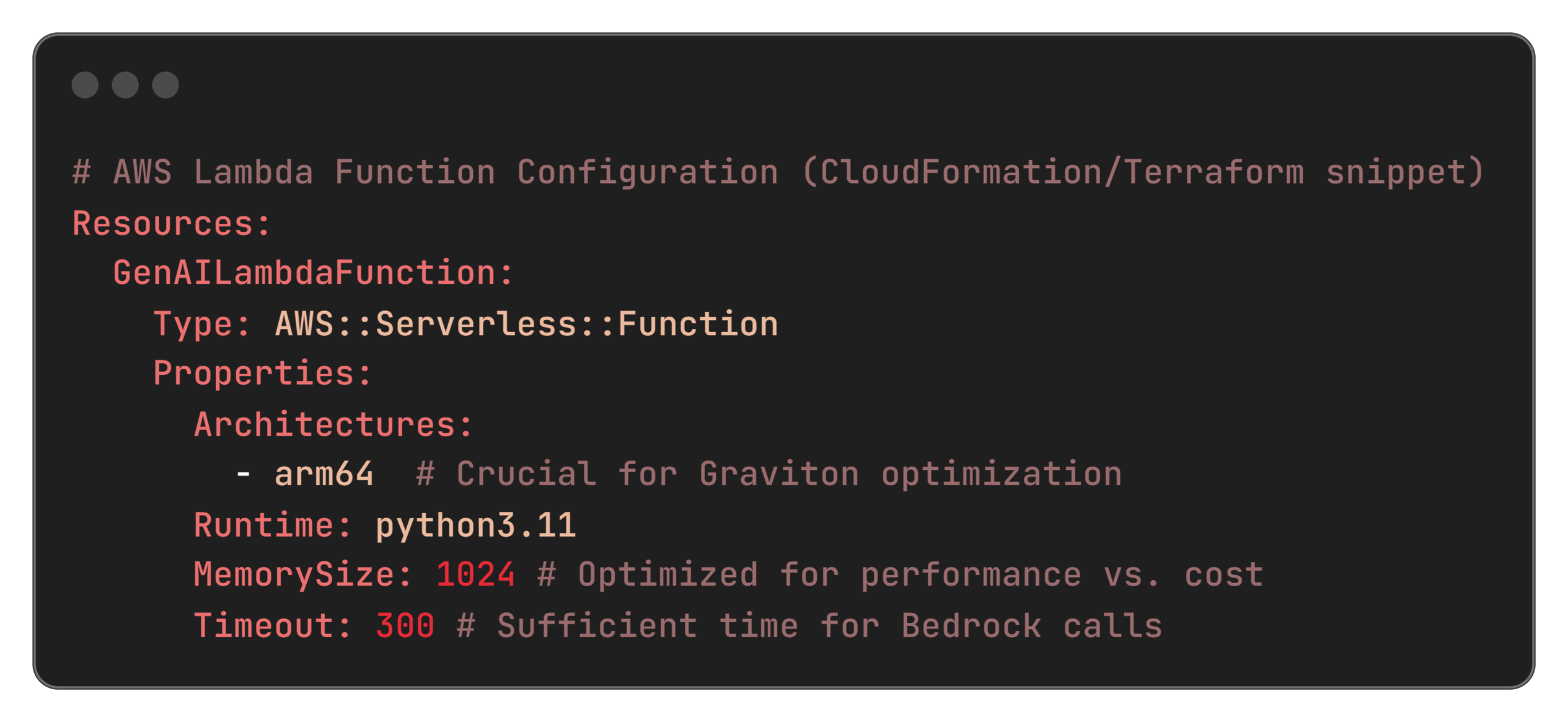
- Migrated AWS Lambda functions from x86 to Arm64 architecture (Python 3.11 runtime). These Lambdas handle core compute tasks, including requests to Bedrock for AI inference.
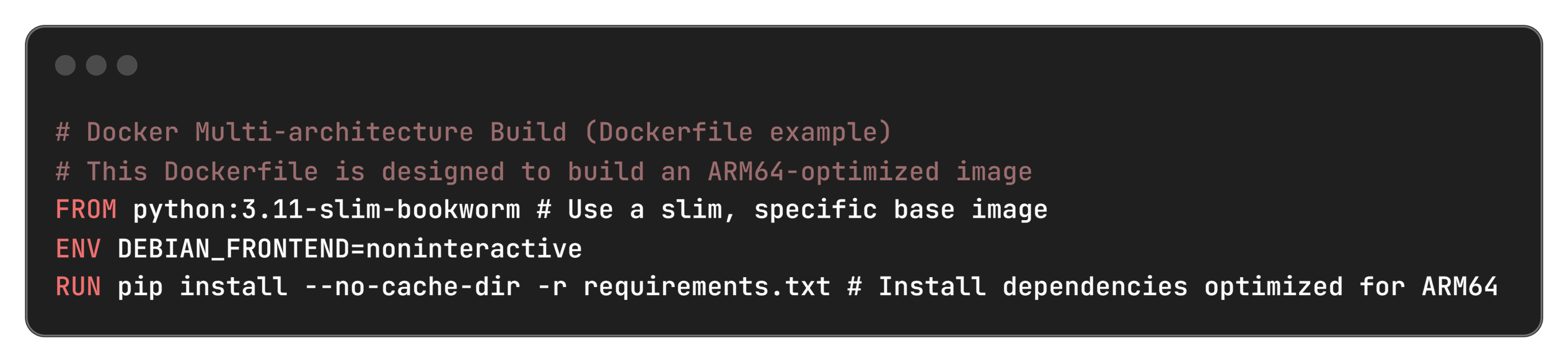
- Rebuilt Docker containers for multi-architecture support, specifically linux/arm64. These containers are used for batch processing and other high-volume workloads, orchestrating calls to the Bedrock models.
- Optimized Python dependencies to ensure full Arm64 compatibility. Built from source when pre-compiled wheels were unavailable.
- Used Infrastructure as Code (IaC) with CloudFormation and Terraform for consistent, repeatable Arm64 deployments, including Arm64-specific AMI selection for AWS EC2 instances.
- Implemented CI/CD with Arm64-specific build pipelines using Docker Buildx for cross-platform compilation.
Steps we followed for our migration
- Initial audit & local testing: We reviewed all Python dependencies for Arm64 compatibility. We started local development using Docker with --platform linux/arm64.
- Parallel deployment: We deployed Arm64-based AWSinstances and Lambda functions alongside our x86 infrastructure behind an AWS Application Load Balancer.
- Gradual traffic shift & validation: We gradually shifted live traffic to the Arm64-based deployments. We validated compatibility, performance, and stability without downtime.
- Consolidation & optimization: Once validated, we moved all workloads to Arm64. We consolidated where possible to simpler, more efficient architectures, and fine-tuning configurations.
We chose AWS Graviton processors, built on Arm Neoverse cores, for their balance of cost savings, raw performance, and energy efficiency. They are ideal for our compute-intensive AI inference workloads and the surrounding pipeline orchestration.
Technical details
Here is a deeper look into the stack, tools, and configurations that powered our migration.
Cloud infrastructure
- AWS Lambda: Arm64 runtime with Python 3.11 for event-driven, serverless inference orchestration.
- Amazon Bedrock: Claude 3 Haiku model for core AI inference capabilities. Our Arm64-optimized Lambda functions and EC2 instances facilitate highly efficient interactions with this model.
- AWS EC2: Graviton instances (e.g., t4g.medium, c7g.large), powered by Arm Neoverse. Used for high-volume, dedicated workloads requiring more sustained compute. Including those that call AWS Bedrock for inference.
- Container Platform: Docker with linux/arm64 builds to ensure native Arm64 execution for all application components.
Development stack
- Language: Python 3.11, ensuring access to the latest Arm64-optimized libraries.
- Key Dependencies: boto3 (for AWS API interaction), FastAPI, uvicorn (for API endpoints) – all verified for Arm64 compatibility.
- Build Tools: Docker Buildx for seamless multi-architecture container compilation.
- IaC: CloudFormation and Terraform, configured to provision Arm64 resources.
Key configurations
YAML:
Docker file:
Challenges and solutions
Our migration was not without its hurdles, but each challenge presented an opportunity to refine our approach and deepen our understanding of Arm64 optimization.
1. Missing Arm64 Wheels
- Fixed by using --platform linux_aarch64 and building from source.
- Code:
Bash:

2. Cross-platform builds
- Solved with Docker Buildx to simplify multi-arch compilation.

3. IaC AMI Selection
- Used dynamic AMI lookup for Arm64 in Terraform.
Terraform example: 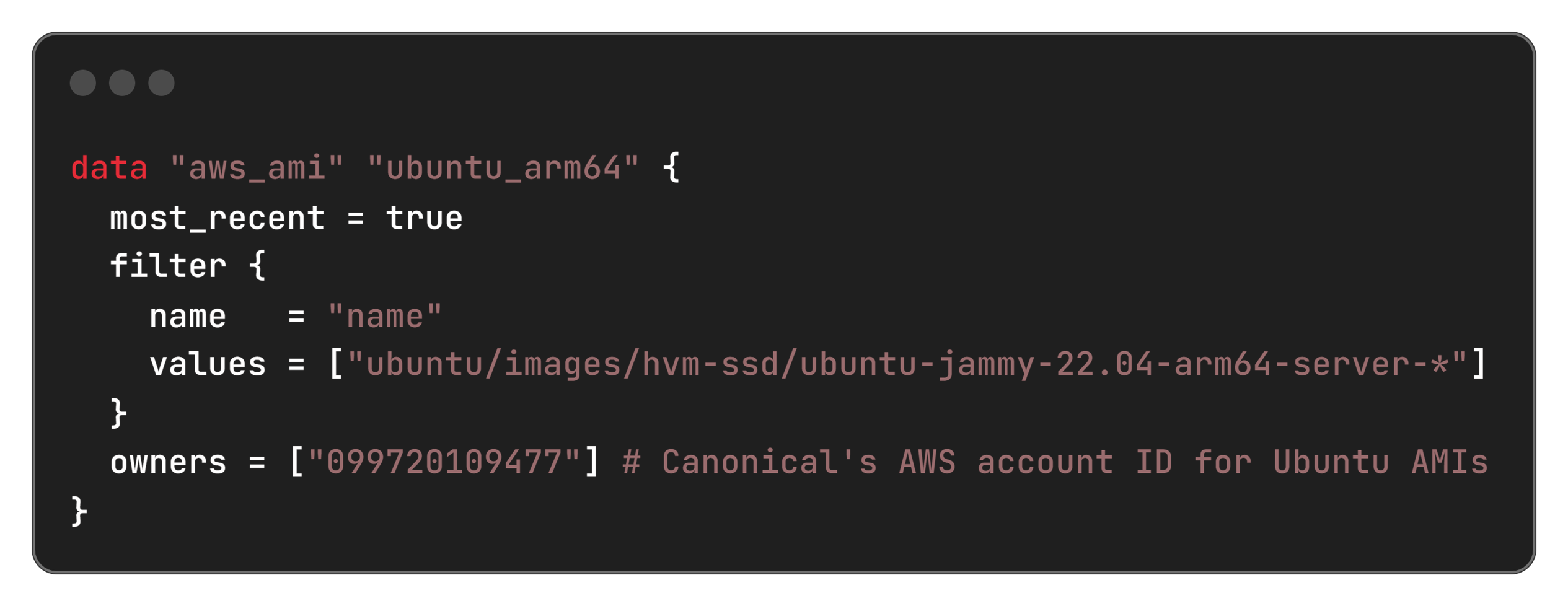
4. Performance testing
- Ran custom benchmarks (ab, Python scripts) and tracked CloudWatch metrics.
Impact: Unlocking AI potential with unprecedented efficiency
Migrating to Arm Neoverse-based AWS Graviton architecture, powered by Arm Neoverse, was a game-changer for our GenAI pipeline. The results were immediate and measurable, delivering significant cost savings and performance gains across the board. This was more than a performance upgrade. It reshaped our Total Cost of Ownership (TCO) strategy by proving how Arm64-based architectures can scale savings in a tangible, repeatable way.
Cost savings
- AWS Lambda costs: Reduced from $200 to $120 per million requests (40% savings)
- AWS EC2 costs: t4g.medium at $24/month vs t3.medium at $40/month (40% savings)
- Annual savings: $960+ per workload, $4,800 across 5 production workloads
Performance improvements
- Inference latency: Improved from 1.2s to 0.9s (25% faster)
- Cold start time: Reduced from 800ms to 600ms (25% faster)
- Throughput: Increased from 100 to 125 requests/second (25% higher)
- Memory efficiency: 15% better memory utilization
Operational benefits
- Deployment time: Reduced by 30% with optimized Arm64 builds
- Carbon footprint: 40% reduction in power consumption
- Scalability: Better auto-scaling performance under load
Cost savings at scale
As illustrated below, our cost savings were substantial across various request volumes, reaching 40% across the board.
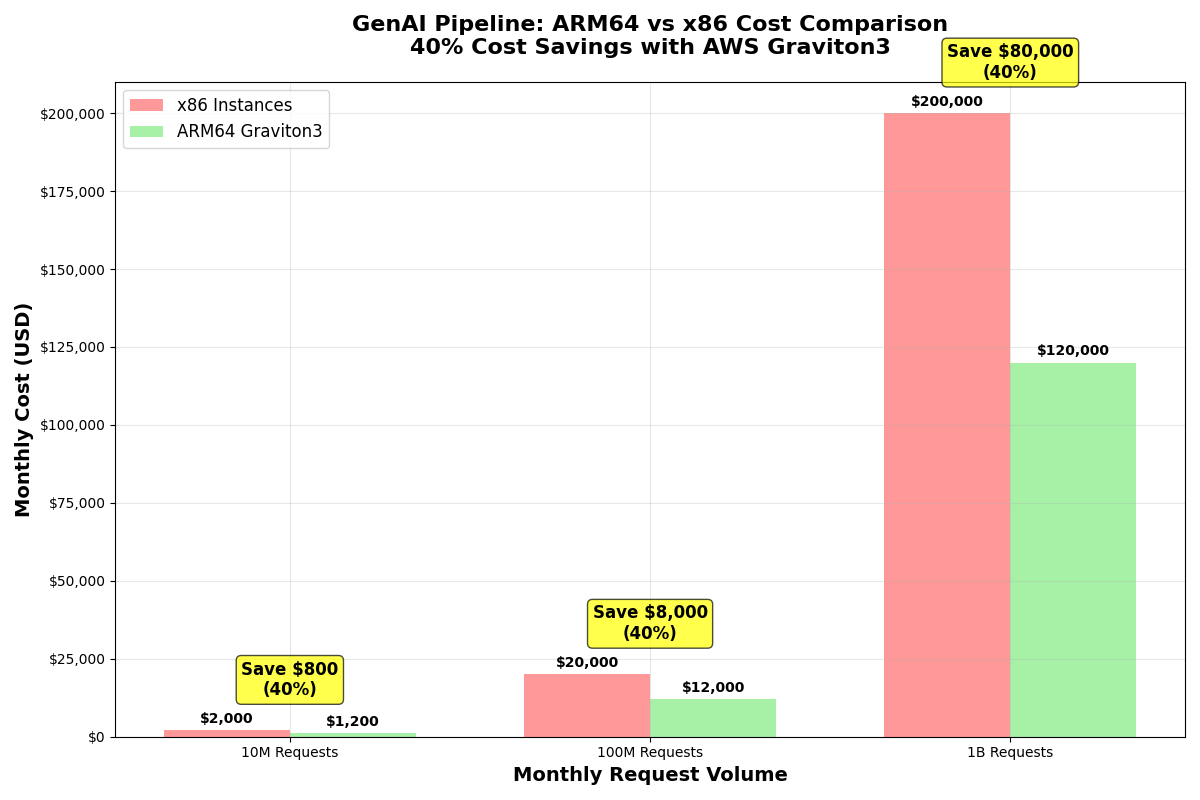
Figure 1: Comparison of Monthly Costs for x86 vs. Arm64-based AWS Graviton3 Instances, showing 40% savings across the board
Long-term financial and performance gains
Our projections confirm that these savings grow significantly over time, leading to substantial cumulative benefits.
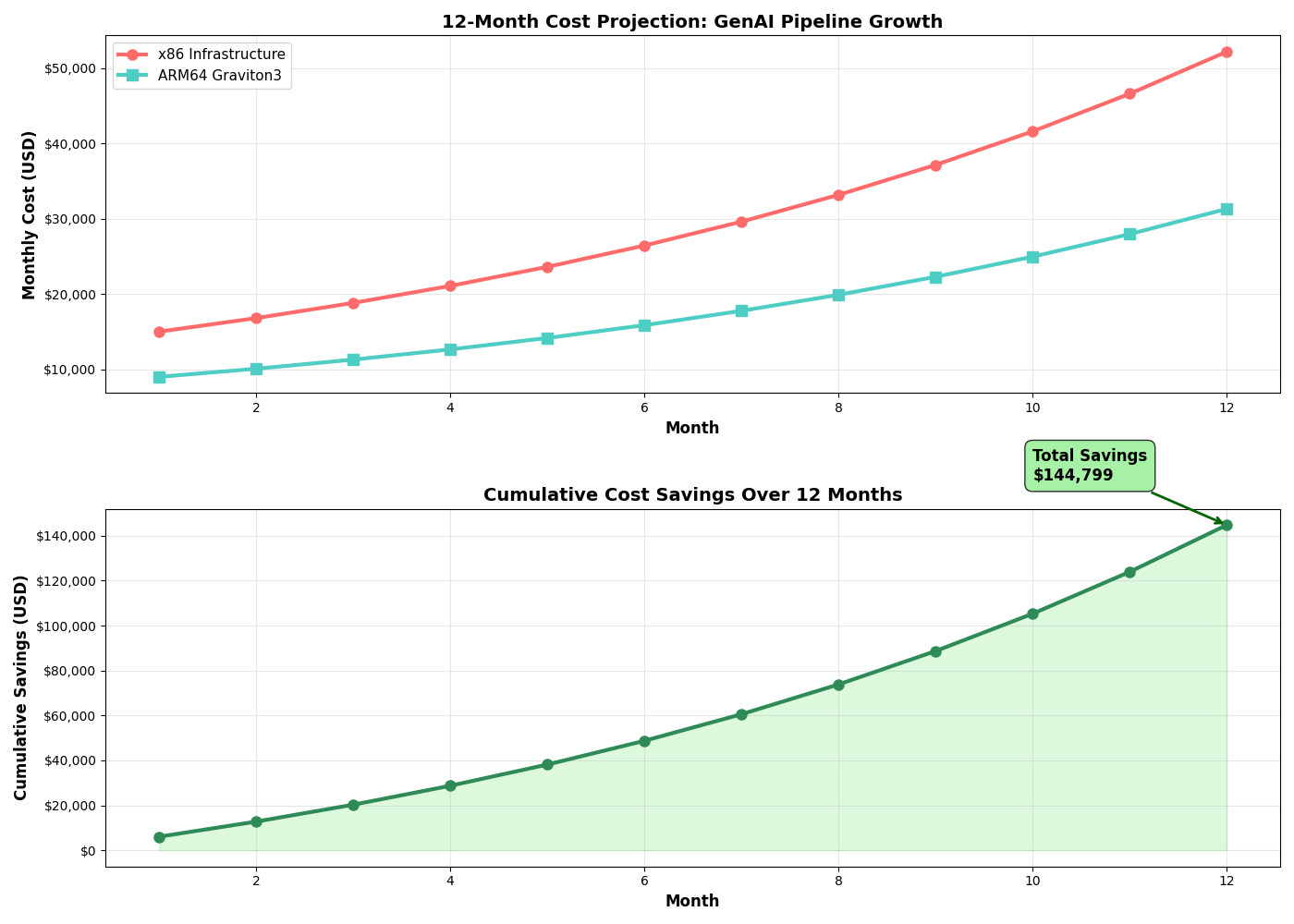
Figure 2: 12-Month Cost Projection and Cumulative Savings, highlighting the long-term financial benefits of migrating to Arm64-based Graviton3.
Beyond financial metrics, Arm-based AWS Graviton instances also delivered significant performance and efficiency improvements:
|
Metric |
x86 (Before Migration) |
Arm64 (After Migration) |
Improvement |
|
Lambda Cost (per 1M requests) |
$200 |
$120 |
40% Savings |
|
EC2 t*.medium Instance Cost |
~$40/month (t3.medium) |
~$24/month (t4g.medium) |
40% Savings |
|
Inference Latency |
1.2 seconds |
0.9 seconds |
25% Faster |
|
Cold Start Time |
800 milliseconds |
600 milliseconds |
25% Faster |
|
Throughput |
100 requests/second |
125 requests/second |
25% Higher |
|
Memory Efficiency |
1.0x |
1.15x |
15% Better |
|
Annual Savings (per workload) |
N/A |
$960+ |
Significant |
|
Deployment Time |
1.0x |
0.7x |
30% Faster |
|
Carbon Footprint |
1.0x |
0.6x |
40% Reduction |
This radar chart visually summarizes our performance and efficiency gains:
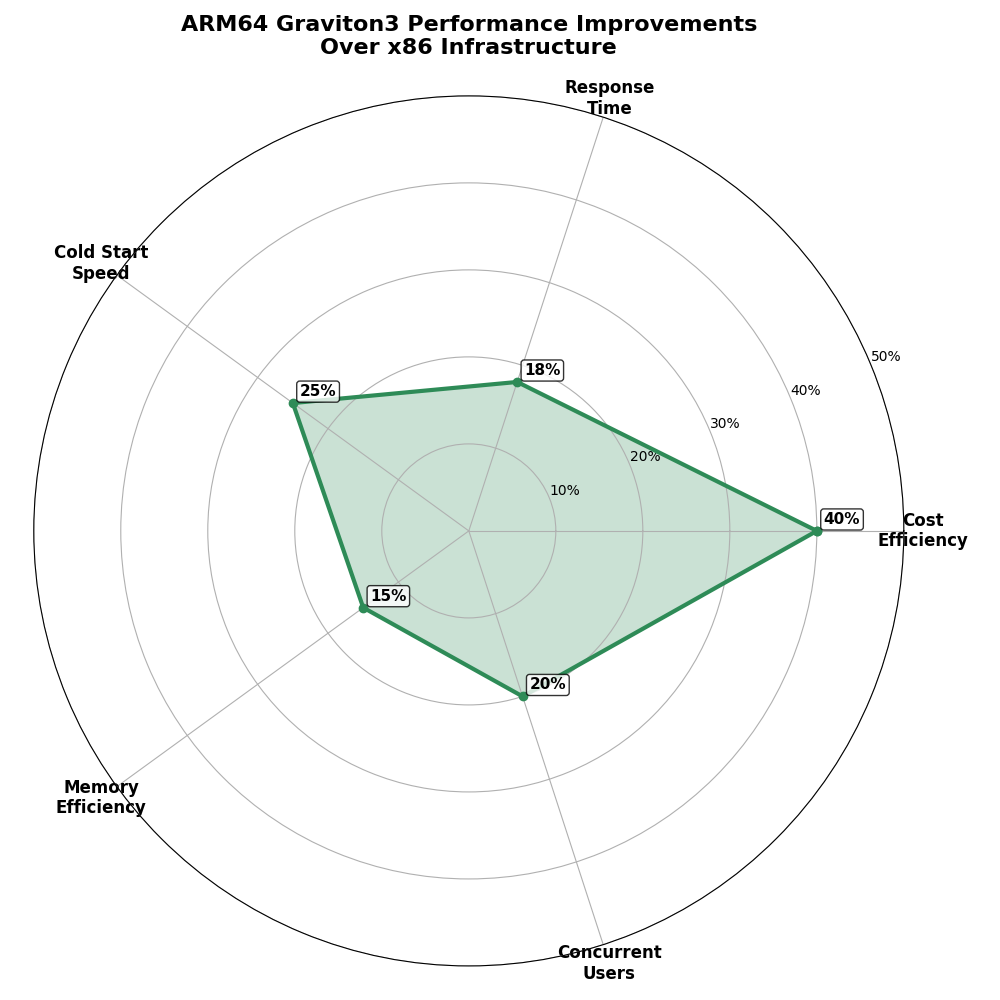
Figure 3: Radar Chart illustrating key performance improvements of Arm64-basedAWS Graviton3 over x86 infrastructure.
Beyond the numbers, we experienced tangible operational benefits:
- Significant annual savings: Our first workload saved over $960 per year. With five production workloads, we saved more than $4,800 annually. These savings directly improved our TCO and freed up budget for further AI innovation and scaling.
- Enhanced scalability: Our pipeline now handles higher volumes with better auto-scaling. Performance stays consistent even during peak times.
Environmental impact
Finally, adopting Arm-based AWS Graviton instances significantly reduced our environmental footprint.
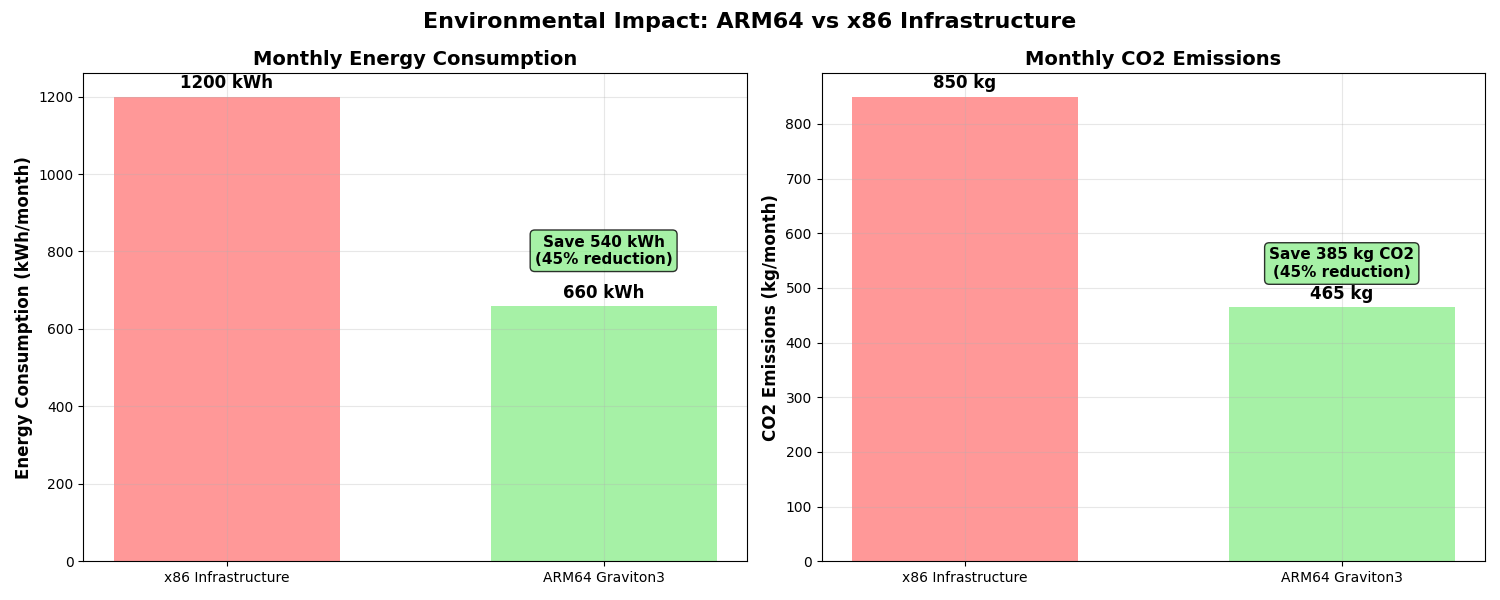
Figure 4: Comparison of Monthly Energy Consumption and CO2 Emissions for x86 vs. Arm64-based AWS Graviton3 Infrastructure, showing a 45% reduction.
The 40% reduction in power consumption aligns with our sustainability goals. Making our AI solution not just performant but also responsible.
What is next: Be part of the Graviton revolution
Our cost-optimized GenAI pipeline with AWS Graviton and Arm Neoverse proved that modern AI can be both powerful and efficient.
Ready to explore it yourself?
- Check the code: Visit my GitHub repo to get started.
- Try it out: Use our deployment guides to launch your own pipeline.
- Watch the demo: See the performance first-hand.
- Join the community: Share feedback, contribute, or collaborate.
- Tell your story: Migrating to Arm? Let us know, we would love to hear it!
Code, repos, and further reading
GitHub Repository:
Documentation:
AWS Resources:
Benchmarking Tools:
Key takeaways and tips for other developers
Before migration
- Check all Python packages for Arm64 support early.
- Test locally with Docker (--platform linux/arm64).
- Roll out gradually—start in parallel with x86.
During Migration
- Use IaC (CloudFormation/Terraform) for consistent deployment.
- Rely on AWS services like Lambda & Bedrock—they handle Arm64 well.
- Monitor performance (CloudWatch: x86 vs Arm64).
Best Practices
- Build multi-arch containers using docker buildx.
- Add Arm64 to CI/CD testing.
- Track cost savings via AWS Cost Explorer.
Watch out for
- Not all libs are Arm64-ready, test everything.
- Avoid full migration at once, start small.
- Don’t skip performance testing, results vary.
Learn more about migrating to Arm Cloud
About the author
Hrudu Shibu is an Arm Ambassador with a strong passion for scalable cloud solutions and system automation. With hands-on expertise in enterprise IT systems, compliance frameworks, and developer tooling, he actively contributes to the developer community through open-source projects and technical writing.

By Hrudu Shibu
Re-use is only permitted for informational and non-commercial or personal use only.
