Configuring Armv8-M systems with CMSIS-Zone
Learn how to configure Armv8-M systems with CMSIS-Zone in this tutorial from Arm.

The configuration of a microcontroller system that includes TrustZone-M or several processors can be difficult, as the application software of the system is developed with multiple sub-projects that share common memory and a set of peripherals. Furthermore, Arm Cortex-M23/M33 based microcontrollers contain security features such as:
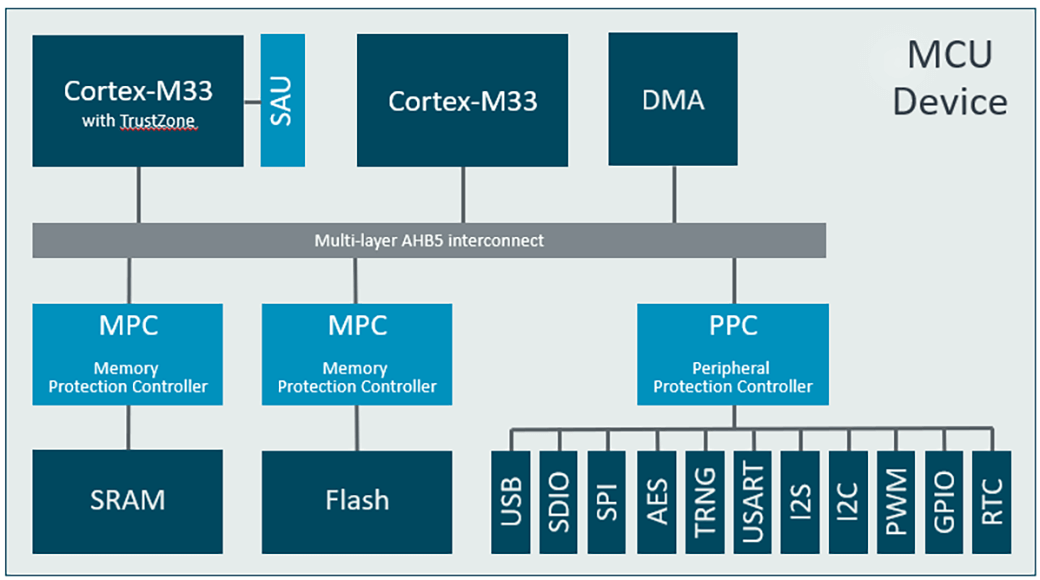
- SAU: Secure Attribute Unit that implements TrustZone-M on Cortex-M23/M33.
- MPC: Memory Protection Controller that configures system-wide access rights to memory.
- PPC: Peripheral Protection Controller that configures system-wide access rights to peripherals.
The SAU, MPC, PPC need a consistent setup across the various projects that matches with the configuration of the development tools (especially the linker script). CMSIS-Zone manages even systems that contain several processors. The figure below shows a multi-processor system where peripheral and memory are shared across two Cortex-M33 processors.
To aid the system designer and software developer, Arm is extending the CMSIS software and tools framework with CMSIS-Zone. It defines methods to describe system resources and to partition these resources into multiple projects and execution areas. The system resources may include multiple processors, memory areas, peripherals and related interrupts.
GUI for resource assignments
CMSIS-Zone includes an utility that:
- displays all available system resources including memory and peripherals
- allows to partition memory and assign resources to sub-systems.
- supports the setup of secure, non-secure, and MPU protected execution zones with assignment of memory, peripherals, and interrupts.
- provides a data model for the generation of configuration files for tool and hardware setup.
The CMSIS-Zone utility is Eclipse-based and stores the relevant information in an XML format using the following file types:
| File type | Description |
|---|---|
| *.rzone | Stores the available system resources (processors, memory, peripherals). |
| *.azone | Stores the system partitioning which includes assignments and memory areas for a related .rzone file. |
| *.fzone | CMSIS-Zone data input file for FreeMarker as explained in Generator Data Model. |
Multi-step approach
The CMSIS-Zone utility supports a multi-step approach which gives the system architect better control. The steps for a multi-processor system could therefore look like:
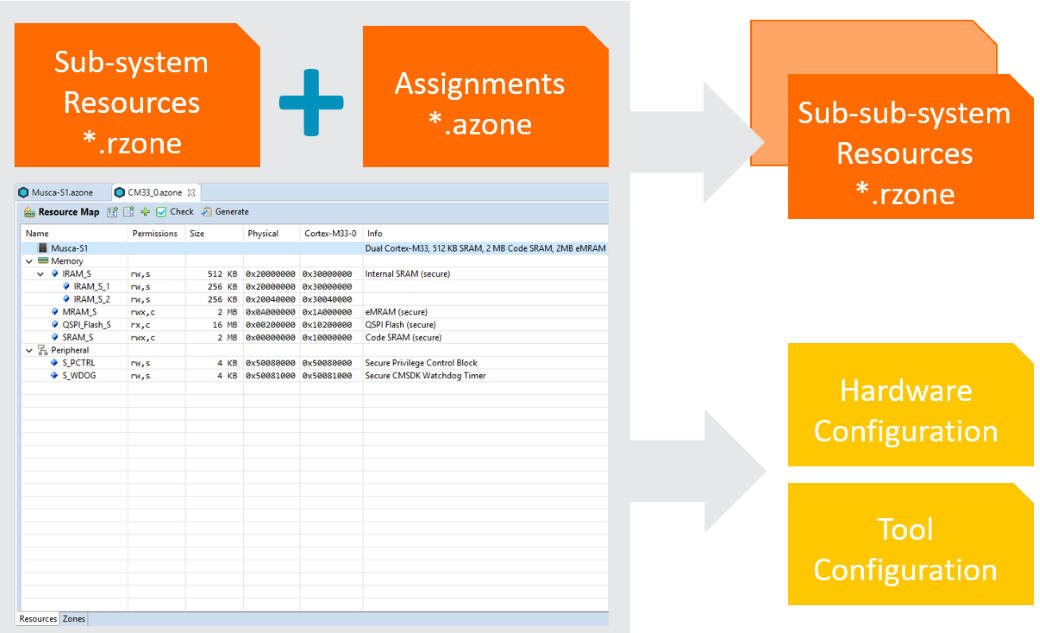
- Split the resources of the multi-processor system into single processor sub-systems. Thus, only the resources of the sub-system are shown in the next step.
- For a processor with TrustZone-M you may now create the partitions for secure and non-secure execution.
- In the last step, you may configure the MPU (memory projection unit) regions for memory and peripherals to enable process separation, for example in an RTOS system.
The separation of resource (*.rzone) and assignment (*.azone) information makes it possible to update the resource information independent of the settings or assignments. The user interface of the CMSIS-Zone utility combines both files into one view and makes it easy to distribute the available system resources to sub-projects. The Generate function of the utility creates sub-system resource files that provide the developer of the various sub-projects with the information of memory and peripherals that is relevant.
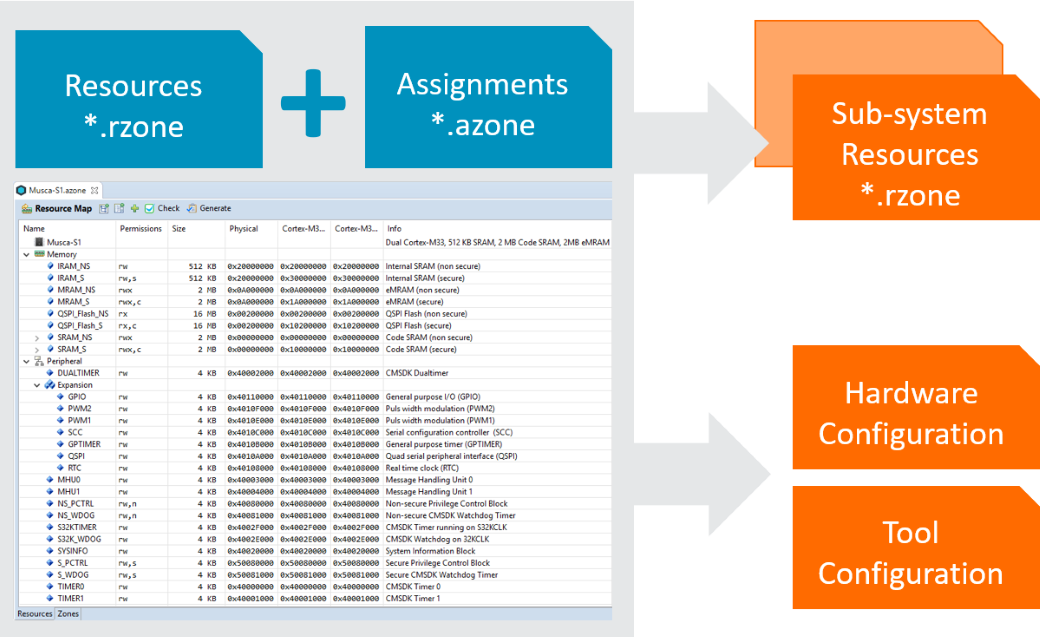
The resource file of a sub-system may be loaded again with the CMSIS-Zone utility. While this multi-step approach gives better control to the system architect, also it shows the software developer only the memory regions and peripherals that are available to the sub-system. Other resources cannot be accessed. This allows to create complex applications with independent teams, as the configuration settings of the various sub-projects are clearly separated.
Currently, the Eclipse-based CMSIS-Zone utility is available as pre-release from GitHub. Several example projects are already provided in the repository that show the configuration for some Cortex-M33 systems. Until October 2019, CMSIS-Zone will be finalized and later integrated into the standard CMSIS deliverables. The CMSIS-Zone configuration will get integrated into the Trusted Firmware for Cortex-M systems (TF-M) and should simplify the configuration of this comprehensive security software stack.
The following video shows how to operate the CMSIS-Zone utility.
Update
We have released version 1.1.0! Please download the CMSIS-Zone utility below and use it for configuring your own hardware system.

Re-use is only permitted for informational and non-commercial or personal use only.
