Product update: Arm Development Studio 2026.0 available now
Explore Arm Development Studio 2026.0, featuring Arm SoC Analyzer, enhanced debugging, toolchain updates, and faster SoC bring-up workflows

Arm Development Studio 2026.0 is now available. This release introduces Arm SoC Analyzer and updates Arm Toolchain for Embedded Professional, Arm Debugger, and Fixed Virtual Platforms.
Together, these updates support the development lifecycle from hardware validation and board bring-up to software development, debugging, and performance optimization.
Introducing Arm SoC Analyzer
Arm Development Studio 2026.0 introduces Arm SoC Analyzer. This board bring-up and diagnostics tool supports the hardware design lifecycle through low-level inspection, validation, and configuration of Arm-based systems.
As SoCs become more complex, engineers must validate more components during silicon and platform bring-up. Before software debugging can begin, teams must establish debug connectivity, discover CoreSight infrastructure, validate trace paths, configure platform settings, and diagnose hardware integration issues.
Bring-up and validation workflows are often repeated across multiple silicon revisions, FPGA prototypes, and emulation environments. Arm SoC Analyzer addresses these requirements with a dedicated environment for low-level, actionable hardware diagnostics and a faster path to enable functional debug environments.
Key capabilities include:
Discover and understand the platform
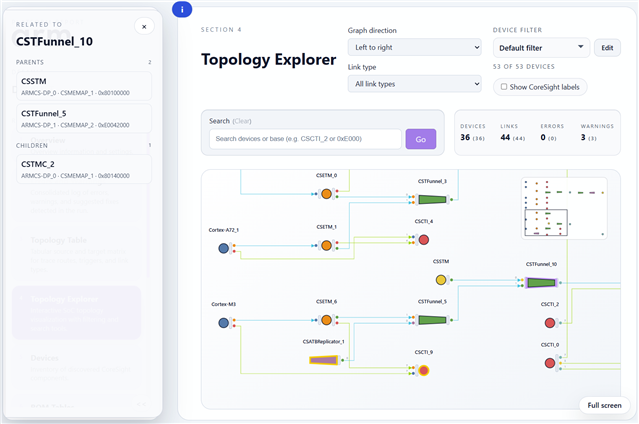
Engineers can discover TAP scan chains, CoreSight Access Ports, ROM tables, and CoreSight topology automatically. This helps teams understand how debug and trace infrastructure is connected across the platform and identify integration issues before software debugging begins.
Inspect and validate hardware
Engineers can access memory, registers, and peripherals through CoreSight infrastructure and data-driven target descriptions. This helps teams verify hardware configuration, inspect device state, and diagnose bring-up issues without requiring fully functional software.
Diagnose integration issues
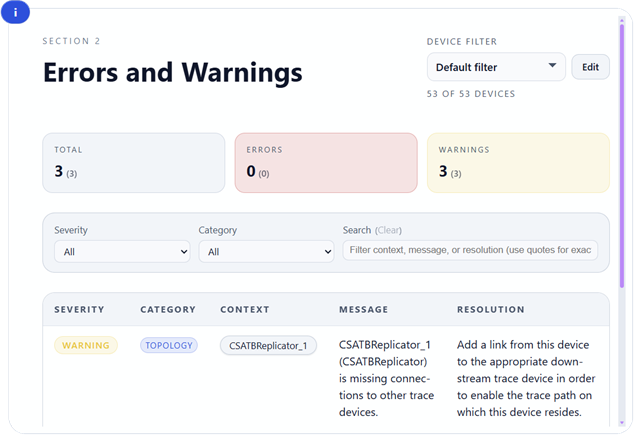
Topology validation provides visibility into the underlying debug infrastructure. Engineers can use these capabilities to identify missing connections, inaccessible devices, powered-down components, and other hardware integration problems that can delay bring-up.
Automate validation workflows
Jython scripting enables engineers to automate discovery, inspection, and validation tasks. This helps teams create repeatable workflows for silicon revisions, FPGA prototypes, and emulation environments.
Accelerate the transition to software debug
After validation, Arm SoC Analyzer can generate platform configurations for Arm Debugger allowing users to perform source-level debug and run control. This reduces manual setup effort and helps engineers move more quickly from hardware bring-up to software debugging.
Teams can share SoC Analyzer reports with collaborators, allowing them to inspect the platform topology and status.
Arm Toolchain for Embedded Professional 22.1
Arm Development Studio 2026.0 updates Arm Toolchain for Embedded Professional (ATfEP) to version 22.1.0.
ATfEP is Arm's LLVM-based embedded C/C++ toolchain for Arm-based systems and newer Arm architectures.
This release includes updates to optimization, standards compliance, architecture support, and developer workflows. It also includes LLVM-libc as an optional overlay for developers who want to evaluate the next generation of runtime library technology.
For complete details, see the Arm Toolchain for Embedded Professional release notes. To learn about recent LLVM developments that influence Arm toolchain technology, read the blog What's New in LLVM 22?
Arm Debugger 6.10
Arm Debugger 6.10 introduces enhanced visibility into processor and system state. The info registers and info all-registers commands have a new /d parameter to show register size, access, location information, and bitfields. For Armv8-M, Armv7-M, and Armv6-M, the Commands view now reports additional details about processor exceptions when they occur.
Updated platform support
Arm Development Studio 2026.0 also includes Eclipse Platform 4.38 integration and Fixed Virtual Platforms based on Fast Models 11.31.
Together with the Arm SoC Analyzer and updates to Arm Toolchain for Embedded Professional and Arm Debugger, these enhancements support the development lifecycle. They support SoC bring-up, hardware validation, software debugging, performance analysis, and optimization.
Available now
Arm Development Studio installers are available from the Arm Developer website. You can purchase user-based licenses from the Arm Developer Store or through our distributor network.
- Existing Arm Development Studio users with valid support and maintenance can upgrade to this version free of charge.
- Arm Development Studio is also available as a component of Arm Success Kits.
- To obtain an evaluation license for Arm Development Studio, contact one of our regional distributors. The distributor will be the main point of contact to assist end users in their evaluation of Arm Development Studio and their purchase options.
Arm Development Studio 2026.0 is now available. For more information, see the Release Note.

Re-use is only permitted for informational and non-commercial or personal use only.
