Making Edge AI development more productive
Explore how CMSIS-Ethos-U, the SDS Framework, and CMSIS Developer Assistant simplify Edge AI deployment, data replay, integration and debugging on devices
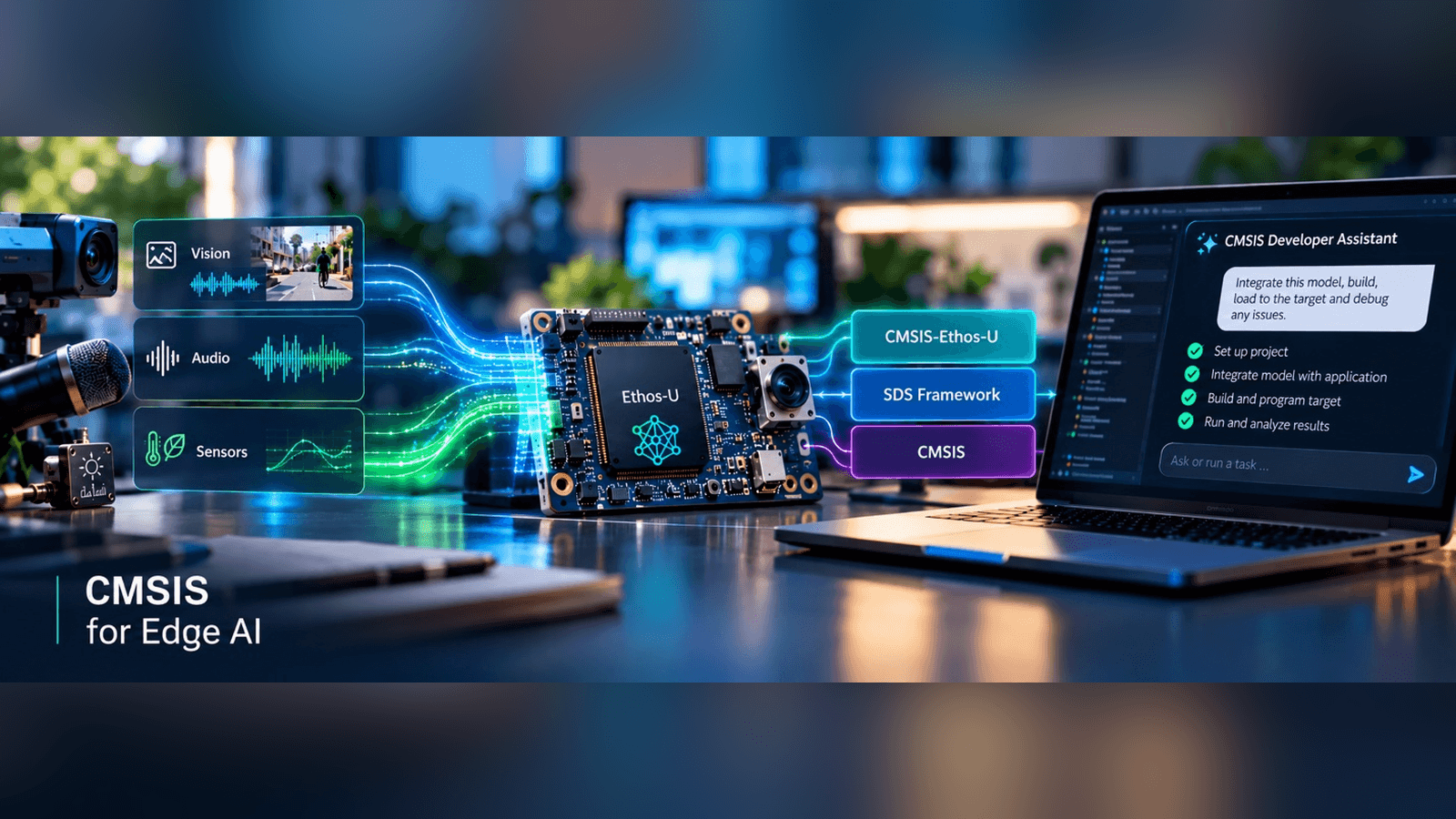
Building an Edge AI application involves much more than deploying an ML model. Developers need to connect models to real sensor data, DSP pipelines, application software, memory and compute resources, RTOS environments, AI accelerators, and ultimately the target hardware. The difficult part is often not getting the model to run once, but creating a development loop in which the complete system can be integrated, tested, debugged, and improved efficiently.
CMSIS provides building blocks for making this development loop more productive. CMSIS-Ethos-U, the Synchronous Data Stream (SDS) Framework, and the CMSIS Developer Assistant address different parts of the workflow. Together, they support hardware-aware ML deployment, reproducible real-world data to AI-assisted integration, debugging, and testing on the target.
A productive Edge AI development loop addresses these related challenges:
- Deploy across different hardware – move optimized ML models onto devices with different NPUs, memory architectures, and system configurations without reinventing the deployment flow for every target.
- Make real-world data reproducible – capture sensor, audio, and video data from real systems and replay the same conditions for development, testing, optimization, and validation.
- Integrate and debug the complete system – bring models, data pipelines, middleware, application software, and hardware together, then efficiently build, run, observe, debug, and iterate on the target.
Deploy across different hardware
Moving an ML model from a development environment to the final embedded target requires more than an NPU driver. The deployment flow needs to understand the target's NPU configuration, memory architecture, and system characteristics. As Ethos-U is integrated into a growing range of microcontrollers and SoCs, providing this information consistently becomes increasingly important.
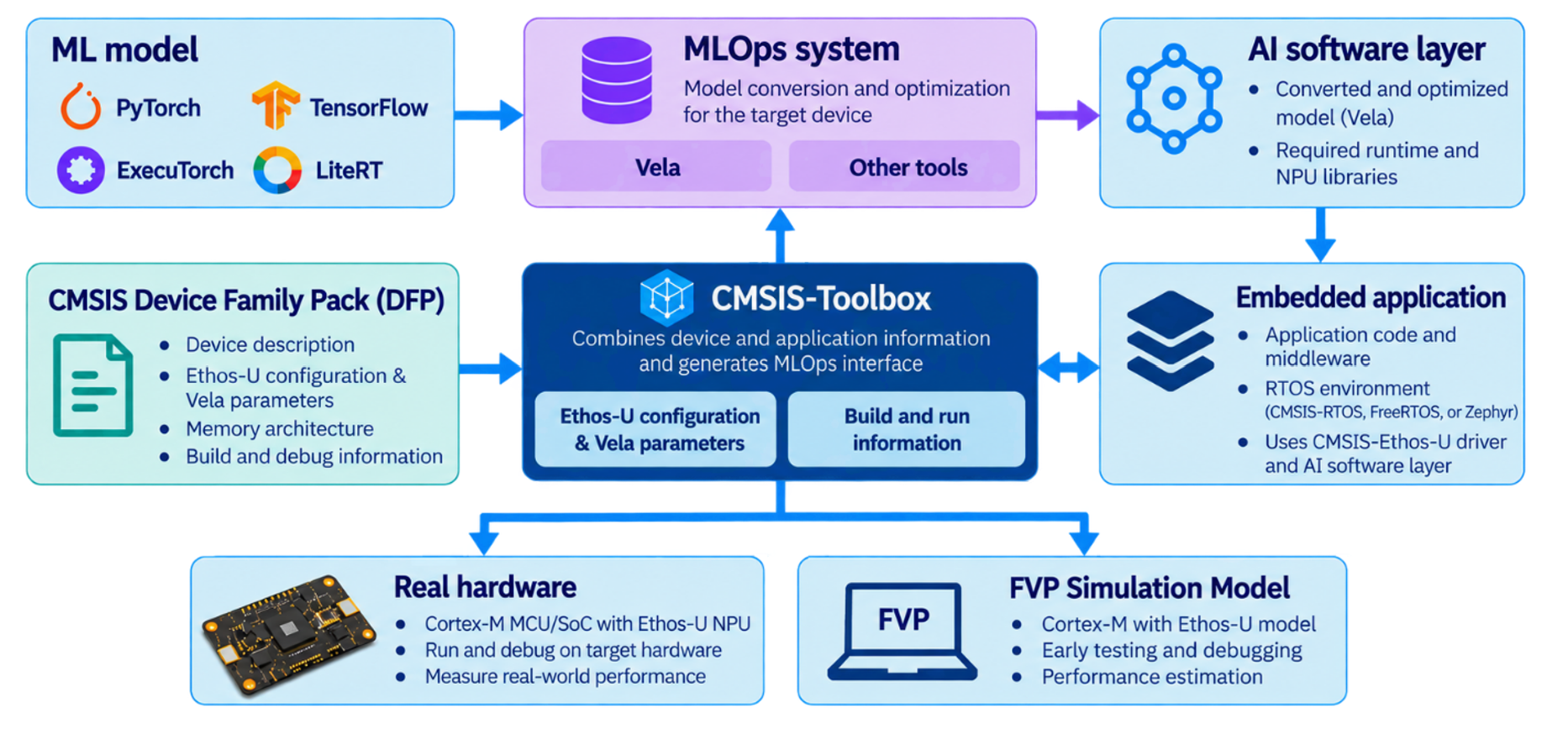
CMSIS-Ethos-U provides a common software foundation for Ethos-U55, Ethos-U65, and Ethos-U85 based systems. Applications use a consistent driver interface to initialize the NPU, configure memory access, execute Vela-optimized models, handle interrupts, and collect performance data. The same CMSIS-Ethos-U foundation can also be used with Zephyr, allowing Ethos-U applications to use the Zephyr software ecosystem while retaining the common NPU driver and deployment infrastructure.
But deploying a model also requires knowledge about the specific device. Vela needs to know the Ethos-U configuration, how the NPU connects to the device's memory system, and where model data should be placed. A silicon vendor can provide this information as part of the CMSIS Device Family Pack (DFP), including a device-specific Vela configuration.
CMSIS-Toolbox connects this device information with the MLOps workflow. For a selected target, it combines information from the DFP with the application configuration and generates a ‘*.cbuild-mlops.yml’ file. This provides an MLOps system with the processor and NPU configuration, Vela parameters, model information, and the build and run information needed for testing on real hardware or an FVP simulation model.
This creates a standardized interface between the embedded project and ML frameworks such as ExecuTorch or LiteRT. An MLOps integration can use the resolved target information to generate an AI software layer containing the converted model and its required software components. The resulting layer becomes part of the application and can then be built and tested using the normal CMSIS-Toolbox workflow.
The goal is not to make every device look identical. It is to provide a consistent deployment workflow while preserving the device-specific information needed to optimize, integrate, and test the ML workload on the selected hardware.
Make real-world data reproducible
Edge AI applications interact with the physical world. Their behavior depends on sensor, audio, or video data that changes continuously and can be difficult to reproduce. When an application fails only under a particular real-world condition, reproducing exactly the same input can become as difficult as finding the problem itself.
The Synchronous Data Stream (SDS) Framework brings these real-world data streams into the development workflow. Developers can capture data from a running system and use the recorded streams for DSP development, ML training and testing, offline analysis, algorithm optimization, and validation. The same data can then be replayed repeatedly on target hardware or an FVP simulation model.
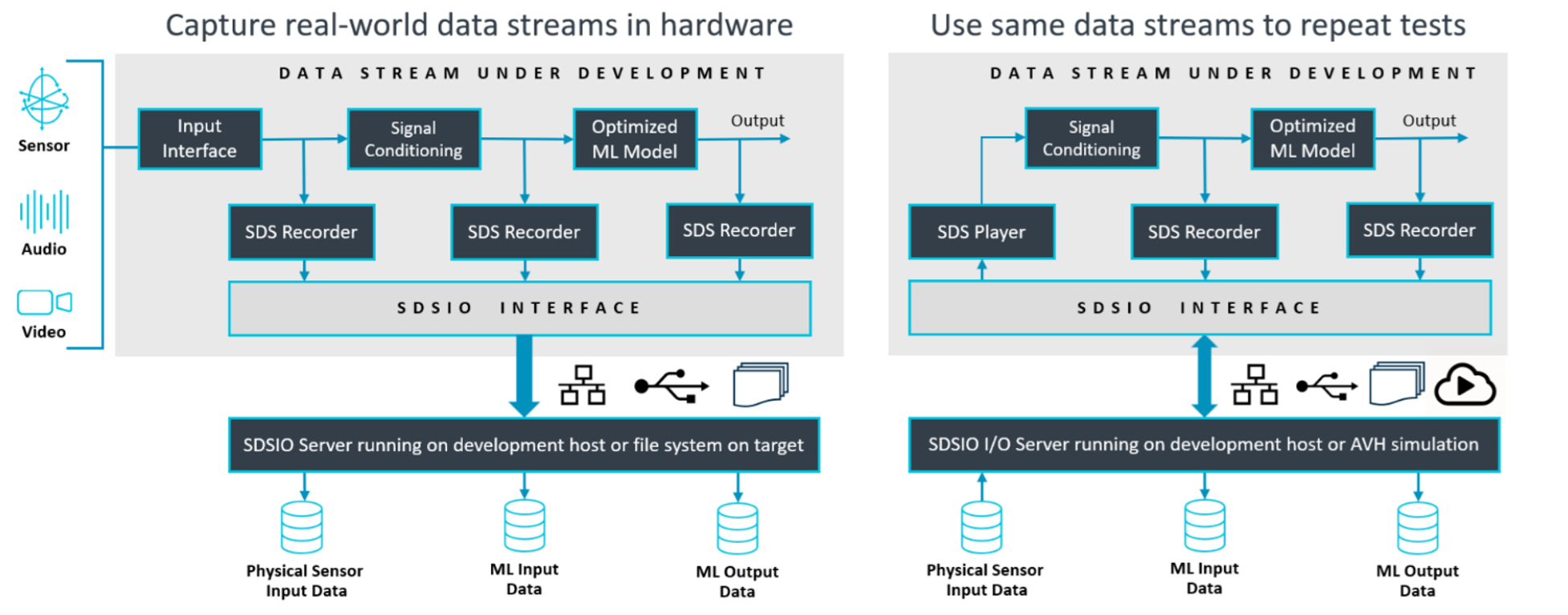
This changes debugging and validation. Instead of saying “it failed when the device was in this particular situation,” the developer can capture that situation and turn it into a repeatable test case. The exact same input can be used to reproduce a problem, compare algorithm or model versions, and verify that a change has actually fixed it.
With SDS v3, controlled playback, algorithm configuration and A/B testing, and managed playback streams extend this approach toward systematic regression testing. Real-world data becomes a reusable engineering asset that can move through the development loop rather than disappearing after each test run.
Integrate and debug the complete system
Even with a target-aware deployment flow and reproducible input data, there is still one difficult step: bringing the complete embedded system together. The ML model must work with sensor pipelines, DSP code, middleware, RTOS services, board support, memory configuration, and the actual target hardware. Integration problems rarely stay within one software component.
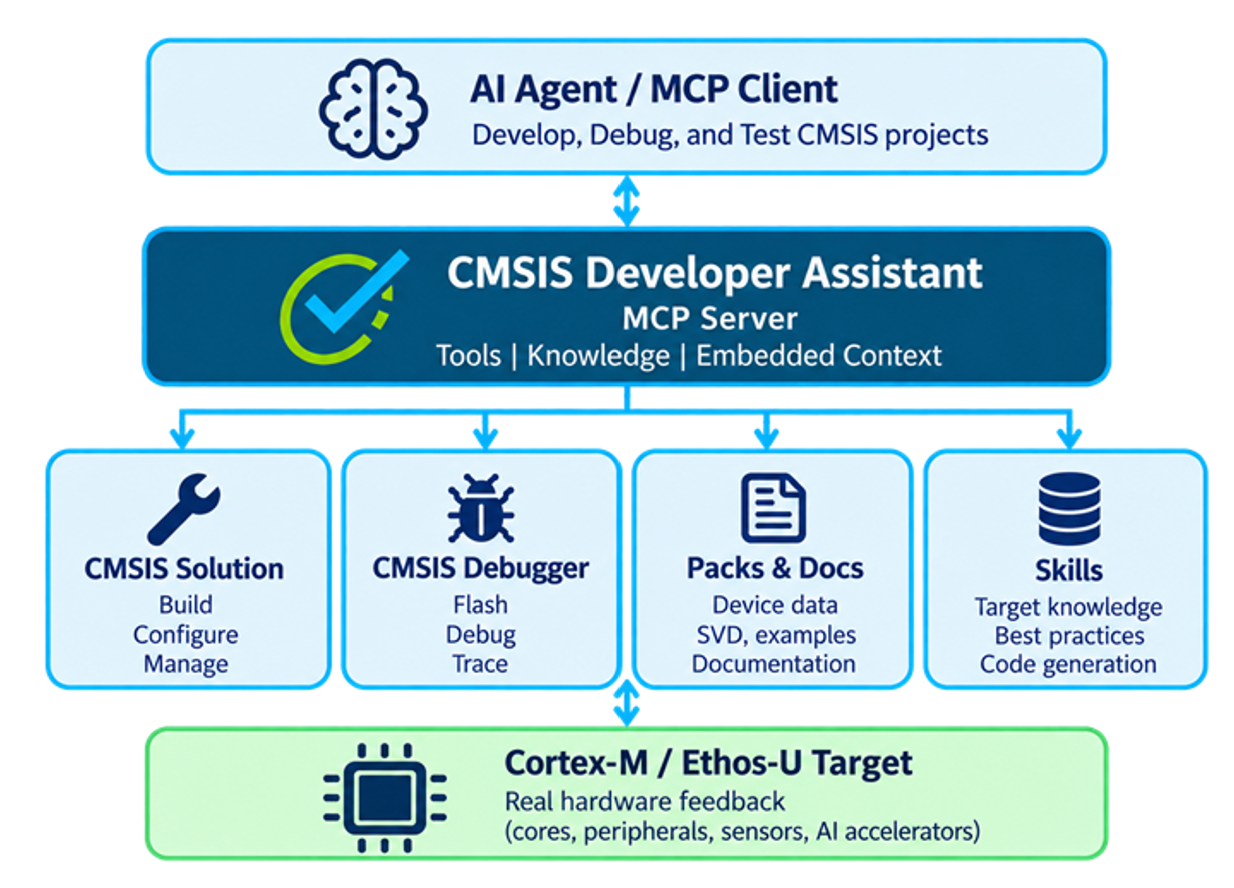
The CMSIS Developer Assistant connects AI coding agents to the CMSIS development environment and the real target. Through the Model Context Protocol (MCP), an agent can work with the CMSIS build system and debugger. It can build and program firmware, control execution, inspect memory and registers, analyze faults, communicate over serial ports, and interact with a connected Cortex-M device.
Tool access alone is not enough. The agent also needs to understand the project and the target. The Developer Assistant combines AI Skills, MCP tools, and target context derived from the CMSIS solution, build and run descriptions, software packs, SVD files, examples, and documentation. This gives the agent a repeatable workflow and the device-specific information needed to work with the actual configuration instead of guessing it.
Connecting the Edge AI development loop
A productive Edge AI workflow needs more than an optimized model. It needs a consistent way to describe and deploy to the target, reproducible real-world data for development and validation, and an efficient way to integrate and debug the complete system.
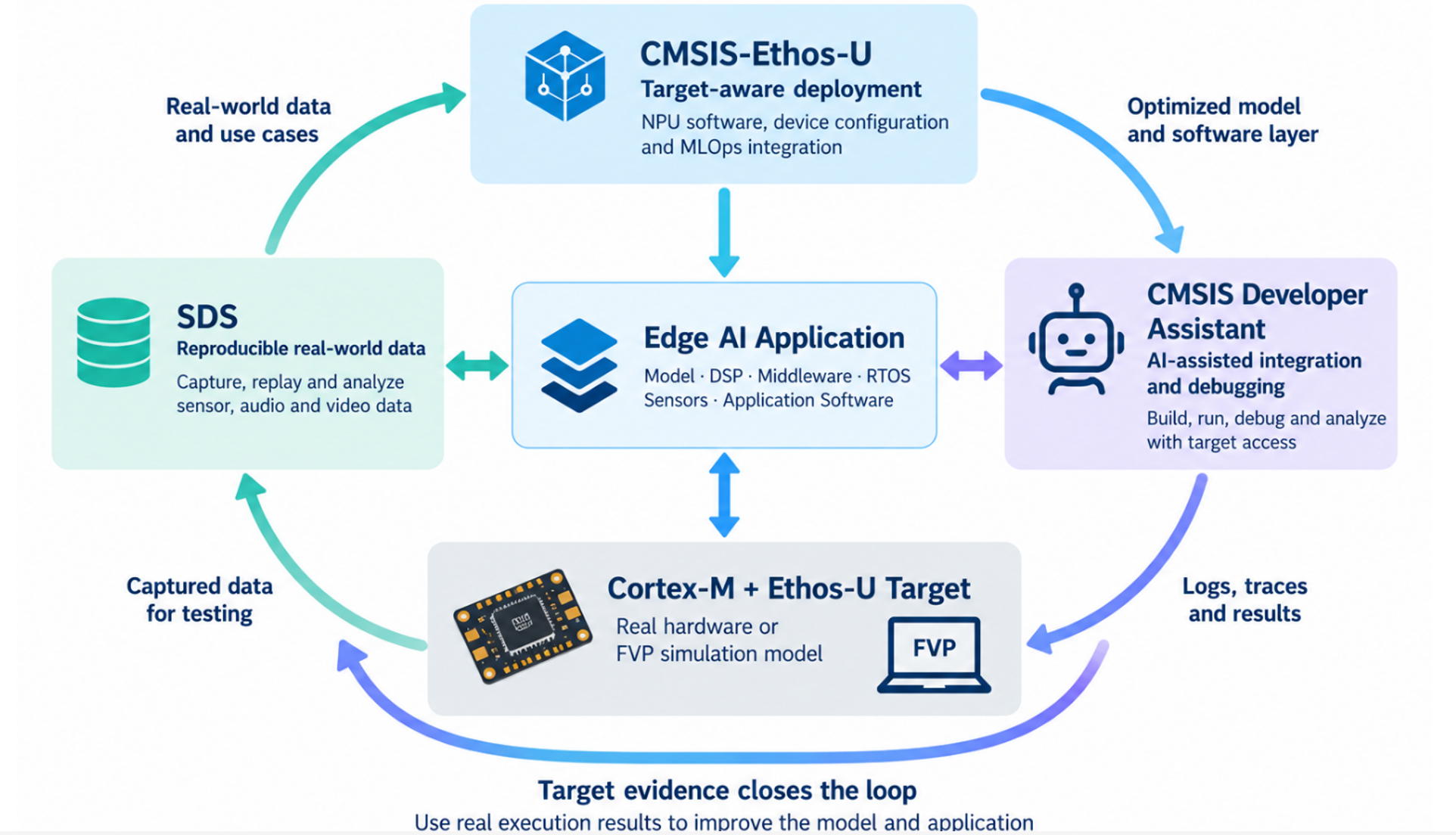
The technologies discussed here address these challenges from different directions:
- CMSIS-Ethos-U and MLOps integration connect ML development with the capabilities and configuration of the selected hardware.
- SDS turns real-world sensor, audio, and video streams into reproducible engineering data that can be captured, replayed, and used for validation.
- CMSIS Developer Assistant brings AI-assisted development into the embedded feedback loop, with access to the project, tools, documentation, debugger, and real target.
Together, these capabilities create a development loop in which target information and evidence from real execution flow back into the next iteration. That is particularly important for Edge AI: the model is only one component, and ultimately the complete application has to work on the target, with real data.

Re-use is only permitted for informational and non-commercial or personal use only.
