Tips on asking questions in the community
Asking good questions in the Arm Community.

It seems relatively simple right? You have a question you need answering, and you ask it in one of our forums.
Maybe not. Sometimes, the person you are asking for help might need more information from you. Do you have a code snippet to illustrate what you are seeing? Perhaps a screenshot? Which version are you using? Without all the information, it can be hard to get the answer you are looking for. With this mind, here are my tips on asking good quality questions in our community:
Search first
Chances are, someone has had the same question as you before. Use the primary search bar in the page header to search existing questions and replies. Each forum also has a search bar that allows you see if your question has already been answered. Speaking of forums…
Pick the right place to ask
We have a range of forums in the community. Picking the right one means your question is front of the people best placed to help you. The Community team does move questions when needed, but you can save us a job by picking the correct place from the list of forums.
The title is important
People often judge their ability to answer a question by the title, so make sure you choose a title that is brief and concise. Someone’s first impression of your title could make the difference in getting your question answered.
Understand what you want to ask
Provide the details, the whole details, and nothing but the details. Be as detailed as you can when explaining the issue that you need help with, but do not cloud your question with non-essential information. Here is an example on what to provide in a question:
- Detailed description of problem
- What you did
- What you expected to happen
- What actually happened instead and why it is a problem
- Error message
- Version numbers of relevant libraries, tools, operating systems and so on.
- Code snippets
- Any attempts to troubleshoot the issue that you have already tried (this can be really helpful)
Insert formatted code where you can
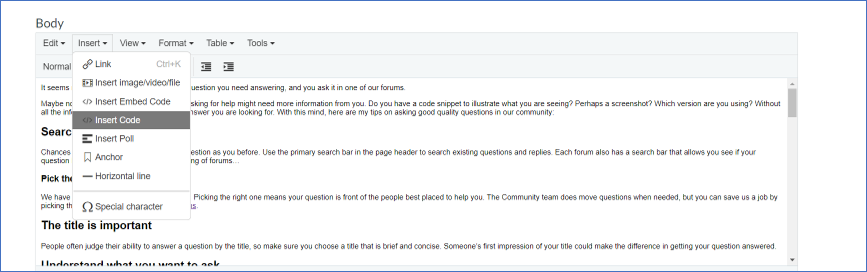
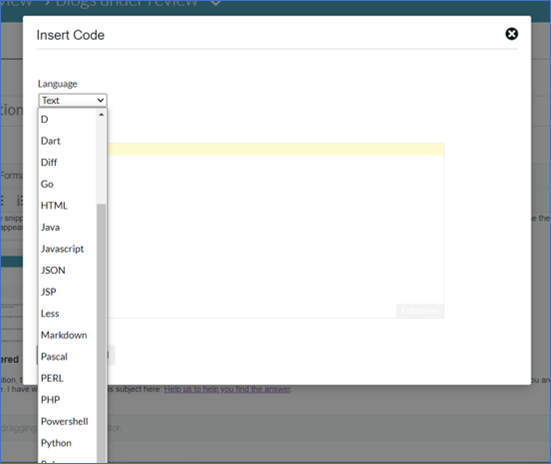
In the text editor you can insert code snippets, and this makes answering questions a lot easier for everyone. When you are ready to add your code, click Insert > Insert Code and choose the language you need. Click ok when you are done, and your code appears nicely formatted, making it much easier to read.
Mark your question as answered
If someone has answered your question, the best way to thank them is to mark their response as the accepted answer. Not only are you giving that person recognition for helping you, you are helping anyone else who will have the same question in the future. I have written more about this subject here: Help us to help you find the answer.
There is one more subject I would like to talk about, and that is responding to questions. Ultimately I want this community to be a safe, and welcoming place for anyone working on Arm. This means being considerate of other people when you are replying to their questions.
Our data tells us that over 60% of our visitors come from countries where English is not a first language. We have people entering the developer world for the first time, and people who have been at this for a long time. I do not think we have this problem in our community, but I would never want anyone to be hesitant about asking for help here.
If someone has asked a question that could be clearer, then politely give them help on what to add. You can even point them in the direction of this post. Finally, if you do see a conversation that might conflict with our community guidelines, then you can flag the post for review by the Community team.
If you have some tips for asking good questions that I have not mentioned above then, please leave them in the comments.
Thanks,

Re-use is only permitted for informational and non-commercial or personal use only.
