Arm AI Model Optimizer: Agent-ready tools to make your models run better on Arm
Use the Arm AI Model Optimizer to optimize, evaluate, and compare your models so you can build your best AI applications on Arm
By Will Lord

This blog post is co-authored by: Will Lord, Principal Product Manager, Arm, and Tae-ho Kim, Chief Technology Officer, Nota AI.
Optimizing AI models for different hardware can be complex and time-consuming. Now with the Arm AI Model Optimizer available through Arm AI Portal you can:
- Leverage optimization techniques, like graph optimization, quantization, and mixed precision.
- Evaluate and compare performance, accuracy and memory requirements
- Identify the right configuration for your application
These agent-ready workflows make it simpler, faster, and give you more confidence to deploy your best applications yet across supported Arm-based hardware, from cloud to edge. The Arm AI Model Optimizer, built on NetsPresso® from Nota AI, is available today via the Early Access Program on the Arm AI Portal website.
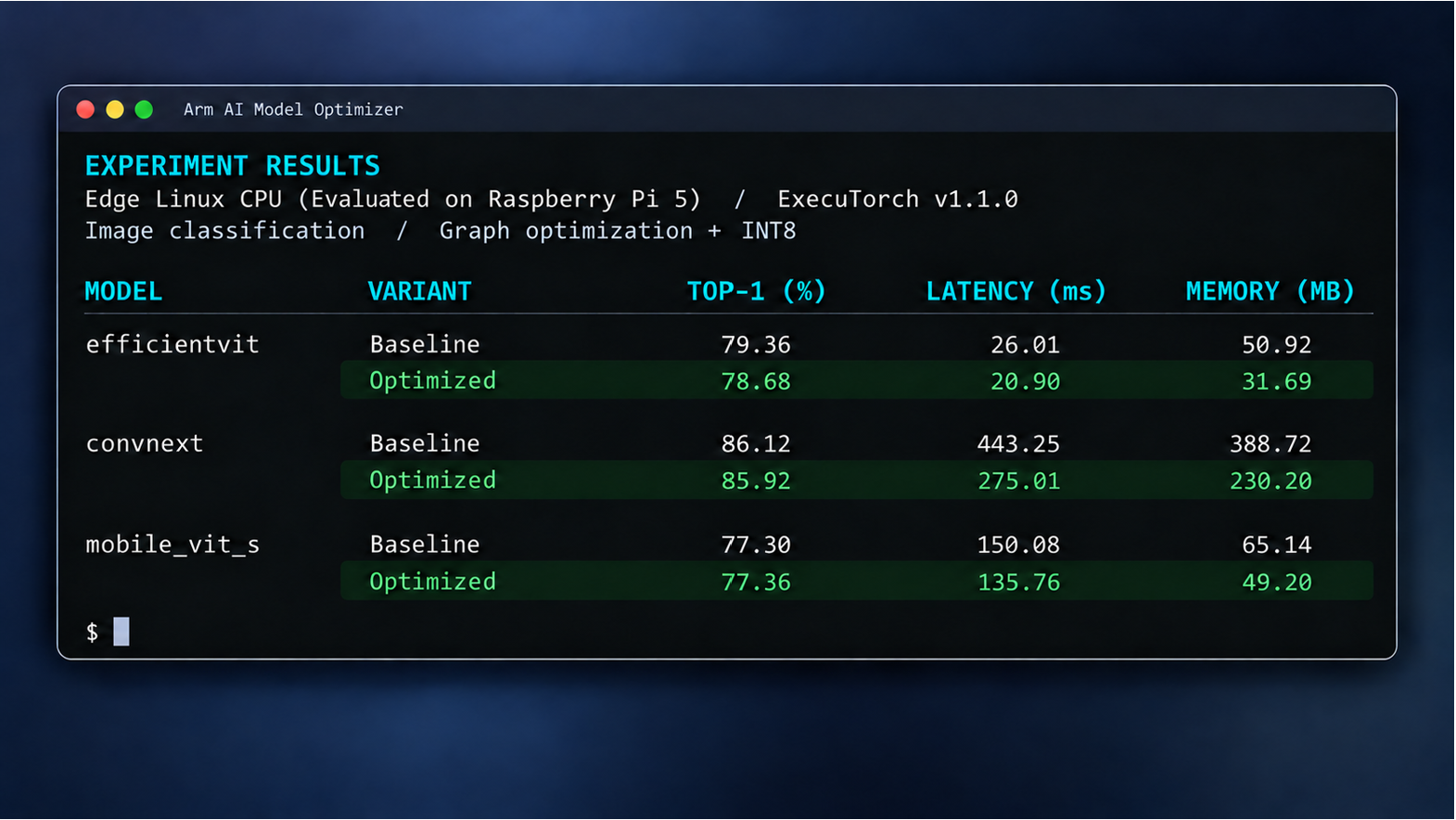
Faster processing, improved memory efficiency: Up to 6x inference speed up and 74% memory reductions on Arm-based hardware
Initial results demonstrate how the optimization techniques available through the Arm AI Model Optimizer lead to faster inference processing and improved memory efficiency, while maintaining model accuracy and quality across a range of workloads:
- Image classification on Raspberry Pi 5: Compared with the same model before optimization, WideResNet-50 delivers 5.9 times faster inference and uses 74% less memory, with ImageNet Top-1 accuracy changing from 80.82% to 80.70%.
- Speech recognition on an Arm mobile CPU: On the vivo X300 Pro smartphone, OpenAI Whisper Base reduces measured decode-stage latency by 52%, from 35.63 ms to 17.17 ms, with the same reported word error rate of 4.85% on LibriSpeech.
- Image segmentation for physical AI systems: On Raspberry Pi 5, MobileSAM reduces inference latency by 23%, from 2,070.63 ms to 1,595.46 ms, with mean intersection over union changing from 0.7309 to 0.7301.
You can get started in three steps:
- Sign up for the Early Access Program and generate an API token
- Install the CLI and authenticate using your API token:
pip install arm-ai-model-optimizer - Follow the quick start to create a workspace and project with a supported model, target and dataset.
Each experiment uses a configuration file to define optimization steps and evaluation criteria. You can adjust settings, rerun experiments and compare results while keeping the model and evaluation data consistent.
Once your project is set up, you can create and run an optimization experiment:
np experiments create --name int8-trial --steps go,gq
cd int8-trial
# Review run.yaml and select quantization and evaluation settings.
np validate
np run --wait
np report
With CLI commands and configuration files, you or your coding agent can explore more optimization configurations with less manual effort, while retaining control over objectives, evaluation criteria and deployment decisions.
Arm AI Model Optimizer features are also made available through the Arm AI Portal MCP server, bringing Arm models, documentation and workflows into the coding environments and agents you already use.
Optimize for the hardware that matters for your application
Choosing the right model is only part of the deployment decision. The best model configuration depends on where an application runs. A workload deployed in the cloud will have different performance, memory and power requirements from one running on a smartphone, industrial edge system or embedded device. As applications evolve, you may also need to reconsider where different AI workloads should execute.
Arm AI Model Optimizer provides a more consistent way to investigate these choices across supported Arm-based hardware, helping you identify the right combination of model, optimization technique, runtime and target.
Current deployment support includes:
- Arm CPUs: ExecuTorch with the XNNPACK backend.
- Arm Ethos-U NPUs: ExecuTorch Ethos-U backend with Vela compilation.
Reference evaluation hardware for these deployments include: Raspberry Pi 5; Apple M4 MacBook; vivo X300 Pro; AWS Graviton4; and Alif Ensemble E8 with the Arm Ethos-U85 NPU. These demonstrate the breadth of supported evaluation environments, rather than representing an exhaustive list of deployment targets.
Better decisions for production: Bring your own data into workflows
Reference benchmarks are useful, but your application's inputs may differ significantly from standard evaluation datasets. For example, an object-detection model deployed in a warehouse may encounter different lighting, backgrounds and object sizes from those used during initial testing.
With Arm AI Model Optimizer, you can bring representative application data into supported optimization workflows. Calibration samples help guide quantization, while separate evaluation datasets let you measure whether the optimized model still meets your quality requirements.
The goal is not simply to generate a smaller or faster model. It is to establish whether the optimized model still meets the requirements of the application you are building.
In the coming months, we plan to expand support for additional runtimes, backends, and Arm hardware. Early Access Program participants will have influence over our next steps through our EAP activities and feedback channels.
Understand performance: Evaluate results before deployment
Optimization does not end when an experiment completes. You still need to understand what changed and how the model performs on your target device.
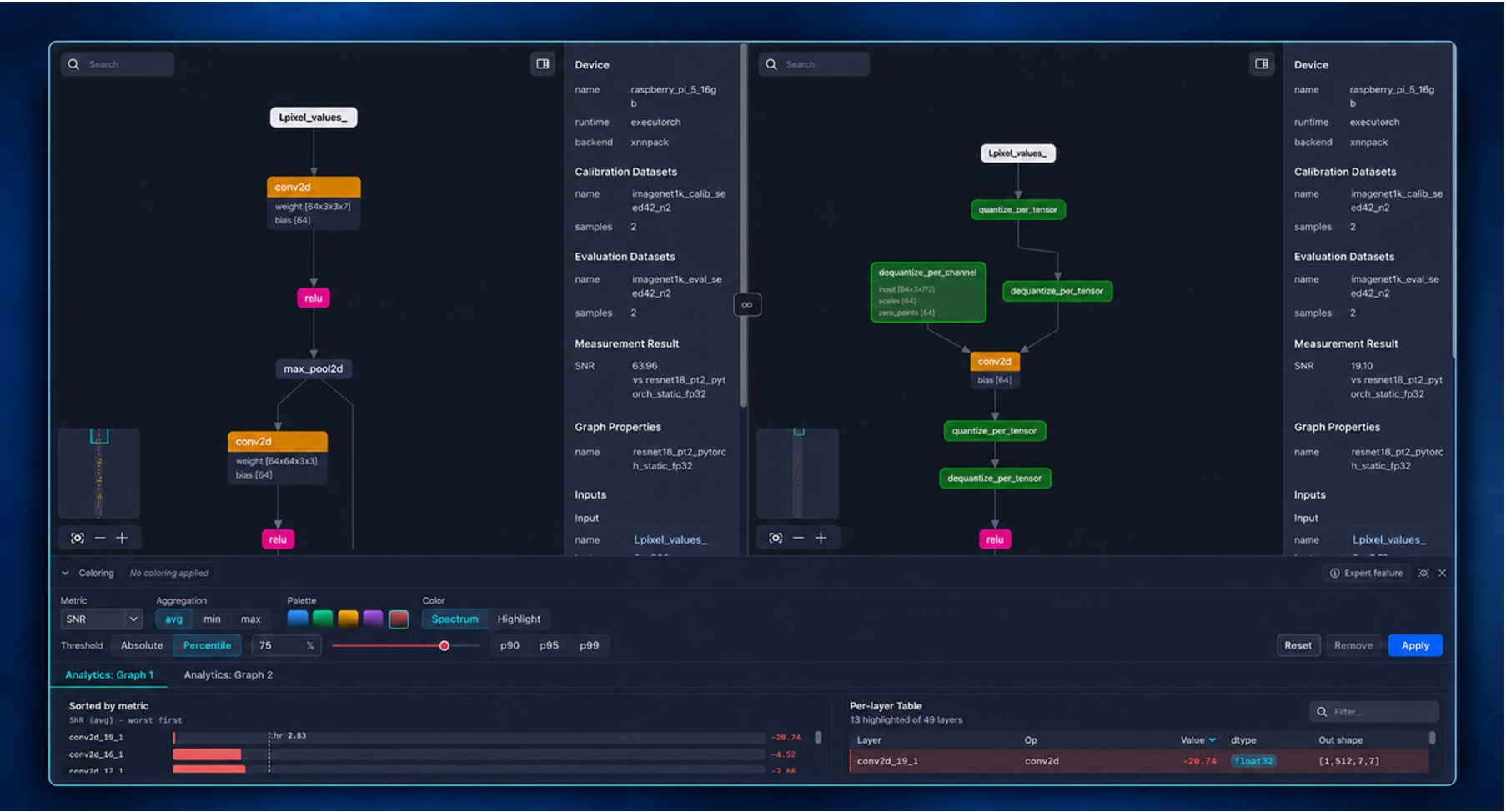
The AI Model Optimizer’s Probe visualization tool helps you investigate changes by comparing model graphs before and after optimization, including operations, quantization and layer-level details.
From a completed experiment, you can generate a visualization and export the optimized model using:
np visualize --tool probe
np export --level deploy
You can then follow the on-device profiling workflow to measure inference latency and, where supported, memory usage on accessible hardware, including remote devices.
These lead to evaluation reports, graph visualization and hardware measurements that together help you make informed decisions before deployment.
Get started now with Arm AI Model Optimizer
The Arm AI Model Optimizer helps you move from model discovery to optimization and deployment with greater confidence, connecting the models, tools and workflows needed to build AI applications across Arm. This means you spend less time managing optimization complexity and more time building what makes your AI application different.
- Join the Early Access Program: Explore Arm AI Model Optimizer through Arm AI Portal.
- Help shape what's next: As part of the Early Access Program Arm and Nota AI will be seeking feedback on model support, hardware targets and optimization workflows as additional runtimes and backends are developed.

By Will Lord
Re-use is only permitted for informational and non-commercial or personal use only.
