Product update: Arm Development Studio 2025.1 now available
Arm Development Studio now offers full Arm C1-Family CPU support and expanded IP capabilities.

Arm Development Studio 2025.1 is our first publicly available release to support the new Arm C1-family of processors (C1-Nano, C1-Pro, C1-Premium, C1-Ultra), and the Generic Interrupt Controller (GIC) v5. This release keeps pace with the latest Arm IP and helps bring next generation designs to life faster, with more visibility, and with greater confidence.
Unified toolchain and IP support to accelerate your entire development flow
Arm Development Studio 2025.1 brings coordinated updates across its core components. These updates deliver a smoother, faster, and more insightful experience from early bring up through to system optimization.
- Arm Toolchain for Embedded Professional 21.1.1: Built on Arm’s next generation embedded toolchain, it delivers full support for the latest Arm architectures and cores. It comes with performance optimizations for both AArch64 and Armv8.1 M code. This release improves GCC compatibility compared to Arm Compiler 6. It supports GCC style linker scripts and includes powerful capabilities from the LLVM project. More details are available on Arm Toolchain for Embedded.
- Arm Debugger 6.8.0: Gain more precise system level insight with enhanced automation, expanded scripting, and architecture aware register handling. For more information see Arm Debugger.
- Arm Fixed Virtual Platforms (FVPs) 11.30: Start software development earlier using accurate, high performance models of Arm’s newest processors even before silicon is available. For more information see the Arm Fixed Virtual Platforms.
-
Arm Streamline 9.7.2: Diagnose performance bottlenecks and optimize complex systems with clearer visibility and more actionable data. For more information see Arm Streamline Performance Analyzer.
Together, these updates provide a ready to use toolchain for the Arm C1 family and enable you to:
- Start development earlier by using updated FVP models.
- Debug with greater precision through improved debugger workflows.
- Optimize system performance by using the latest capabilities in Arm Streamline.
The package includes a collection of example projects to help you get started quickly and reduce your time to first success.
For a complete list of updates, see the Arm Development Studio 2025.1 Release Note.
Arm Debugger 6.8.0: Faster insight, better automation
Arm Debugger 6.8.0 improves visibility into complex systems and reduces friction during debug workflows.
What is new and why it matters
- New
jtag-scancommandWe have introduced a new
jtag-scancommand that enables you to scan devices on the JTAG chain during an active debug session with a stopped target from the debug console. This enables workflows where the system can be driven to a known state before interacting with the scan chain. This improves flexibility and reliability during early bring-up.. -
Improved register lookup via
info registersYou can now reference symbols that resolve to registers. This makes debug scripts cleaner and reduces guesswork.
- New Python support for Coherent Mesh Network (CMN)
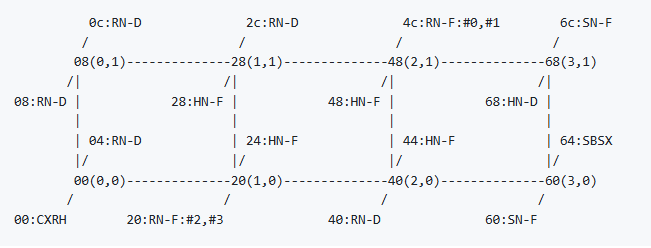
A suite of CMN focused scripts helps you visualize and configure mesh topologies and enable non secure access. These scripts are essential for debugging complex multi core systems. They are now integrated with Arm Debugger.
The tools help developers understand system performance on systems based on Arm's CoreLink CMN family interconnects (CMN-600, CMN-650, CMN-700, CI-700 etc.). The tools support developers of complex multithreaded applications and middleware, as well as system administrators who need to understand whole-node performance. The visualization example below shows a mesh topology that includes crosspoints with nodes of different types attached to them. You can read more in the CMN tools documentation.
Enhanced Embedded Logic Analyzer (ELA) workflows
The ELA workflows receives significant quality improvements that help you diagnose complex on chip interactions more easily.
Key enhancements include:
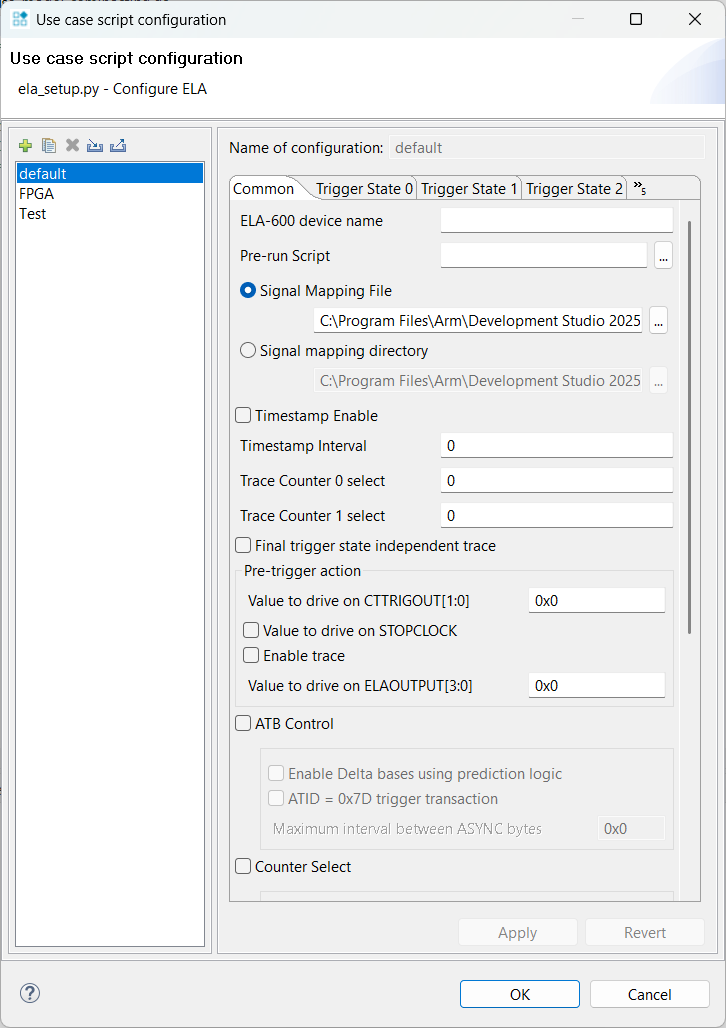
- ELA-600 and ELA-500 use case scripts available by default in the Scripts view for quicker setup.
- Automatic JSON signal mapping immediately links human readable signal names to ELA devices.
- Bitfield level editing of mask and comparison values removes the need for manual bit calculations.
- Multi device workflows are simpler with a new drop down selector for ELA devices.
- Optional pre run scripts enable repeatable workflows and CI/CD integration.
- Import and export multiple configuration files, supporting collaboration and reuse.
- New output options in ela_process_trace.py export decompressed and decoded data to .vcd or .txt for use in external waveform viewers.
These capabilities help you move from raw trace data to actionable insight with far less friction.
Available now
Arm Development Studio installers are available from the Arm Developer website. User-based licenses are available to purchase from the Arm Developer Store or our network of distributors.
- Existing users of Arm Development Studio with valid support and maintenance can upgrade to this version free of charge.
- Arm Development Studio is also included as a component of Arm Success Kits.
- The way to obtain an evaluation license for Arm Development Studio has changed. It is no longer possible to obtain a 30-day evaluation license from within the Arm Development Studio IDE. Prospective customers must now contact one of our regional distributors to request an evaluation license. The distributor is the main point of contact to support users in their evaluation of Arm Development Studio and to explain purchase options.
Update: Arm Development Studio 2025.1-1 is now available. This patch release includes an updated version of Arm Debugger. All other components are unchanged. For more information, see the Release Note.

Re-use is only permitted for informational and non-commercial or personal use only.
