Entitlements could not be checked due to an error reaching the service. Showing non-confidential search results only.

AI Models Optimized for Arm. Ready to Build.

Discover, compare, optimize, and deploy AI models on Arm with AI Portal. Access pre-optimized models, deployment-ready code, and hardware-aware optimization tools to build AI applications across cloud, edge, and physical AI.


opimized model icon

Pre-optimized models
with performance data

tool icon

AI model optimization tools
for Arm hardware

code icon

Deployment-ready code
with guided workflows

Optimization Tooling
AI-Portal-Launch-page-assets_V1_section_Optimisation-Tooling_400x400px

Arm AI Model Optimizer

Optimize AI models for Arm hardware with Arm AI Model Optimizer, built on NetsPresso®. Use agent-ready tools to automate optimization, compare performance, accuracy and memory trade-offs, and evaluate results on supported Arm devices. Join the Early Access Program to get started with the CLI or your coding agent.

Get Early Access
Code Examples
AI-Portal-Launch-page-assets_V1_section_Code-Examples_400x400px

Ready-Made Deployment Paths

Start building with code examples, reference applications, deployment scripts, and workflows for Arm-based targets. Use these resources to deploy AI models on Arm with less integration work and a clearer path from model selection to a running application.

Explore Code ExamplesBrowse Learning Paths
MCP Server

Build Faster with Agentic AI Workflows

Bring AI Portal into your Coding Agent

Connect your coding agent to AI Portal through the Arm MCP Server to discover models and workflows, compare options, and find resources for your target hardware without leaving your development environment.

Run the following command in your terminal:

codex mcp add arm-ai --url https://mcp.api.devplatform.arm.com/ai-portal
View MCP User Guide

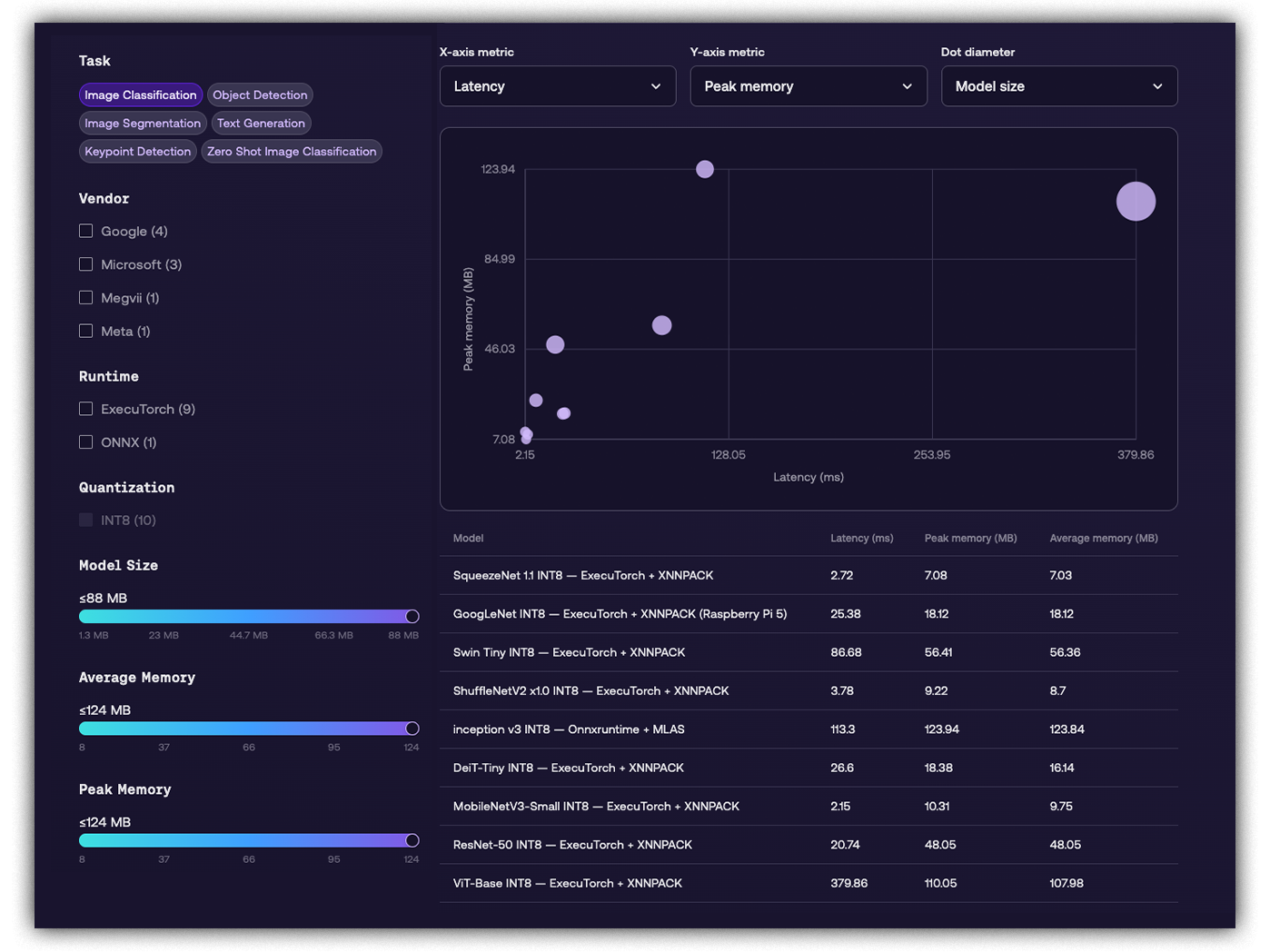
Compare Models for your Target

Quickly understand trade-offs across performance, memory, and model size before selecting the right model for your exact needs.
 

compare

Compare Models

Match Optimized Models to Arm Hardware

Find models optimized for supported Arm hardware across cloud, edge, embedded, and mobile.

Edge Linux

Target Linux-based edge AI across automotive, robotics, IoT, and other intelligent systems.

Explore Edge Linux Models

Embedded NPU

Run on-device AI on embedded NPUs designed for constrained devices and dedicated acceleration.

Explore Embedded NPU Models

Mobile GPU

Build neural graphics and AI-enhanced visual experiences for supported Arm-based mobile GPUs.

Explore Mobile GPU Models

Mobile CPU

Find models for language, speech, vision, and other AI workloads running on mobile CPUs.

Explore Mobile CPU Models

Cloud CPU

Run AI inference on Arm-based cloud CPUs with models optimized for supported server environments.

Explore Cloud CPU Models
FAQs

Frequently Asked Questions

Which AI frameworks, runtimes, and developer tools are supported?

Arm AI Portal provides models and resources for multiple AI runtimes and developer tools, including ExecuTorch, LiteRT, and ONNX Runtime. You can also access Arm-optimized models through Hugging Face and connect supported coding agents through the Arm MCP Server.

Which AI models can I optimize for Arm?

Arm AI Model Optimizer supports model optimization using techniques such as graph optimization and quantization. You can optimize supported models, bring your own LLM, and use custom datasets to evaluate performance, accuracy, and memory requirements for your application.

How do I optimize AI model performance on Arm?

Use Arm AI Model Optimizer to automate optimization experiments, apply techniques such as quantization, and evaluate performance, accuracy, and memory trade-offs for your target Arm hardware.

Can I compare AI model performance on Arm hardware?

Yes. Use the AI Portal comparison tool to compare supported models for your task and target hardware. Evaluate performance, memory requirements, and model size to identify the most suitable model for your application.

How do I deploy an AI model on Arm?

Use deployment-ready code examples, reference applications, deployment scripts, and guided Learning Paths available through Arm AI Portal. These resources help you move from model selection and evaluation to deployment on supported Arm hardware.

How do I access Arm AI Model Optimizer?

Join the Arm AI Model Optimizer Early Access Program by creating or signing into your Arm Account. Once registered, download the CLI, generate an API token, and follow the documentation to start optimizing models for your target Arm hardware.

Can I use Arm AI Model Optimizer with coding agents?

Yes. Arm AI Model Optimizer provides an agent-ready CLI that enables coding agents to configure, run, and compare optimization experiments, helping you evaluate performance and accuracy trade-offs for your target hardware.

Can my coding agent access AI models and resources through the Arm MCP Server?

Yes. Connect supported coding agents to Arm AI Portal through the Arm MCP Server to access models and development resources directly from your development environment.

Which Arm hardware and device classes are supported?

Arm AI Portal provides optimized models and resources for supported Arm-based hardware across cloud, edge, and physical AI. Browse models for Cloud CPU, Mobile CPU, Mobile GPU, Embedded Linux, and Embedded NPU targets to find resources relevant to your deployment environment.